The Registry Path Under Windowsvista?

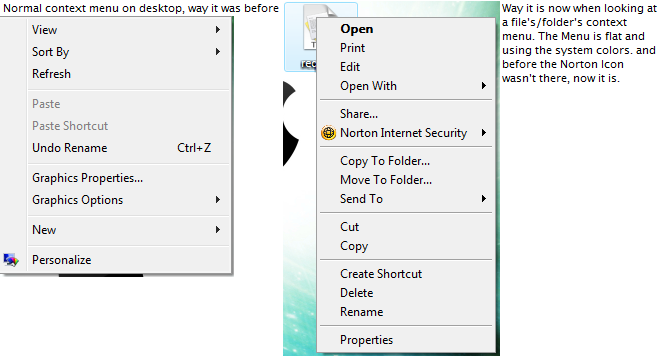
Um, with TuneUp utilities there's an option that it can add the Copy/Move To Folder option in the context menu. However I want to know whats the exact registry location 'cause this happened. I guess my Norton 09 did a pulse update and now when I rightclick on file/folder the menu uses the system colors and shows the Norton icon where it says "Scan this file/folder". This wasn't like this the day before so it HAS to be Norton. If anyone knows how to fix this issue I'm having plz help?

Here's an image of what I mean problem.jpg.

Please anyone help in anyway they can

Re-Titled - thanks mps69

problem.bmp

Attachment: problem.bmp

#524705

http://windowsxp.mvps.org/context_folders.htm

I'm almost positive that applies to vista

#524730

What I'm gonna do is install then reinstall Norton. Then see what happens. This will be my PlanB, thnx sccissorhands

#524748

Don't use Norton. Norton is a resource hog.

Uninstall Norton. Install Malwarebytes (google it)

#524766

Look guy. The new version I use (Internet Sceurity 09) is not much or a resource hog on my PC. Infact it's better that compared to 08. So I'll still keep it

#524779

Alright, I'm just saying. If you go to any computer forum on the net, that's what's being recommended. If you have the original norton disk, it's not like it will be that big of pain to try.

#524786

It's not that I won't try it, it's just that I can't try it. I'm 14, so I still have my dad around me. He purchased Norton 09 so we can both use 'em. He'll get severely pissed if I didn't use it and make him waste money when there's a cheaper version available for just one licensee instead of 3. Plus I'm happy with Norton, even, and when, I get a Mac; even though it's so far virus free, I'll use Norton for that "I'M A FREAKING BEAST" kinda security :D

#524799

Oh I see, actually there is a free version of malwarebytes that just doesn't have real time protection

#524802