 Aqua-Soft Forums
Safari 4 Is Out

OH MY GOD! It's gorgeous !!!
I'll try it NOW ! 
--------------------------------------------------------------------
Here are some screenshots of my Safari 4:
** TOP SITES:

** COVER FLOW BOOKMARKS

** ADVANCED HISTORY

** OPTIONS SCREEN

** NEW TABBING

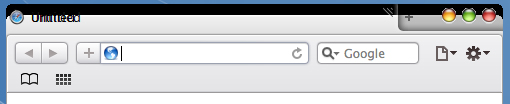
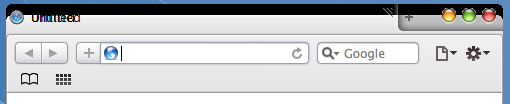
For mac users.
On Mac OS X you can disable the Tabs on Top feature with the following Terminal command:defaults write com.apple.Safari DebugSafari4TabBarIsOnTop falseEnable:
defaults delete com.apple.Safari DebugSafari4TabBarIsOnTopDisabling the feature will give you the classic tab bar appearance of Safari 3.
Will get rid of the nasty tabs.
So it looks nice, has some nice features, but it uses 190MB RAM right now with only one tab open...
(But... it is only a beta!)
For mac users.Will get rid of the nasty tabs.
Can you post a screenshot of safari 4 under Leopard with tabs on top disabled?
im having trouble wid this.
Yeah, sometimes it freezes the whole PC...
Hmmm, it has a chrome taste.
Me hopes that it is themeable (sp.) like Google chrome.  How do you change the font for the Bookmarks bar?


I haven't installed it yet. Love the new features and performance improvements but i hate it that the fact they got rid of the OS X styled GUI. I wish they can out an option in preferences called "Themes" 4 saying Aqua, Graphite, Windows Aqua, Windows Graphite, and a tick box enabling/disabling the up/down arrows to be together
I installed it, tested it and I must say, afar from the GUI, it's great. However, it's not properly skinned if you use WindowBlinds. The images are messed up and everything, however it looks OK if you use a visual style. Though now it looks more like something out of Google rather than from Apple, animations have been cut out like when saving passwords or adding a bookmark. The progress bar in the address bar was taken out and instead you have to look at a throber to the right of the address. (This is a minor one)Even fonts like Lucida Grande aren't used in the bookmarks bar so for example if ya use the Apple logo character for your main bookmarks, in Windows it appears as the Unknown character box.
So far, give it a 4 star for speed, 5 for new features, but 3 for new GUI.
When I installed it on my computer using a visual style, the MaxMinClose buttons have a white orb around the edges.
I do however love the new design. I also think that it's much more CPU than previous versions. Maybe this is due to the new coverflow features and bookmarks. It is still lovely though!
Also, did anybody notice that they got alot of the new design from Google Chrome?
dude, yeah, for the Windows Version though. If ya have Mac OS X Leopard it looks like how it should but other wise Apple gave Windows a Fast Compass but the looks of something very Googly
Referring to the GUI area: I hate Apple, they made Safari 4 more 'Window-ish' for Windows Users :/ They better don't screw iTunes to.  Oh well, in 367 days im going to have my Macbook
Referring to the performance area: OK, It's Safari b*tch! Im speechless, love the 'Top Site' feature, it kinda remembers me of the American Idol commercials. It's faster, better stronger Screw Firefox 3 (for now xD)
PS: hmmm, something corious is that Safari 4 is more stable, like it used to be back in my old PC (L)
apple will update this safari 4 beta soooooooooooooner..its stl beta..nt perfect for me yet..having cz prblem like fonts even coverflow doesnt work..even im qualified wid da requirements...back to 3.2.. im gonna install safari 4 if ts stable nw.for windows offcourse
For mac users.Will get rid of the nasty tabs.
Sorry still not works, would you please tell me how to do it, I just copy paste from yours and hit enter it says didn't find the command, thank's Timan
I don't like the style at all. The tabs suck and while some features are great like Top Sites and bookmarks cover flow, the rest I don't like. Bring back the Leopard !
I like the new native look for Windows, but it looks a lot like chrome with those two buttons next to the search bar.
But I do really love the tabs in the titlebar because it saves a lot of space.
One bad bug tho: Bookmarks do not work on Windows Vista. I can't import them and save new ones, they just don't show up...
One bad bug tho: Bookmarks do not work on Windows Vista. I can't import them and save new ones, they just don't show up...
Hmm, odd... I'm on Vista now and I just added new bookmarks to my bookmark bar...
What I also like is, when there's a star indicated on one of your top sites, it means that the site's been updated.
This is handy to follow blogs, news sites or Facebook 

@ xfifteen: Do you use Vista x64 or x86?
Staying with the older Safari 4 developer preview and/or Safari 3.2.2. I like Chrome as Chrome. I like Safari as Safari. I don't like Safari as Chrome (ugly-fied) for Windows. Apple's making a habit of blowing things of late...
@ xfifteen: Do you use Vista x64 or x86?
hi, I'm using x86.
(I guess you are using x64 then?)
grts
Staying with the older Safari 4 developer preview and/or Safari 3.2.2. I like Chrome as Chrome. I like Safari as Safari. I don't like Safari as Chrome (ugly-fied) for Windows. Apple's making a habit of blowing things of late...
+1000
Absolutely agree. What is wrong with Safari 4 tabs is the absense of taste. I do want to believe that apple still believes in choice.