Safari Min/Max

About:

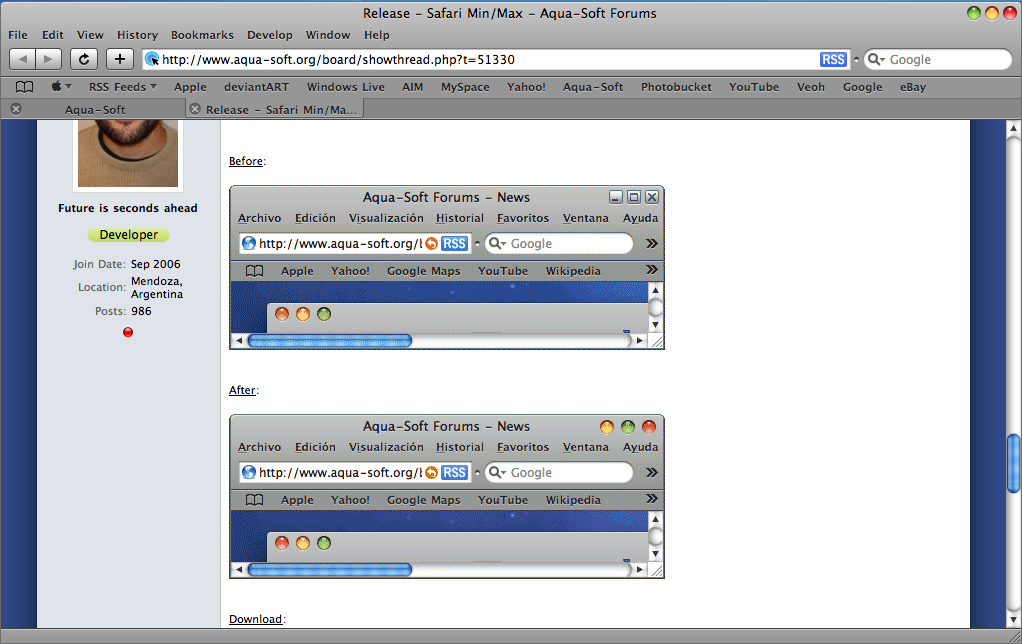
Add Leopard min/max/close style buttons to your Apple Safari for Windows.

Before:

SafariMinMax-before.png

After:

SafariMinMax-after.png

Download:

Safari Min/Max at File2Go (thanks yorkey for uploading :) )

[s]http://www.matiasmoreno.com.ar/SafariMinMax.exe

Install:

Put SafariMinMax.exe into Startup folder (C:Documents and settings<yourusername>Start MenuProgramsStart). Then double-click it.

Notes:

Not tested under Vista or Windows 7. May not work there.

#522964

wow, this was great, I was looking for this long time ago, Thanks for releasing it ! ;)

#522965

Oh... first bugfix. Please re-download. :)

#522969

Good job

#522974

Min/max/close buttons where pretty misaligned. Now fixed. Please redownload (yeah, again :()

#522975

Very nice :D (Working well under Windows Vista Home Premium 32-bit)

#522978

Genius dude, pure genius! I have been wanting this for a long time now!

#522979

wow that's amazing.

#522988

Wow, this is old. No offense Matonga but you weren't the first one to know how to do this. My DA friend has been doing these mods since ver 3.0.1. Here's the link to the current version http://xHousexOfxWolves.deviantart.com/art...-Gift-107321470. To be terse, all of you guys didnt have to wait. ^.^

Look.bmp

Attachment: Look.bmp

#522990

Wow, this is old. No offense Matonga but you weren't the first one to know how to do this. My DA friend has been doing these mods since ver 3.0.1. Here's the link to the current version http://xHousexOfxWolves.deviantart.com/art...-Gift-107321470. To be terse, all of you guys didnt have to wait. ^.^

Matonga took care to include GLYPH SPACING as per original mac. Your friend just replaced the original glyphs as is using probably Resource Tuner. Don't be so quick on the draw.

#522994

Matonga took care to include GLYPH SPACING as per original mac. Your friend just replaced the original glyphs as is using probably Resource Tuner. Don't be so quick on the draw.

My bad, and I was talking (but u couldnt tell) in a non sarcastic way, so if I sounded rude, sorry. I'll try it

Okay I've tried and here's my report:

1: yes the spacing is good, looks very nice, lile implementation of inactive states

2: in the link I provided earlier, the buttons had mouseover effects, these are just static

3: one problem is when Safari is maximized, the buttons from SafariTheme.dll are shown a bit and the trafficlights are bit cut off (look at the image) [image1]

4: the inactive images are a bit rough [image2]

5: there's some discoloration with subwindows (EX: attachment manager window for Aqua-Soft) with both Active and Inactive states [images3&4]

So far it works as it's intended to, good work. Just maybe fix these bugs

Do not double post - Oversize image removed - mps69

#522998

can you make 1 for itunes? that would be great. i use firefox, and when i use a mac skin, it gives it those buttons. but itunes does the same thing as safari and it would be great if you could do that.

#523016

Hey matonga, my current WB theme is set to have the buttons on the left, does this works with your mod?

#523047

- Added mouseover effects.

- Solved subwindow discoloration problems (as per description of mvosx1094).

@mvosx1094:

3. I don't have such problem here. Windows version? Visual Style / WindowBlinds? VS/WB theme?

4. Mmm... I made them based on LeopardXP Visual Style by nobodyuse at DA. Though I know Mac OS X real buttons have less contrast (they look more calm and serene).

aquasoft-separator.png

Edit

- Added option to show buttons left side of window (as in all Macs) (unchecked by default, go to MinMax icon and select "Left side" option).

@skdj:

Check new option ;)

#523050

Cool joes! Anyway to get it on the left? Maybe a fix for it to work with TrueTransparency? :)

Thanks alot hey! :D

#523052

Anyway to get it on the left?

I see you were posting while I was editing mine. :D

Just redownload. ;)

#523055

Boom! thanks matonga! :D Looks cool

#523057

Thanks. It would be even better if it supported iTunes.

#523091

It works properly but there's still some things that are bugged.

1: the discoloration is still present if you minimize the window the restore it. (I minimize to XWD v5.6)

2: when Maximized the buttons are still cut off and if LeftSide is active, the buttons from SafariTheme.dll are shown just a bit.

3: when a subwindow is used(EX: aquasoft attachment manager) and goes in active, the whole window is displayed as active but the aeras where the buttons go (Left&Right Side) are colored inactive.

Other than that nice job on making it able to be leftsided, hovereffects, and spacing.

th_Maximized2.jpgth_subwindowinactive2.jpg

#523120

thiis great, matonga !!

yes..please can you add to hide the menu ?, thank's a lot

#523150

I second Husaini - it'd be great if you could make the app hide the menu bar... Even better if there was also a keyboard short cut to toggle the bar...

Btw Husaini, I thought you were enjoynig lilfe on a Mac...? ;)

#523217

I second Husaini - it'd be great if you could make the app hide the menu bar... Even better if there was also a keyboard short cut to toggle the bar...

Btw Husaini, I thought you were enjoynig lilfe on a Mac...? ;)

yes PoulNyrup, but I still use my Desktop PC, so I still need this kind of mod, I don't think I can leave this site:p

#523221

how bout something for iTunes??

#523239

yah matonga how bout itunes???cant wait for that..nice work dude!

#523268

I post this before anyone else does: :)

Server is down.

Will be up again 17 p.m. GMT+00 time.

aquasoft-separator.png

Edit

I've been trying to hide the menu bar with no success.

I was able to hide the menu and move the toolbars up, then I tried to resize the web view and it goes like crazy, trying to recover it's original position. If I don't move them up, an empty space is left where the menu bar should be. It looks ugly (both ways).

#523296