Aqua-Soft Forums
You can get NEW VERTION of Y'z Shadow and Y'z Toolbar at
( )V
)V
...Dock is NOT restored(T T)
You can get NEW VERTION of Y'z Shadow and Y'z Toolbar at
()V
...Dock is NOT restored(T T)
It's nice to hear this, I always used Y'z shadow, thanks for the tip dude!
Good to hear. But I'm set on Styler toolbar.
Finally! I've been waiting for a new version of Y'z Shadow for ever! Now I can finally add shadows to the top edge of the window...
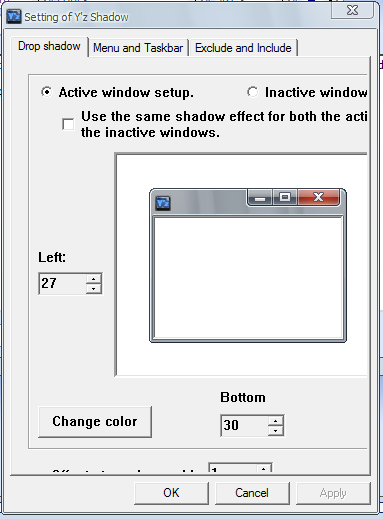
There seems to be big problem with the settings window though. A lot of the stuff is cut off, so you can't adjust many of the settings. Anyone know how to fix this?
Firecracker found a nice way of accessing the cut off function.
From the News thread
by firecracker
a simple work around is manually editing the ini file to get at the settings out of reach.
Firecracker found a nice way of accessing the cut off function.From the News thread
by firecracker
a simple work around is manually editing the ini file to get at the settings out of reach.
Yeah, with mouseover solid taskbar and editable alpha channel for taskbar. Great!
This is a great revelation.
Congratulations and look forward to newer improvements and even some surprises in YZ Dock.
I like them all, but YZ Dock seemed to lead the revolution back when so this is great news indeed.
[REQUEST] Please make the much appealed for weather docklet to work and switch icons as the conditions change and i do hope theres a reliable access point to draw from for weather info that stays up all the time.
MIRROR
"There seems to be big problem with the settings window though. A lot of the stuff is cut off, so you can't adjust many of the settings. Anyone know how to fix this?"
Does anyone know if Mr. Y is attempting to fix this problem? The more I use the workaround the more annoyed I get.
contact him and ask him to fix it? If you know Japanese, that might help. You could document the bug in screenshot/arrows format and post in his comments section. That could be a visual way to get his attention. http://translate.google.com/translate?u=ht...sl=ja&tl=en
contact him and ask him to fix it? If you know Japanese, that might help. You could document the bug in screenshot/arrows format and post in his comments section. That could be a visual way to get his attention. http://translate.google.com/translate?u=ht...sl=ja&tl=en
Have you actually tried to do this? Without knowing or being able to type Japanese, I can't see a way to get past the blog's "Captcha" security.
hha.. didn't try it myself. I do speak some Japanese and can ID characters but I suspect they require you to match characters so you would need to have japanese input enabled on your pc, right? If you create your bug screenshot and post it here.. I'm sure one of us would help you post it on the site.
Actually, post #6 already has a short description and a bmp image. If someone were willing to post that, that should do as much as anything I could have done. As you say, Japanese input would need to be enabled.
BTW, thanks for getting involved.