 Aqua-Soft Forums
I'm currently trying to understand the Stack Animation samples,
and I thought it my be interesting for other developers, too.
You will find the source-code for the animations in the "Effects" folder. I took a look at the Linear Grid Animation:
function GetGridRect(k1, k2, Width, Height, cWidth, cHeight, iWidth, iHeight,

  IconSize, CellSize, IconXOffset, IconYOffset, BordersSize: Integer): TRect stdcall;

begin

  Result.Left := Round(iWidth * CellSize * sin(k1 / k2 * Pi / 2)

	+ ((Width - CellSize) / 2 + IconXOffset) * (1 - sin(k1 / k2 * Pi / 2)));

  Result.Top := Round(Height - (CellSize * (cHeight - iHeight) + IconYOffset + BordersSize) * sin(k1 / k2 * Pi / 2));

  Result.Right := Result.Left + CellSize;

  Result.Bottom := Result.Top + CellSize;

end;
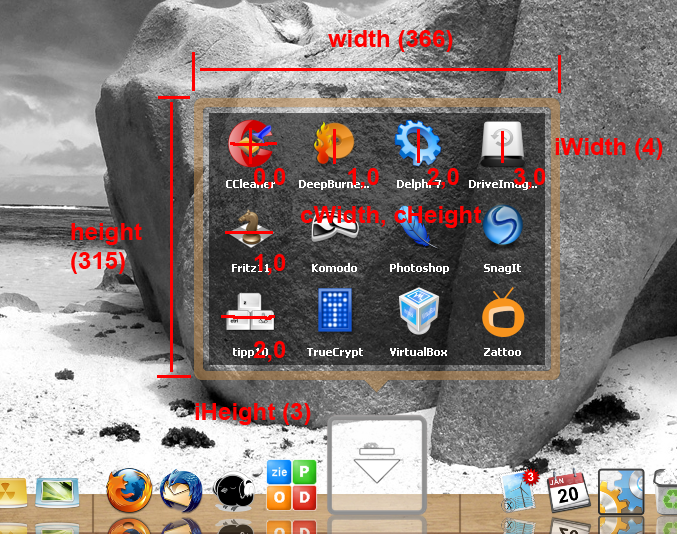
Here a more detailed look at the grid animation and the parameters:
k1 = current animation-time in ms
k2 = max/end animation time in ms. This is what the users sets as "Animation Speed"
Width = Width of the opened Grid, including Borders
Height = Height of the opened Grid, including Borders
iWidth, iHeight = Number of Icons in a row/column of the opened Grid
cWidth, cHeight = Indexes to identify the single Icons on the grid. Just like chess: Top Left Icon is (0,0), next to it is (1,0),...
IconSize = ending Size of the Icons. This is what the user sets as "Icon size"
Cellsize = Icon Size + margin
IconXOffset = seems to be zero all the time, not sure for what it's needed
BordersSize = Size of every Border of the grid (not all together)
Only the orange parameters are variable for one grid. the other values stay constant for this grid.
What you have to calculate as the Result are the coordinates of the Icon-Cells (Icon+Margin) TopLeft and BottomRight corners.
In the attached txt-file you see a complete dump of the parameters and the result values of the grid, that is shown the Screenshot.
It's only the open Animation, close Animations will always be the reverse open Animation.
EDIT: i missed some parameters in the dump. reuploaded, now.

 I'll try to implement a variation of my wobble animation.
 There is no way to prevent fan icons from rotating.

 ... I'll try my best at understanding it, but you'll have to compile it for me