DVD Rip/Burn?

So I borrowed a DVD from my friend and I copied it to my MBP's HD. Now Since I need some space on the HD I want to burn that copied content on a DVD.

Now the thing is that the DVD was a video DVD, and i copied the whole DVD. I want the new burnt DVD to run like the DVD i copied from earlier. Do i copy the contents Directly onto the burn folder or is there a software which can rip the contents and let me burn it to the new DVD. Please Help!

Regards

#510319

Nero.

#510334

Thanks for the reply, but my question is do I copy the contents of the copied folder on my MBP's HD to the burn folder or is there a ripper which can rip contents of the Copied DVD (which is on my HD already) and then i burn them on the DVD??? Do i do the first thing or the second one.?

#510337

Saved as an image, I hope. If it's saved as ISO or DMG, burning is easy. If not... then remember to do that for next time :P

I think Levi made an app that allows ISOs to be played in DVD Player. Search for it...

#510350

http://www.aqua-soft.org/board/showthread....light=isoplayer

^ ISOPLAYER. Go to the information page for screenshots.

For ISO burning, DVD Copy or DVD ripping though...

Might I recommend disco for ripping DVDs- its slick, fast, simple and looks good;

http://www.discoapp.com/

Or use mp4converter's DVD Copy;

http://www.mp4converter.net/dvd-copy-mac.html

#510359

Thanks levi... and phantom.. i will surely try 'em

//edit

I believe Disco might do the trick, but I suppose I would not like to pay for this one time thing. I have Nero on my windows machine. I suppose I will copy it there and do something there.

Thanks for it anyways dude.

#510708

How to burn a DMG onto a DVD?

#513135

(--)

I know that Daniusoft DVD Copy allow copy dvd to a new dvd disc directly, you can try it:

http://www.convert-video-dvd.com/dvd-copy.html

#513262

hey thanks for the link. `but just gotta know that ~Disk Utility and Burn can do these things easily!

#513266

Daniusoft Digital Media Converter Pro is a perfect video converter. It is not only a video converter but also a DRM Protected video converter. Most important, its price is really reasonable.

Look at its supported format:

Input format:

DRM audio and DRM video (WMA/WMV/M4A/M4B/M4P/M4V/ASF)

Common audio and video formats: MP4, MPG, MPEG, 3GP, RM, RMVB, DAT, MOV, FLV, VOB, MP3, WAV, M4A, WMA

High-definition video: M2TS, TP, TRP, TS, AVI

Output format: Audio: MP3, M4A, AC3, AAC, WMA, WAV, OGG, and APE.

Video: MP4, FLV, AVI, WMV, ASF, 3GP, 3G2, M4V, MPG, VOB.

It is also very easy to use:

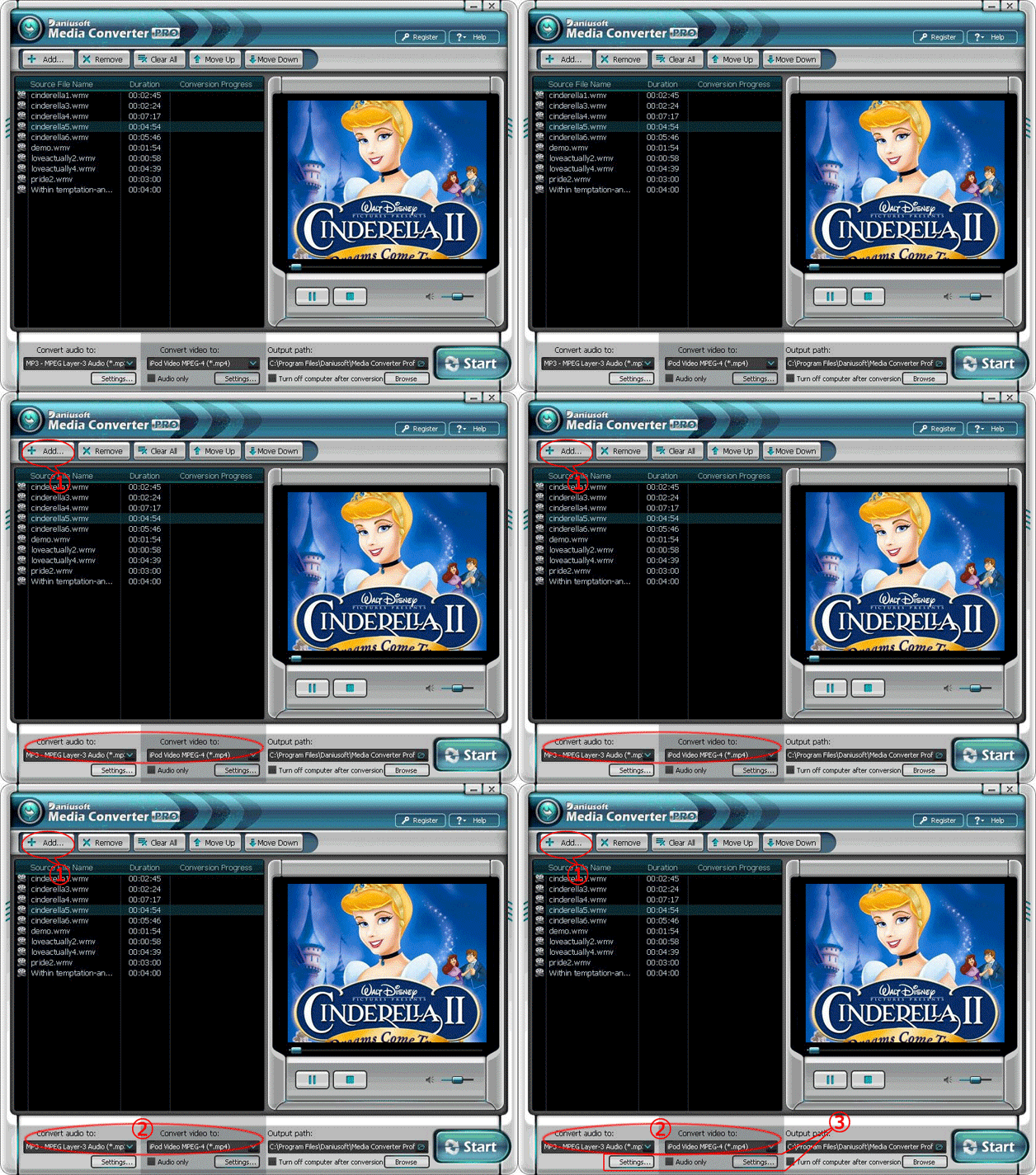
Stpe 1:Download and install the DRM Removal Software. Run the software and click “Add…” button to load WMA or M4A, M4B, AAC, WMV, M4P, M4V, ASF files.

Step 2: Choose output formats. If you want to convert protected audio files, please select “Convert audio to” list; If you want to convert protected video files, please select “Convert video to” list.

Stpe 3: You can click “Settings” button to custom preference for output files, and Click “Settings” button bellow “Convert video to” list for protected video files.

digital-media-pro.gif

#515893