 Aqua-Soft Forums
<< New progress Bars >>

tutorials:
get reshack (resource hacker) and edit the following dlls:
shimgvw.dll
shdocvw.dll
shell32.dll
once you open these files, you should go to the "AVI" catagory and change each one of the old avis with the ones above. to change you simply expand a resource type (for example avi number 256), and you can see a 1033 figure (1033 defines the english language) right click it and choose Replace Resource. load your avis and when asked to fill out the type of resource, put "AVI", name of resource is the parent number of that 1033 number (in that example its 256), and the language is ENGLISH (when its 1033).
thats it.
take care:)
later.
Edit- one more thing, make sure you back up your original files. 
Originally posted by Siddharth@Nov 8 2002, 07:57 PMnice work goku (is that you talu??)...do you have one in brushed style??
siddharth
Hehe, yes thats me - TALU
Glad to see the good 'ol people coming back Sid!
Thanks for the thumbs up
ill make a brushed one as wll - good idea
Goku (Talu)
AWESOME WORK,Goku but the link is not working for me ,cut and pasting or dragging and pasting,I cant wait to get my hands on those .
thanks alot:)
seems like geo****ties isnt working for me either, and its a temporary problem. when i get back home tonight ill repost it.
please feel free to bring up some more ideas for other avi files, other than those download/copying dialog animations.
Great new animations Goku. 
Goku, have you considered using ResHacker to delete the Windows ani and move your ani to the progress bar area? Even tho it won't show progress, at least it may look good.
Just a suggestion.
Good work man!! 
Originally posted by Duckie@Nov 9 2002, 03:04 PMGoku, have you considered using ResHacker to delete the Windows ani and move your ani to the progress bar area? Even tho it won't show progress, at least it may look good.
Just a suggestion.
sorry duckie, but i dont seem to understand what you mean. please reply.
thanks.
goku
p.s thank you all guys.
EDIT - I GOTCHA - a screenie will be posted soon!! (GREAT IDEA)
I would also like a brushed progress bar
question in ResHack:
in what system file can i customize the DIALOG BOX of the download window?
please let me know - cause im working on something cool.
hows your progress coming Goku?
Originally posted by MDZ61384@Nov 12 2002, 07:25 PMhows your progress coming Goku?
as much as its a small tiny thing to do, i have no time for it..
im terribley sorry.. when i find time, ill make a graphite and a brushed one, based on the blue aqua prog' bar.
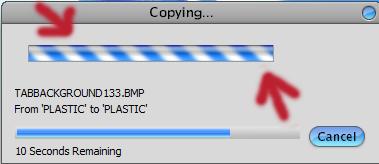
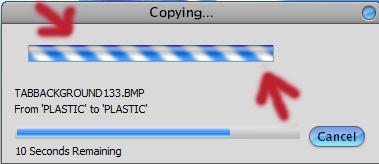
besides, whoever didnt understand what duckie was suggesting in few replies back, ill post a screenie of the of copying/moving/deleting dialog box, cause i took the REAL PROGRESS BAR off of windows, so it has only the avi file running.. and it looks a lil more accurate, rather than having two progress bars.
do it in reshack - shell32.dll in the dialog resource # 1020.
anyways, if ANYONE KNOWS where can i find the DOWNLOAD dialog box, please reply!
LATER.
I"ll be looking forward to it when it comes
hey im at work now, cant believe im actually doing this:
here is a link to a BRUSHED, GRAPHITE and AQUA prog bars (i also added speed to the ani so its looks much better).
TIP- click the link and dont release the button, then drag it to your browser's address - release it there and voila, geocities are fuged
p.s. thanks to marvila for the tip!
{edit--> if it you guys cant seem to have the animations run, is its probably cause of the codec. Since on this computer i use i cant change it to MICRO**** RLE, you can do it yourself ---> SORRY:( :( if its a prob, ill take care of that later tonight or tomorrow morning.
GOKU.}
Awakening and ancient thread here, but hell, it's better than starting a new one:
Does anyone know how to replace the flat thin blue progress bar that is at the bottom of the dialog in this shot:

With something that looks more like the standard panther texture like this (the one in the middle obviously) :

I just spent 30 mins weeding through aqua soft looking for an exact picture of what I mean,.. it ws a picture of the real osx copying bar, but was in french,... where is that damn thread,... I think it was one of the all in 1 pack overhaul threads.
EDIT NEVER MIND ITS ICEMANS
Originally posted by Three Drives@Jul 27 2003, 08:47 PMAwakening and ancient thread here, but hell, it's better than starting a new one:
Does anyone know how to replace the flat thin blue progress bar that is at the bottom of the dialog in this shot:
With something that looks more like the standard panther texture like this (the one in the middle obviously) :
I just spent 30 mins weeding through aqua soft looking for an exact picture of what I mean,.. it ws a picture of the real osx copying bar, but was in french,... where is that damn thread,... I think it was one of the all in 1 pack overhaul threads.
I used to have an aqua theme that had the progress bar as the candy stripe. I unfortunately do not have that theme anymore nor do I remember the name of it.
By the way, what theme is that in the pic you are showing?
Goku, nice progressbars, thanks
:evil: It still does the original AVIs!
@Goku
It's not shell32.ddl you need but shdocvw.dll. The dialog that displays the download status is in there.
Thanks Goku.
Goku is it possible that you update the AVIs in the manner that they have center position instead of being snaped up side.
Also may be a bit smaller widht and hight.
I hope so.
[EDIT] Attached image is from sosodamn's thread regarding the same matter.
@Goku .. thank you so much ..they look great , I will for sure use them.. (Y)