 Aqua-Soft Forums
I want to hide that icon, I searched but coulnd't find how I can do this. I took screenshot. Thanks for help.
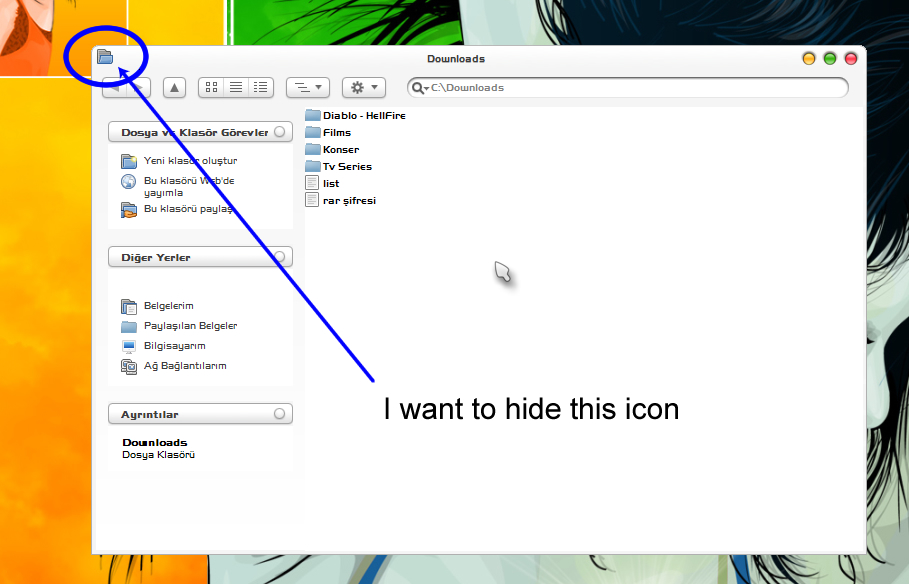
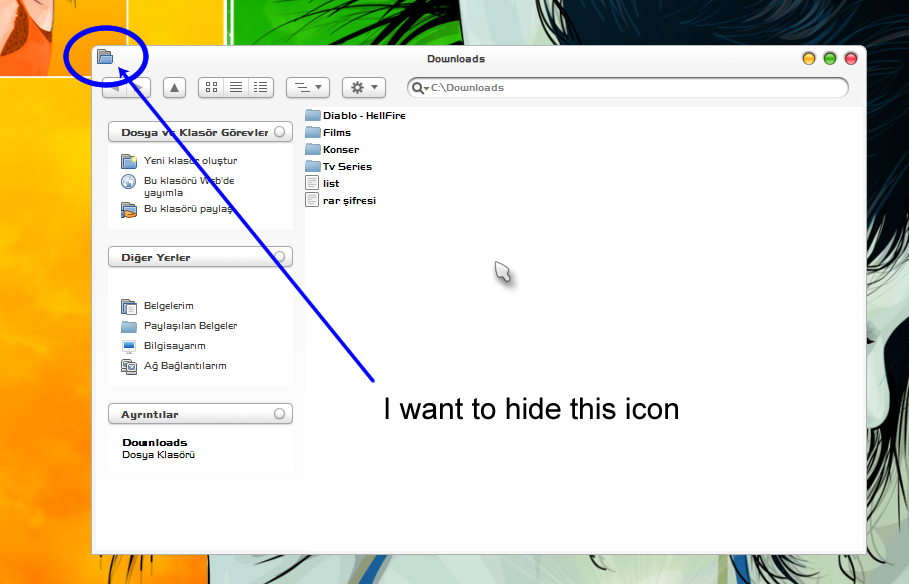
I want to hide that icon, I searched but coulnd't find how I can do this. I took screenshot. Thanks for help.
Reshack it out of the application, and replace with a blank icon.
This is explorer.exe, reshacking wont work
I'm sure you can change these using Icon Packager, but I will cost ya.
You could also jump over to Virtual Plastic and root around in there, again I'm sure someone has and "easy" solution to this for ya. 
if you are using styler you can add this entry to the both sections of desired styler skin's ini file:
captionicon=Transparency.ico
and of course you need a transparent icon that named "Transparency.ico" (without the quotes) in same folder of the ini file
edit: what's the name of the vs in the screenshot by the way ?
This is explorer.exe, reshacking wont work
Reshack the application's executable, not explorer...
thanks for helping my friends I wil try archdevil's solution
VS is http://lemonex.deviantart.com/art/Milky-Tiger-3-1-21586838
ArchDevil is right.
Open your styler toolbar's skin's .ini file. Go to [Explorer]. Under Bandheight/Bandwidth, add this:
captionicon=transparency.ico
Make sure you actually have an icon called transparency.ico in your skin's folder.
If you don't believe me, try it out on your own.
um...
UM....
UM....
You know what the shell IS, right?
It's just a ****ing .exe, just an application. If you're going to be a smartass, please, get it right.
um...UM....
UM....
You know what the shell IS, right?
It's just a ****ing .exe, just an application.
"Explorer.exe" is a executable.
Explorer in itself is a shell. Litestep replaces what? EXPLORER. Bblean, Xoblite, Talisman all replace what? EXPLORER. Not explorer.exe.
Example:
Explorer = Windows
Finder = Mac OS X
lrn2windows
If you're going to be a smartass, please, get it right.
PS: Instead of questioning me, prove me wrong.
He doesn't afraid of anything!
Let's be grown ups shall we? Fighting over a ****ing file, who gives a shit.
While “Windows Explorer” is a term most commonly used to describe the file management aspect of the operating system, the Explorer process also houses the operating system’s search functionality and File Type associations (based on filename extensions), and is responsible for displaying the desktop icons, the Start Menu, the Taskbar, and the Control Panel. Collectively, these features are known as the Windows Shell.
Check, and mother****ing mate.
Um. We are talking about, like, different things, lol.
The shell is run through explorer.exe
that is an application.
Working on the premise that explorer, the shell, IS explorer.exe, as is the file manager, explorer, I fail to see how your wiki quote holds any water? Or is relevant, lol.
@KAW²l this ain't just any file!
Um. We are talking about, like, different things, lol.The shell is run through explorer.exe
that is an application.
Working on the premise that explorer, the shell, IS explorer.exe, as is the file manager, explorer, I fail to see how your wiki quote holds any water? Or is relevant, lol.
@KAW²l this ain't just any file!
It clearly refers to Explorer as a shell, making windows dependent on it. Applications are dependent on the OS, not the other way around, thus proving that you are wrong, I am right.
http://en.wikipedia.org/wiki/Windows_Explorer
Read it for yourself, if you can't understand.
wat.
wat da fuk u on 'bout sonny?
Nobo'y said noffink 'bout windows dependancies!
Also task manager end explorer LOL WINDOWS STAYS UP.
Windows ain't dependant on it. It looses a lot of functionality, but it's far from dependant.
Also, who said OSs were dependant on the apps lmao
@KAW², dude, if you lived in a very poor country, you'd need everything to carry water you could!
Also 'fill me' I c wat u dud tar.
I understand completely.
wat.wat da fuk u on 'bout sonny?
Nobo'y said noffink 'bout windows dependancies!
Also task manager end explorer LOL WINDOWS STAYS UP.
Windows ain't dependant on it. It looses a lot of functionality, but it's far from dependant.
Also, who said OSs were dependant on the apps lmao
@KAW², dude, if you lived in a very poor country, you'd need everything to carry water you could!
Also 'fill me' I c wat u dud tar.
You're missing the point, I'm comparing two things. Applications are applied to the OS. (YES, WHO WOULD'VE ****ING THOUGHT?!) System Files are the backbone of the OS. Also, lrn2internet, grammar, and spell.
Explorer is obviously what makes Windows, well... Windows. It handles the start bar, and other necessities.
iTunes is an app. Safari is an app. Winamp is an app. Samurize is an app. Explorer is not. Get over yourself. :
http://en.wikipedia.org/wiki/Application_software
GODAMNIT.
I like turtles.
Good good.
@Zep, I see where our issue is now. You define app as, like... an application, wheras I define it as anything that executes. Making explorer not in your view, but yes in mine. And of course I'm right 
(Though I would not call explorer software)
However, My windows doesn't have a start bar, or use explorer as a file manager, but it's still windows 
(Though explorer does update what windows are open so I can't murder it in it's sleep.)
'lrn2internet, grammar, and spell.'
Internet cannot be learned, grammar I like to think I'm quite good at, and for spelling... I have firefox 