Flyakite v3.5 installation problem

hello,everyone!

now i face a problem that i can't install the Flyakite v3.5.

-. i install windows SP3 on top of Flyakite v3.5.

-. and then the icons and folders all are changed. so i want to reinstall Flyakite v3.5. but it can't work.

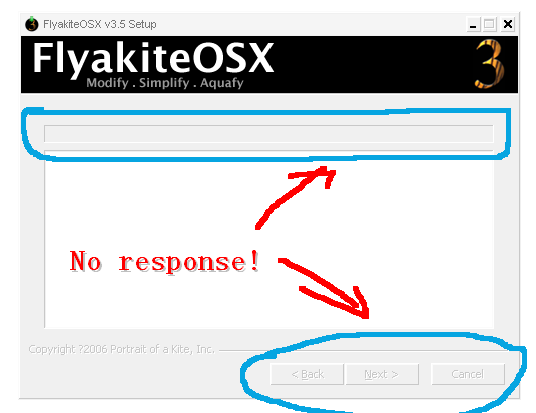
i mean that the previous steps are OK, but when i put the button "install" in the last step. there is no

change, the installation scroll bar is "GRAY" color and wasn't active. i wait for many minutes, the scroll bar

was still freeze, no processing.

-. hence, i uninstall windows SP3, and try to install Flyakite v3.5 again. it also didn't work.

-. furtherly, i go back to the previous backup and install Flyakite v3.5 again, it still not work.

;by the way, i install "UXTHEME PATCHER" and try again, no work!!!

anyone can help me? how to reinstall Flyakite on top of windows SP2?

your sincere help will be highly appreciated!!!!!!

thanks a million!

Tony xu

#503694

lol retard monkey.

you cant install FAK on SP3 :slant: why do people consistently ask this question :slant: shouldn't it be common knowledge?

#503710

lol retard monkey.

you cant install FAK on SP3 :slant: why do people consistently ask this question :slant: shouldn't it be common knowledge?

thanks!

and so how can i install FAK after unstalling SP3?

now i have uninstalled SP3 and the FAK installation doesn't work.

only the last step is no response.

Image00000.bmp

Attachment: Image00000.bmp

#503745

Are you on SP2 now?

#503761

Hi KAWSquared,

1. It's not polite to address people in such a derogatory manner, regardless of how intelligent you may think yourself to be.

2. I am running XP SP3 together with Flyakite without a problem in the world. The recipe is simple.

a. Make sure you have administrator rights on the pc.

b. Uninstall Flyakite. Restart.

c. Upgrade to SP3. Restart.

d. Patch the uxtheme.dll. Raphael has released the patched uxtheme.dll file for the final version of Windows XP SP3 at the link: http://www.withinwindows.com/uxthemes/Wind...900.5512_EN.rar. Alternatively, you can get a patcher from this link: http://www.softpedia.com/get/System/OS-Enh...e-Patcher.shtml. In both cases, it's the uxtheme.dll version for XP SP3 6.0.2900.5512, i.e. the latest.

After the patch - restart.

e. Reinstall Flyakite. Restart.

Now, if people would only stop going around telling others that it's not possible to install Flyakite on SP3...

#503788

@PoulNyrup, thank's for the link and informations, I found that 2 patches are really different in size, so which one do you use ?

Just to make sure everything works find ?

thank's a lot

#503790

Husaini - you're everywhere! I'm starting to think you're some kind of bot roaming the web forums... :P

The difference between the 2 links:

1st link: Is just the uxtheme.dll file (in a .rar) You'll have to play around with replacer.exe & other stuff...

2nd link: This is the one I used, a little patcher program from Damian666. I could imagine this has a larger size, as it does the gritty work of replacing system files for you (you of course have to restart after running the application)... I would recommend the 2nd link for folks that don't want the hassle of fiddling around with system files themselves...

Btw: Are you still in your "HUD" fase at dA? ;)

#503796

Husaini - you're everywhere! I'm starting to think you're some kind of bot roaming the web forums... :P

The difference between the 2 links:

1st link: Is just the uxtheme.dll file (in a .rar) You'll have to play around with replacer.exe & other stuff...

2nd link: This is the one I used, a little patcher program from Damian666. I could imagine this has a larger size, as it does the gritty work of replacing system files for you (you of course have to restart after running the application)... I would recommend the 2nd link for folks that don't want the hassle of fiddling around with system files themselves...

Btw: Are you still in your "HUD" fase at dA? ;)

He he, yes PoulNyrup, just saw your SS in here and your DA, and thank's again for your explanation, see you !!:P

#503797