Aqua-Soft Forums
Honestly, I just got the biggest "wtf" moment. The Psystar "open computer", which most, if not all, believed to be a hoax, due to the fact that the randomish address and suspicious 'online store' activity, has actually shipped!
Quoting from Engadget;
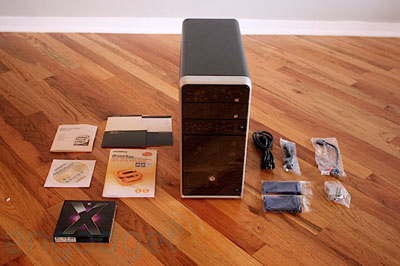
Engadget NYC might have gotten to play with Apple's latest and greatest iMac yesterday, but we keep it dirty in the Chi -- yep, we've got the first Psystar Open Computer shipped out for review. We're just getting it set up, but check out the unboxing below, and hit us up with anything you want to know in comments -- you know we're going to put this thing through its paces.
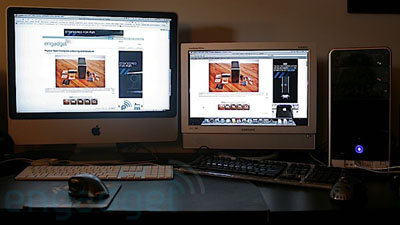
Yep, that's the sexy new iMac's that we're released not 48 hours ago to the left, and the Psystar "open computer" osx86 machine on the right. With OS X. Leopard. Working. Out of the box.
Alas, it is exactly what it says it is, osx86. With osx86, there are always hardware issues, considering the operating system isn't made for the hardware... Which is exactly what engadget said.
Okay, so we've been playing with the Psystar Open Computer for a few hours now, and we've formed some early impressions and put together a short video of it in action. We haven't really tried to stress the system yet, but based on our other experiences with OSx86 machines, we're expecting things to generally go smoothly. That said, there are some definite rough patches and issues, all mostly having to do with the fact that OS X isn't really built for this hardware.
Here's the low down from Engadget.
# It's running 10.5.2, build 9C31, which is behind the latest Apple build of 9C7010.# The mobo is a Gigabyte GA-G31M-S2L with an Intel G31 Express chipset. We're not sure which model of Core 2 Duo is in there as of yet.
# The graphics card appears to be an NVIDIA GeForce 8600GT, but it doesn't show up in ASP, so we have to confirm. Psystar's store says it's supposed to be a 256MB card, but we have 512MB -- strange.
# It's LOUD. Crazy loud. OS X doesn't seem to interface with the fan controller, so it runs at full tilt all the time. It doesn't really come across on the video, but it's loud enough so that it's hard to talk on the phone when the machine is running. There's no way we could deal with this thing on a daily basis.
# The DHCP lease drops every fifteen minutes or so and you have to manually renew it in prefs.
# Apple System Profiler doesn't know how to read the configurations of several systems, notably memory and audio. The Audio screen just says there's no built-in audio, while the Memory page returns an error.
# That said, audio works just fine, showing up in prefs as HD Audio Output, and obviously the memory works fine.
# We plugged in a couple cameras, an iPod, and an iPhone, everything worked as expected.
# There's no iMovie or iPhoto out of the box, since iLife doesn't come with Leopard -- you'll have to buy it separately.
# Time Machine seemed to recognize an external HD, but we didn't have time to fully test it out.
# The included copy of Leopard was out of the shrinkwrap, but there's no way to install it -- it shows up in Startup Disk but it won't restart, and it's not recognized at boot.
# Front Row works fine.
# You can grab the entire System Profiler file here, if you're so inclined -- just make sure and share with the group if you notice anything crazy, okay?
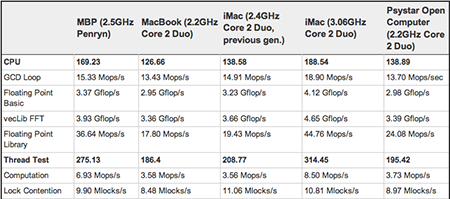
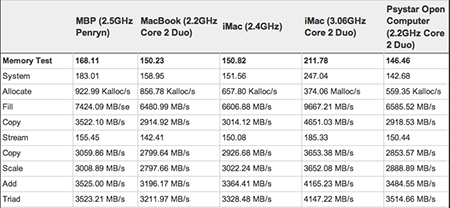
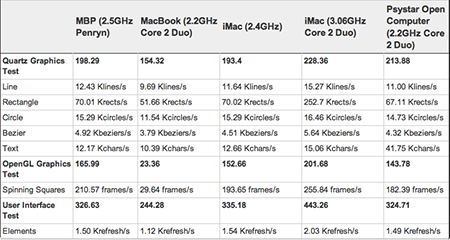
As far as benchmarks, it doesn't exactly blow Apple's gear away, but it definitely holds its own -- and the GeForce card just destroys the integrated graphics in the MacBook / Mac mini. Check it out:
* All machines tested with Xbench 1.3.
* All machines tested were using Leopard.
* You can check the bold Xbench scores to compare the cumulative results for each test.