 Aqua-Soft Forums
I have used skinstudio to make rollup buttons on a theme but it doesn't work when i click on it. it just stay there doing no action. Does anyone know what's happening? appriciate all helpers^^
Rollup doesn't work
As per SS 5.0 for UIS2, the options are found under /Window Borders/Titlebar buttons -Free Form. Button 14 should be the Roll up/Unroll, Check out the "Action on click'. the Value should be Rollup/Unroll... This is not available if you are using Per Pixel borders...
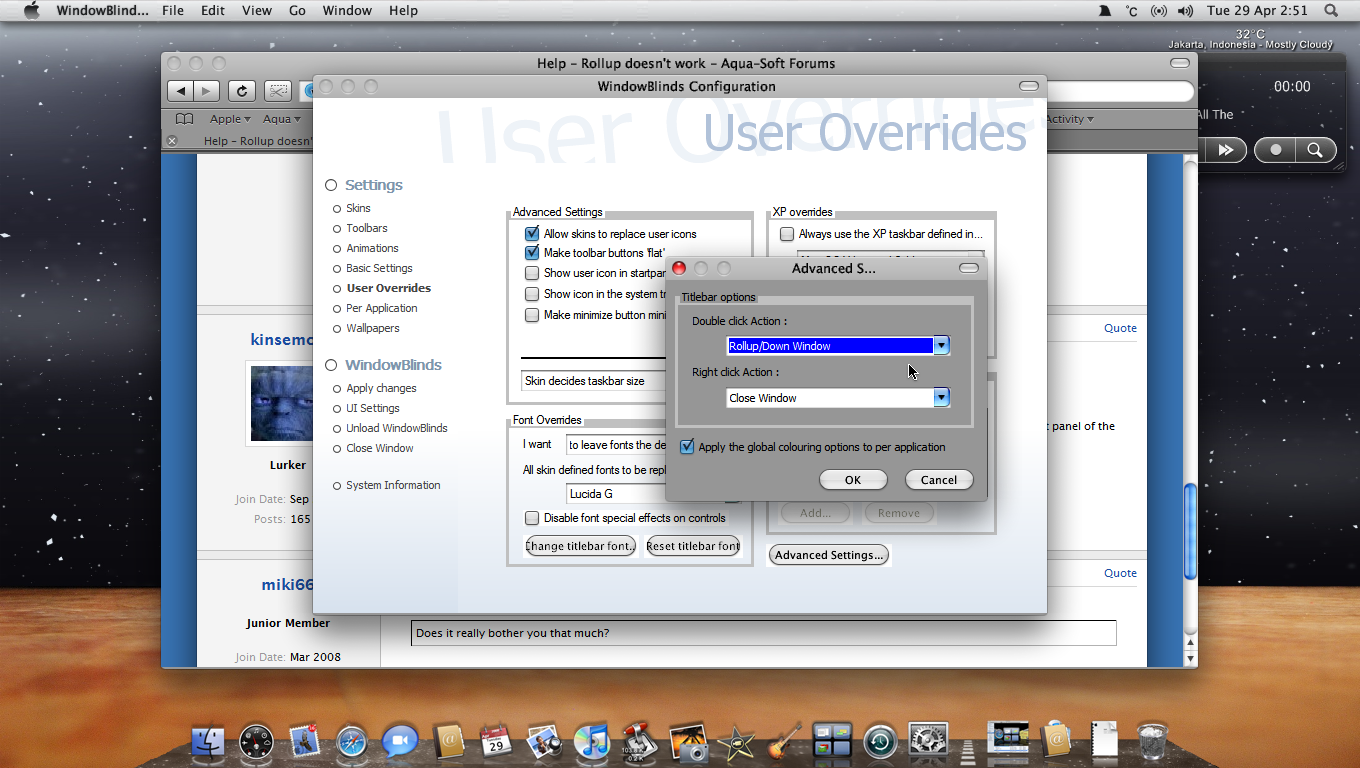
btw, you can also configure WB to rollup/unroll by right-clicking the Titlebar in wbconfig 'Override Default Settings'...
i'm pretty sure the rollup actions are made under titlebar-free form. for some weird reason it never worked though.
and thanks for the second option! now i have made it to rollup by right-clicking:P..most of the windows responded to it however, safari and wbconfig did not. i realized safari was not effected by wb but why wasn't wbconfig itself? any clue?
As per SS 5.0 for UIS2, the options are found under /Window Borders/Titlebar buttons -Free Form. Button 14 should be the Roll up/Unroll, Check out the "Action on click'. the Value should be Rollup/Unroll... This is not available if you are using Per Pixel borders...btw, you can also configure WB to rollup/unroll by right-clicking the Titlebar in wbconfig 'Override Default Settings'...
so by doing this, we can enable roll up on any WB theme?
so by doing this, we can enable roll up on any WB theme?
Yes, almost all apps, including firefox. I only encountered 1 or 2 (e.g. IcoFX) which does not or only roll halfway.
@miki66, it IS the program's config utility, so i guess it does not turn into itself, it's like asking Objectbar to allow itself to included in the Exclusion List. Does it really bother you that much?
Yes, almost all apps, including firefox. I only encountered 1 or 2 (e.g. IcoFX) which does not or only roll halfway.@miki66, it IS the program's config utility, so i guess it does not turn into itself, it's like asking Objectbar to allow itself to included in the Exclusion List. Does it really bother you that much?
which WB version is this for? im using 6.02 Build 43. and when i right click on the titlebar, these options dont come up. do i need skin studio? if i dont, how would i do it in this version 
Cheers
@Aydinz,
WB version 5.5.
Rollup/unroll by clicking titlebar is NOT configured by default.
Open wbconfig.exe (or right click the wb icon in systray). There ought to be an option "Override default settings" on the left panel of the config window, at least in wb 5.5.
Does it really bother you that much?
i guess the answer would be NO...anyway, i'm happy with what it does now. thanks a lot!
@Aydinz,WB version 5.5.
Rollup/unroll by clicking titlebar is NOT configured by default.
Open wbconfig.exe (or right click the wb icon in systray). There ought to be an option "Override default settings" on the left panel of the config window, at least in wb 5.5.
maybe this will help you Aydinz
thanks for the replies ppl, ill be getting WB 5.5 soon and trying this 
thanks for the replies ppl, ill be getting WB 5.5 soon and trying this
WAIT!!!
what Husaini showed you was the wbconfig for wb ver 6, which you already have! why downgrade to 5.5?
just right-click on the wb icon on the systray and it will open the config window. or go to windowblinds folder and open/click wbconfig.exe...
WAIT!!!what Husaini showed you was the wbconfig for wb ver 6, which you already have! why downgrade to 5.5?
just right-click on the wb icon on the systray and it will open the config window. or go to windowblinds folder and open/click wbconfig.exe...
No, kinsemon mine is just ver.5.0, well maybe the same wbconfig menu ?
oops Husaini, sorry about that mate, hehe..
but you're right, the config windows for these versions should not vary that much..
and like i said, for Aydinz to just right-click the wb icon in systray...
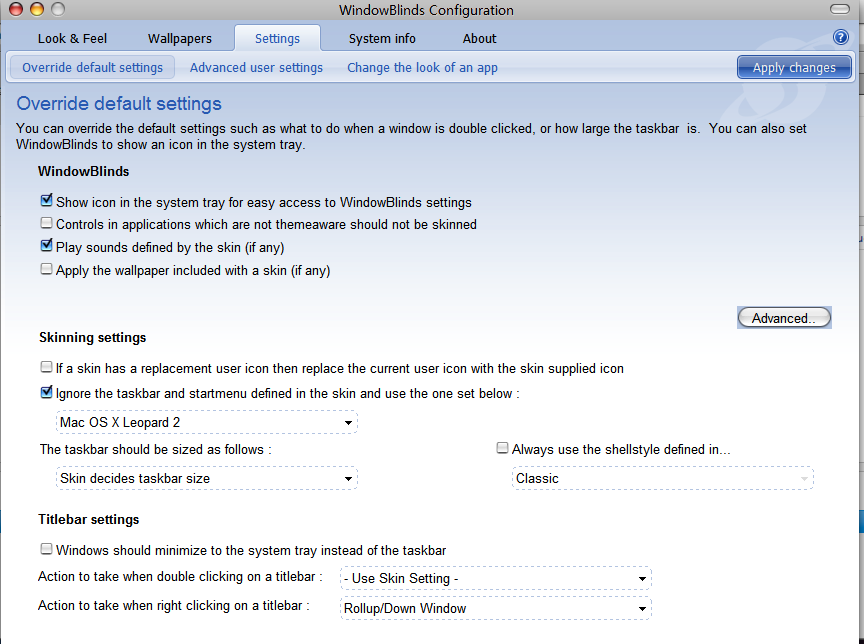

lol thanks guys, i went to this thread again just as i was about to get 5.5 then i found all these new posts and i followed where miki66 went and i got it
Thanks to all of you for your help i got it working on my version