 Aqua-Soft Forums
On a scale of 1-10 how good is my emulation?
Programs Used:
Safari For Windows with multi-plugin
LeftSider
FinderBar
iVista Leopard Dock (Rk Launcher)
Tell me what I can improve on!
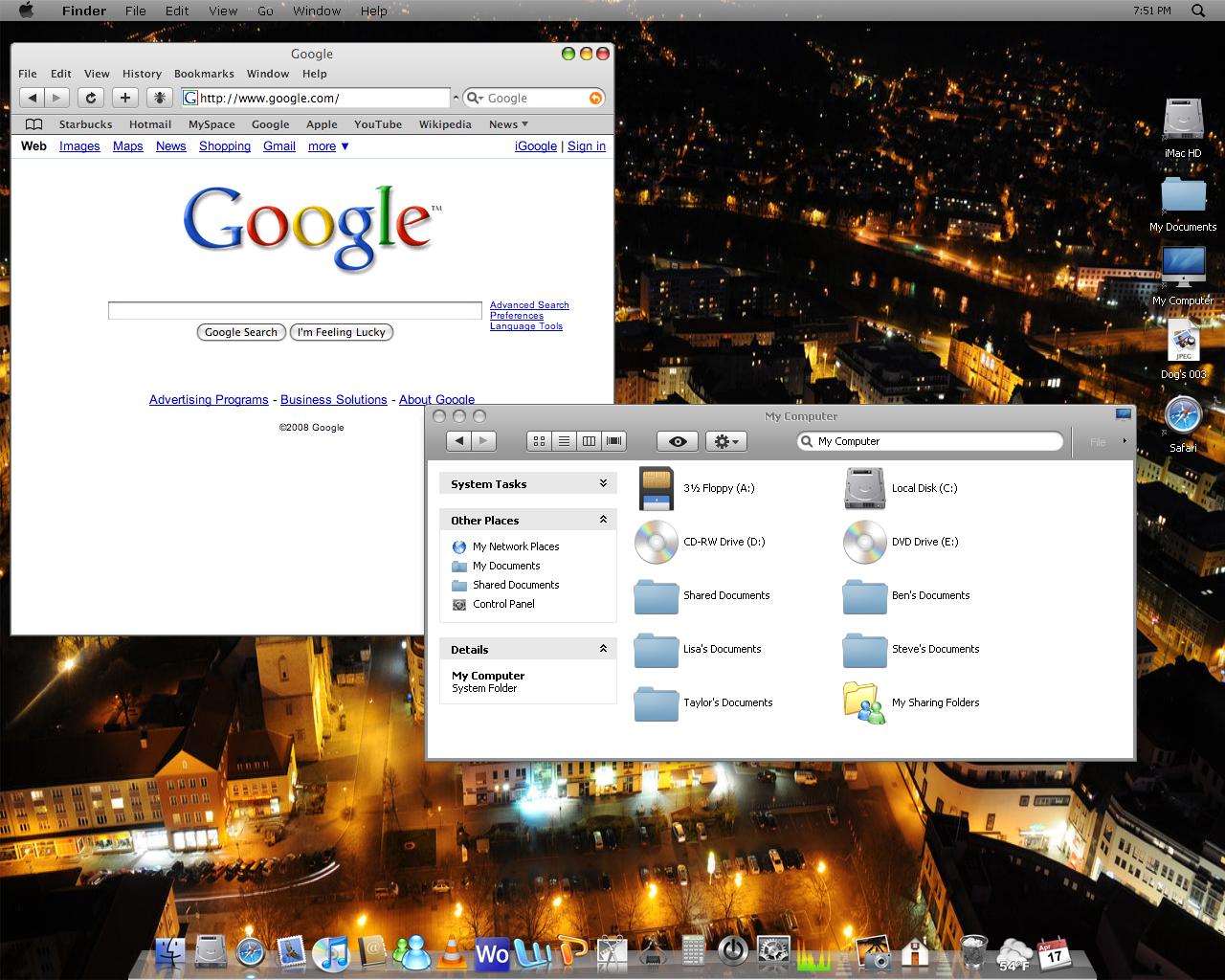

On a scale of 1-10 how good is my emulation?
Programs Used:
Safari For Windows with multi-plugin
LeftSider
FinderBar
iVista Leopard Dock (Rk Launcher)
Tell me what I can improve on!
How is this relating to wallpapers? *unsure*
6 or 7 not too bad but definetely needs improvement, like the fonts, the shortcut arrows.
Turn on cleartype, first and foremost.
I'd say around 5, you can still improve by getting windowblinds, objectbar and a few other programs as well as some mac font and findexer for the sidebar 
hmm not bad... id say 5 too...
But yea... If you want a 10 it needs improvement....
Some tips to begin:
- Turn on ClearType just like Bebi_Bulma said...
- Change fonts to MACGrande, LucidaMacBold... something like that...
- I suppose you are using Styler so turn on the shadows and Hide Menu Bar of Explorer...
- I really dont like LeftSider, so you should try WB or TrueTransparency...
This will make it a way better already...
If you need some reference take a look at my desk...
http://www.aqua-soft.org/board/showthread.php?t=48339
If you need any help to change something just ask...
And keep it up.. you're doing a nice work...
Cya!!
How is this relating to wallpapers? *unsure*
Well I kinda figured that wallpaper and desktop are kinda the same thing.....Cause your wallpaper is on your desktop..Sorry if it's off topic. This was the closest I could find.
I'd say around 5, you can still improve by getting windowblinds, objectbar and a few other programs as well as some mac font and findexer for the sidebar
I tried Windowblinds and I liked it but the taskbar Apple icon was blue and not grey like Leopard. And object bar does not let you use themes other than the preloaded ones.
Whats Cleartype? Is it an application?
First of all, you need ClearType. Google it. It is a font smoothing engine. Once you turn it on (especially an LCD) you'll ask yourself how you ever lived without it.
Now, on your emulation. I'm gonna have to say a 3.... not trying to be harsh, but a 3 is kinda being nice  .
.
There are 2 ways to do that MacMan...
* Windows Way
Go to Display Options/Appearence/Effects and choose "ClearType" in the second box..
* Styler Way
Open Styler, go to Desktop Tab and activate "Clear Type" and configurate contrast however you like... also set Shadows on by simply set "Drop Shadow" on...
Thats it..
I tried Windowblinds and I liked it but the taskbar Apple icon was blue and not grey like Leopard. And object bar does not let you use themes other than the preloaded ones.
If you get the full version it does. By the way, see this windowblinds theme: http://neodesktop.deviantart.com/art/Leopa...LeoFox-63760929
I'll give you a 1 - 2. Here's why:
-Safari hacks? GTFO. Use Firefox with the Foxdie skin.
-Fonts? Lulz. Use LucidaMacBold at 9px for just about everything.
-The Objectbar font... fail. Use OBFont (can be found on dA).
-Objectbar needs some shadow.
-Never again save your shot at that quality.
-Install findeXer.
-You need a definitely need a better skin. Try Blitzr's Leopard Final skin (can be found on dA).
-Your dock got you a 1 - 2.
-Your windows need drop shadows. Try Styler. Google it.
-Lose the black arrow shortcut overlay. Apply a blank icon for it.
kthxbai.
I'll give you a 1 - 2. Here's why:-Safari hacks? GTFO. Use Firefox with the Foxdie skin.
-Fonts? Lulz. Use LucidaMacBold at 9px for just about everything.
-The Objectbar font... fail. Use OBFont (can be found on dA).
-Objectbar needs some shadow.
-Never again save your shot at that quality.
-Install findeXer.
-You need a definitely need a better skin. Try Blitzr's Leopard Final skin (can be found on dA).
-Your dock got you a 1 - 2.
-Your windows need drop shadows. Try Styler. Google it.
-Lose the black arrow shortcut overlay. Apply a blank icon for it.
kthxbai.
Thanks for the feedback.
I installed findeXer it looks great.
Where can i get the Lucida ac fonts?
It's not object bar it's FinderBar
That was the first time I ever took a screen shot, so get off my back!
Is the Blitzr skin a WB skin? If so I can't do it. My computer won't accept it for some reason.
I have the Styler Toolbar
I thought i'd get better than a 1 or 2.....
Ok...
Let me give you a hand..
*Windows VS:
Use this one:
Leopard X -> http://kspudw.deviantart.com/art/Leopard-X-76664828
For me it is the better...
*Fonts:
Take a look at Attachments, thats all you need...
After you download do the following:
Configure Finderbar to use MACGrande font at 11px
Open Styler go to /Style/font and configure it to use
- Aquabase at 10px to Caption
- AquaBase or LucidaMacBold at 9px to the others...
- Also disable "Shadow", "Bold" and "Italic"....
*Shadows:
Like i said before...
Explore Styler options and find for it...
Is pretty simple.. you just have to activate it and its done..
Look out for"Hide Explorer Menu" option as well...
* Clock:
tClock. Google it, Download it and configure it to use MACGrande at 11px...
It will make you bar look a way better
Hmm....
Thats all for now...
Do it and send a updated screen so that we can tell you what else you should do...
Cya!!!
EDIT:
Take a look at this to see how properly configure FindeXer -> http://www.markraats.com/FinderXer_Tutorial.htm
And here for more real good Leopard Like Skins -> http://www.markraats.com/Apple_Emulation_Themes.htm
Cheers!!

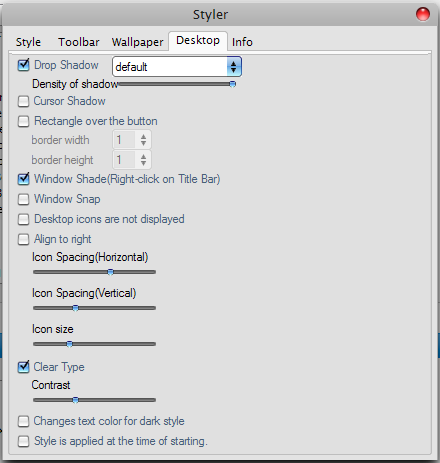

How do open Styler? When I Select it, it says styler is already running. How do you change fonts? Slso, how to change fonts on FinderBar?
double click the tray icon.
To open Styler Preferences Windows double click the tray icon just like BapeStar said...
To change Finderbar fonts open Finderbar.ini (its inside Finderbar main folder) with notepad and look for [Window] part, than edit it to look like this, save it and Restart Finderbar.
[Window]

MainWindowWidth=640

WindowLeftMargin=0

FontName=MACGrande

FontSize=11

FontWeight=Norm

FontColor=Black

FontTopMargin=-2

FontLeftMargin=-6

WordIndentationRight=16

MakeMenu2Bold=1
Thats it...
Cya!!