
OSX UI Kit for Windows/Linux

Hi guys,

I spent a few hours today learning the amazing Adobe Air framework and decided to release the fruit of my labours.

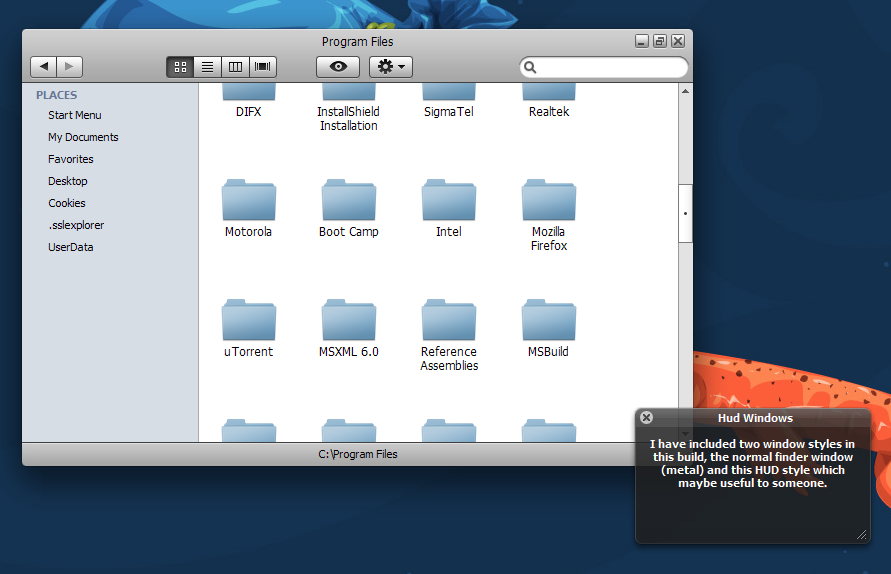
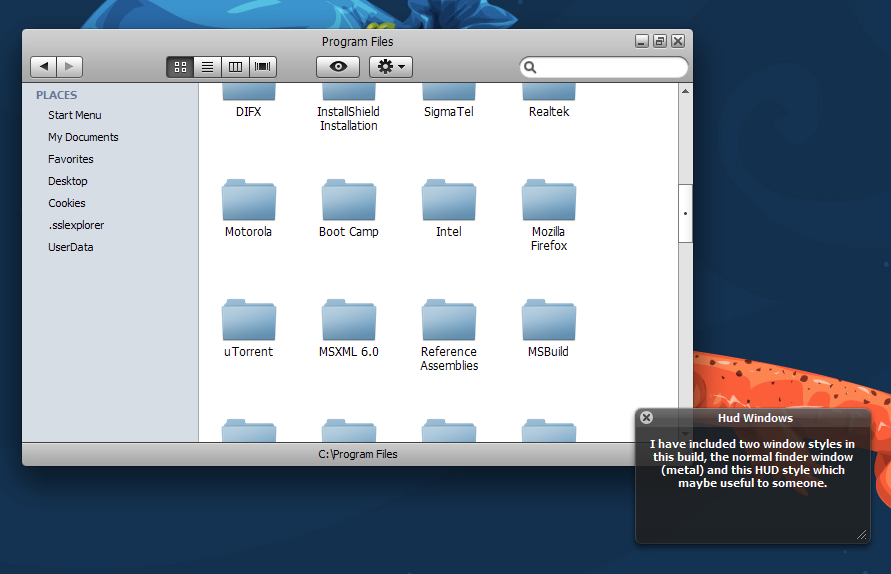
Using PNGs collected from Leopard I coded examples of 'emulating' two different Leopard styles: metal and HUD. Both styles are alpha blended and resizable so truly feel at home on windows. This little example of what can be acheived works really nicely, you wouldn't beleive windows could look this good heh - it is open source so hopefully someone will find something useful to do with this, maybe we'll see some nice nw apps coming out who knows. I created a very (very!) simple Leopard finder clone using the Window styles I'd created.

I would encourage any developers to get hands on with Air though. It's very simple to make nice looking apps. Obviously you'll need the adobe air runtime (its only small) to run this.

I'm releasing this under a creative commons, so do whatever you like with it, just give me a little credit if you do use my code.

Stuff attached.

Download adobe air here: http://get.adobe.com/air/
post-932-1207861448_thumb.png

OSXUIKit.zip

airuikit.png
airuikit.png

Attachment: OSXUIKit.zip

#497624

Wow that would look great if the exit min max button didn't look like the ones in itunes :x

But great none the less :)

#497628

Looks amazing!!!

But i didnt catch some things...

1) This program replace windows appearence?

2) If yes, it emulates everything with just one "theme" (Finder, appearence, menu...)???

3) Where can i find "Adobe air runtime" to download or it comes along with a whole package??

Although it looks incredible for a 1st Release!!!

I will take a look at it for sure!!!

#497637

Argh yeah, didnt have the resources to hand so I made do with the fugly windows ones. Still tho, fits in better with the os I guess a bit.

#497638

Hi Darkfire,

No this doesn't replace any windows' appearence. It is simply a tool for developers so they can make programs that LOOK like native mac applications (hope I explained that ok). So programmers/coders can easily make applications that resemble mac apps using this source code. If you're still interested you can download adobe air here:

http://get.adobe.com/air/
#497639

Hmm...

Thats a pitty...

Anyway it looks really nice!!

Keep it up!!

#497641

looks good right now..

keep it up.. man

#497645

Thanks peanut. In the next release I'm going to organise the stuff much better so it's easier for developers to use and include things like buttons/scrollbars etc etc to really get the full mac emulation.

#497646

It would be great if this could turn into a Leopard version of Flyakite.

#497662

Really impressive work, Hope someone with coding skills would develop this as a explorer.exe replacement.

#497664

I like the black window you have created :)

I hope we can have a tutorial for this...this looks fun.

#498432

looks promising alilm, btw, how do you uninstall this? I see Adobe Air in the add/remove, but it's not clear how to uninstall the .air.

Thanks in advance

#498436

@firecracker

Hmm, it should appear in add/remove. If not just delete the directory that you installed the program into, it doesn't leave any little files about the place.

I'm glad it seems to be of use. I'm hoping that someone can make an actual app out of it :) I've looked at making an iCal clone, this might be something I do.

#498696

Thanks peanut. In the next release I'm going to organise the stuff much better so it's easier for developers to use and include things like buttons/scrollbars etc etc to really get the full mac emulation.

Nice, AquaElements take two? :P

#498704

hey thanks alilm, I lost visibility of this post in the last few days. I'll try your suggestions when I get home. It seems a little odd that the 'air' environment doesn't make transparent, the process of managing installed apps within it's framework. Feels a little incomplete.

#498800

Nice job it looks very nice.

I didn't catch something tough. How should i use the file ? I'm developing an Adobe Air application but don't know what to do with the OSXUIKit.air file that was in the zip file.

Thanks for your help.

ps. I'm using the HTML framework from adobe air.

#499869

Very interesting. BTW, top and bottom shadows seems to be shifted a little (you can see borders)

#517176

can i see more screens please

#517194