
Firefox bookmark toolbar problem...

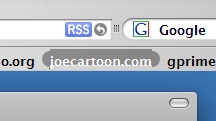
Having this problem with hover and pressed states on the bookmark toolbar, I would appreciate if anyone could guide me to the right .css file that needs to have some value changed. I figure that is in the "Browser" folder in the Browser.css in the .jar file, but I can' locate any piece of code that would move the .pngs up or down. But then again, I'm no coding geneous :-)

Any help is appreciated.

Regards,

Dodgers.
post-53206-1206377703_thumb.png

Firefox.PNG
Firefox.PNG

#495678

IT is or supposed to be in the browser.css file. just look for the words 'bookmark, hover etc etc. you'll also won't miss the addresses/urls for the respective pngs...just figure them out.

regarding your screenshot, maybe instead of moving the png (the capsule-like object), why not raise the text a bit? or if you want to really move the png down a bit, you'll have to increase the HEIGHT of your bookmark bar FIRST...

#495781

Thx for the reply. My guess about which file to modify was right, and your reply definitly led me on the right track. The solution was to add the word center after the "repeat-x" in the browser.css:

.bookmark-item:hover > .toolbarbutton-text{

background: url("chrome://browser/skin/bookmark-hover-mid.png") repeat-x center !important;

margin: 0px !important;

-moz-opacity: 1.0 !important;

}

.bookmark-item:hover:active > .toolbarbutton-text,

.bookmark-item[open=true] > .toolbarbutton-text {

margin: 0px !important;

-moz-opacity: 1.0 !important;

background: url("chrome://browser/skin/bookmark-pressed-mid.png") repeat-x center !important;

However, I can't for the life of me, figure out where to center or move the text a bit upwards in the toolbar. Any ideas?

Regards,

Dodgers.

#495807

am not much into writing codes, but i think you'll have to play around with the bar HEIGHT. i think by default the text is at vertical center of the bar. if you decrease the bar height, the text would just follow suit (appearing to "move up" a bit). just put or increase the padding at the bottom of the bar, with padding color similar to the bar...

#495829

Yep, that sounds logical. I'll give it a go and post back. Thx for your help.

Regards,

Dodgers.

#495932

Yup it worked a charm. I just edited the padding-top from 4 to 2 px and added a padding-bottom of 2 px to get it centeret right. Thanks alot for you helpful suggestions kinsemon :-)

Regards,

Dodgers.

#496045