Reshacking Boinc client tray icon...

Hi all.

So I've tried to reshack the boinc tray icon and nothing I do has any effect. I've used reshack on all sorts of apps before (exe's, dll's and other), and I'm not sure why this won't work. When trying to mod the icon, reshack accepts the change but the tray icon itself doesn't change. There are three exe's and one dll in the program folder that have icon resources inside. This leads me to my Q's:

1. Has anyone tried and had succes whit modding Boinc tray icon at all.

2. Could the problem be that, Boinc tray manager is recognized as a "no title" application by windows (e.g. it doesn't store autohide settings for the tray icon and therefor it reloads the default icon everytime?

3 If so, where could that default icon be located, if not in the programs folder?

Help with this would be very much appreciated, so please reply guys :-)

Regards,

Dodgers.
#493964

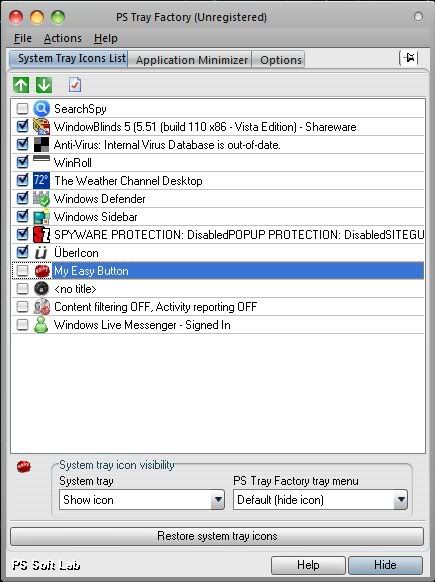
Bionic icon...what?.....anyway if it is reloading I dont know what to say but you can try using PS tray factory http://www.pssoftlab.com/

#494051

Lol, thanks for the response razar :-).

First off, Boinc is an app that wil run different tasks from the university of Berkeley, among them "rosetta" which chews up data to find structures in proteins to help find cures for various diseases and "malariacontrol" which attempts to map out what can be done in order to limit malaria spreading.

Info can be found here if interested: boinc.berkeley.edu/

About PS tray factory, as far as I can see, it will only manage your tray apps for you right? It's not possible to change the icons of the tray apps with PS tray factory correct?

The thing is, I just want to change the icon of the Boinc tray app, and unlike other apps I've reshacked it won't work with Boinc for some reason. Anyhow, from the amount of responses I think noone has succesfully changed the icon ;-). So I'll leave it at that and just live with it as it is.

Again, thanks for your response,

Dodgers.

#494080

Actually you can change the systray icon with ps tray factory heres how:

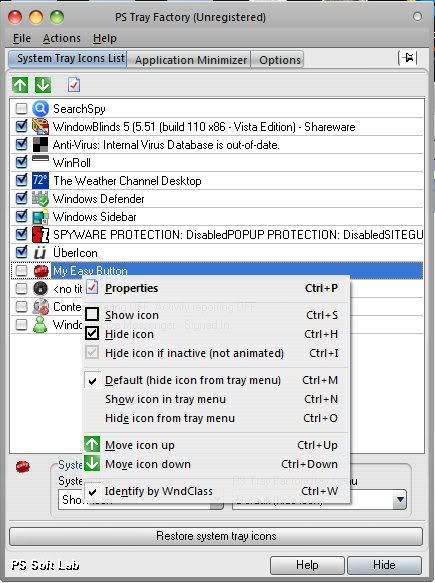
First open ps Tray Factory

NewBitmapImage.jpg

Then select the bionic icon (im just gong to use the easy button for example)

right click the bionic icon

NewBitmapImage2.jpg

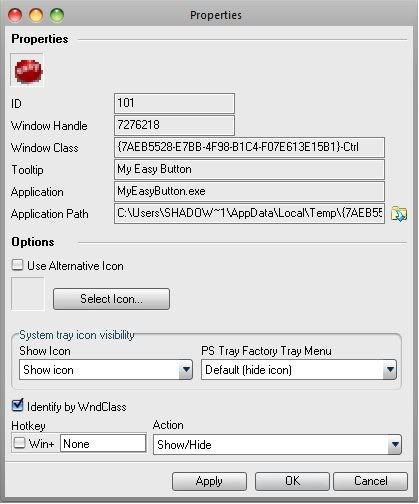
and press properties.... when your at properties (should look like this)

NewBitmapImage3-2.jpg

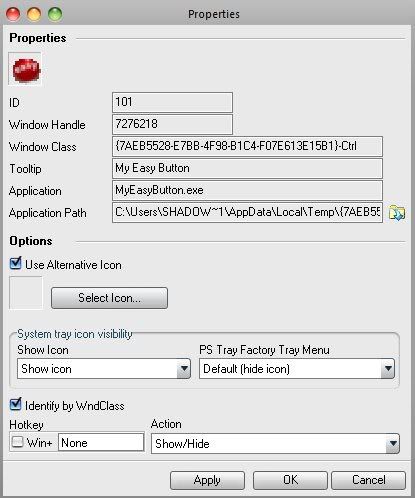
press "use alternative icon"

NewBitmapImage4.jpg

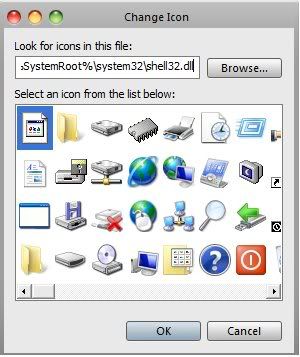
then press "select icon"

NewBitmapImage5.jpg

and choose the icon you want to change it to!

hope this helps

-razar45

#494112

Wow, worked right off the bat. The icon changed so no probs there. However when shutting down and restarting the app the icon reverts to default. I suspect it's because windows tray doesn't remember the program. It shows up as a program when selecting "control panel->taskbar and startmenu->hide inactive icons". So if it doesn't stick it's a nogo for me...I'm kind of anal about these things ;-). But thanks for your excellent minitutorial razar it did work as you said it would.

Regards,

Dodgers.

#494134

no prob...im just here to help :)

#494379