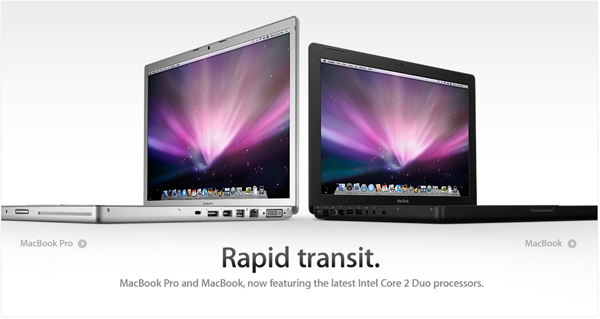
New MacBooks and MacBook Pros Released

12c75a2ce9605d31da4b1f3808334ba4.png

Apple today released a small upgrade to its MacBook lineup.

The new MacBooks feature a standard processor speed of 2.1 GHz, with a 2.4 GHz option available. In addition, they now come with 2GB of memory standard, and hard drives up to 250 GB. Interestingly, they still equip the base MacBook with a combo drive, rather than putting a standard Superdrive in every model.

The new MacBook Pros have also been overhauled. They are now equipped with a standard processor speed of 2.4 GHz, with the option of up to 2.6 GHz. They also offer a midrange 2.5 GHz model, which, in this writer's opinion, is a bit dumb. Why offer upgrades of just .1 GHz?

The big news, however, is the use of a multi-touch gesture capable trackpad on the MacBook Pros. This option is not on the MacBook (yet). However, despite speculation that a software update would be available for current MacBook Pro owners to enable increased gesture support, there isn't a software update available (as of 10:25 AM Mountain Time).

UPDATE: Just reading Engadget now, and they've confirmed a couple more things that I missed:

- 512 MB graphics memory in high end 15 inch MacBook Pro

- Penryn processors are used

- LED backlight option for 17 inch displays

- In the box now is a display cleaning cloth (wish they shipped that with mine...)

UPDATE NUMBER 2:

The Apple remote now is a $19 option on seemingly all of the notebooks they offer.

#492739

Crap! You beat me to it!!

Anyway, friggin sweet!!!

#492740

Not as I expected.

I bought my macbook pro over a year ago and it still isnt that much different from these new ones. Unless im missing something, this isnt really a new macbook pro at all, just slightly more expanded?

Multi-touch trackpads have been on macbook pro's for a long time! Its nothing new... hmm.

#492742

Looks like they updated the iPhone to 1.1.4 as well today.

Downloading the update now.

#492767

****! wish i had waited two months.. o well least i got a cloth in my box

#492770

The new pics from Apple look like it's a polished steel case, not aluminum. Looks darker...

#492788

The new pics from Apple look like it's a polished steel case, not aluminum. Looks darker...

Your eyes deceive you. A cursory glance of the Design page in the MBP section on Apple's website says it's aluminium.

#492803

I knew it was aluminum, the images just make it seem darker.

#492819

Yeh the images looks darker in Apple gallery... but the actual product is not. In fact there is not a single visual change in these new models from previous ones.

Check the tear down here

#492826

I purchased my MacBook Pro 17inch widescreen glossy on January 23rd. Do you think they'd allow me to exchange for the new ones?? Like price drop from 3099 (CAD) to 2899 (CAD) and almost 100 more GBs....that's a hard one to swallow.

Plus, I had to do an exchange prior to the 23rd of Jan. Exchanged it on the 7th of Feb because the hard-drive was making a rattling noise whenever you turn it on. Sort of like rocks in a tin can.

So what do you guys think......will I have any luck with this? I mean, isn't Apple all about the Customer Experience?

#493008

Rocks in a tin can? well shoot, I get that all the time with my PowerBook G4 (last gen). But not during startup, but rather whenever the drive is read/spun up. Should this be a sign for worry?! I haven't thought nothing of it, like if it was normal... :o

#493010

Rocks in a tin can? well shoot, I get that all the time with my PowerBook G4 (last gen). But not during startup, but rather whenever the drive is read/spun up. Should this be a sign for worry?! I haven't thought nothing of it, like if it was normal... :o

I wouldn't really worry either if it always did that. But It never did when I originally had it, all of a sudden, a week into it. It was taking a really long time to start up, like almost a minute or two vs, say like 30 secs.

Plus.....I also installed Windows Vista on it.....and when @ the boot screen. When I held down the options key to select the OS, It would show the little black arrow. And a blank screen, no drives what-so-ever.

I un-partitioned the drive back to a super drive running only Mac. Still the rattling rocks....They sounded even louder now and continued for a longer time period. This time I was just like WTF?? To go from this never happening to all of a sudden weirdass noises from the hard-drive and a long-ass start-up?

Let's just say they gladley exchanged it.

#493014

Well, Leopard takes at least 1 1/2 minutes to boot up on average (Leopard 10.5.2).

I got this Machine broken, took it to Apple to have it repaired when I saw there was still some time on the warranty. Got it all fixed up for free. Thing is though, This model SHOULD have a 100GB 5,400RPM Drive in it. When I got it back from apple, it only had a 40GB 5,400RPM drive in it. I decided not to bug Apple because frankly I trust them and I thought that perhaps the guy who gave it to me put the low 40GB in it. Do you think the geniuses might've screwed me over?

#493015

Well, Leopard takes at least 1 1/2 minutes to boot up on average (Leopard 10.5.2).

Were are you getting these numbers from? I'm running the old baseline macbook 2ghz 1g w/ 10.5.2, and it from start to login takes 38s, without login 42s. Any longer and I'd be punching myself in the face

#493016

Keep in mind I have a 1.67GHz PowerPC G4 Processor under the hood.

#493022

oh sorry man, I didn't know you were referring to just yours. danm thats rather long.

#493029

Before I got rid of my MBP, it had 10.5 Retail on it. I booted it up a few times on an external monitor. It took just under a minute to get to the desktop.

But that was 10.5, on a Intel chip, which is native for Leopard.

AFAIK 10.5 isn't completely native to PowerPC. (correct me if I'm wrong)

#493030

http://www.apple.com/macosx/techspecs/

"Mac computer with an Intel, PowerPC G5, or PowerPC G4 (867MHz or faster) processor"

edit: oh wait "native".. i should read before i post

#493031

Correct me if I'm wrong, but I don't there is nativity issue with Leopard on either PPC or Intel. It works nativately on both (not emulated, like rosetta did for ppc apps on intel).

So it's just difference between raw power of both processors, PPC and Intel. Intel chips are really fast compared to those old PPC ones.... and on the same note, Apple has made significant changes in the OS to make good use of Intel x86 architecture. Hence the speed difference.

#493051

So now they're telling me I will most likely pay a restocking fee, and the manager has to approve of it. Laptop must be in tip top shape which it is.

Now that im looking at all the specs of the new MacBook Pro's however, I don't think it's actually worth it now, If I do have to pay a restocking fee......Im assuming it'll be anywhere from $100 - $130 maybe.

That's basically like me going out and buying and external hard-drive. The specs are pretty much the samething. Up to 2.6GHz......but the standard is 2.4. The display is the same, you pay more for the 1920x.....something resolution.

Honestly the only thing I'll be gaining is the cloth to clean my screen, lol.

#493090

****************UPDATE**********************

Very pleased with Apple Customer Service and the whole Apple experience.

The store let me exchange for the newer versions with no problems. It's been over 30days by a week from original purchase, but under 30 from exchange receipt.

Some noticeable things right off the bat with the newer MBP's will be the keyboard. It has dedicated play, pause and search keys now for when your listening to iTunes. Dedicated.....I forget what this is called, but it lets you see all the windows you have open, there is a dedicated key for that. And also a dedicated Dashboard key.

These keys are located at the very top rows as first functions with the 2nd functions being that of the F1 - 12 keys

The command keys actually have command written out on them now.

Yes the touch pad is the multi-touch, but like many have already said elsewhere, Im not sure if here as well. They kept the touch pad the same.....instead of giving it that huge one on the MacBook Air. Pretty disappointing as you'll find the multi-touch a little frustrating when your fingers run out of room, lol

I have the Glossy screen 17inch model, and the screen seems more vibrant then the previous Glossy I had, maybe that's just me though.

Standards are:

250GB Hard-drive - big change, older model was 160GB

2.5Ghz intel Core 2 Duo Processor - Slight change there...I believe the standard on the older version was 2.4Ghz

2GB of 667Mhz DDR2 SDRAM (PC2-5300) - No change there, same with older model

NVidia GeForce 8600M GT with 512 of GDDR3 Memory - Older model was only 256

Cleaning cloth - thought mines never had one @ first....But its in the package with the installation Cd's, same one as the iPod Touch, just a little bigger

and there you have it. Not the biggest of updates......I lucked out. If your in what was my situation before and you cannot upgrade I guess you can call it, for the new version, no real biggie. Just minor changes

#493288

I was hoping we'd see a black keyboard on the MBP... it looks hot on the Macbook Air.

lol, but speed bumps and the new trackpad feature is nice.

#493403

Yes, that was quite a disappointment for me :slant:

#493404

I was hoping we'd see a black keyboard on the MBP... it looks hot on the Macbook Air.

lol, but speed bumps and the new trackpad feature is nice.

Yeah, I like that keyboard.

#493425

Hmmm.... for some reason I like the current MBP keyboard. If at all they are to upgrade the keyboard on MBP, I would prefer them to keep the aluminum color like current one while making the keys macbook type.

I find the black keys on gray aluminum to be too contrasting.

#493439