 Aqua-Soft Forums
Well, I don't know if here is the right to place to post it ... but let's try ...
Anybody know this alternative balloons for Xp and Vista ?
http://mpj.tomaatnet.nl/vista/glasstoasts.html
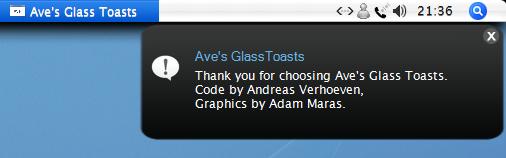
I have made a screenshot with a " custom " skin.
Nice app !!!
Well, I don't know if here is the right to place to post it ... but let's try ...
Anybody know this alternative balloons for Xp and Vista ?
http://mpj.tomaatnet.nl/vista/glasstoasts.html
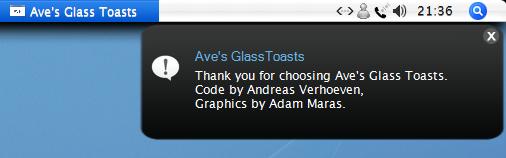
I have made a screenshot with a " custom " skin.
Nice app !!!
Very Simple.... I like it .... and Ave's Apps Section would probably be more appropriate(ave being the creator of glasstoast)
Nice is there a repository of skins someplace?
Nice looking skin you made. 
^^ Agreed? Care to share? 
PS. Here's the original thread which was a pia to find.
@prcmelo-rj
Seems to me from your screenshot your taskbar is on top. Mine displays nothing and according to the link SirSmiley posted it does not work on top so my question is how did you do it?
it works with the beta 1 skin
^^ Agreed? Care to share?PS. Here's the original thread which was a pia to find.
ok, here is the skin, you can rename your beta 1 folder to something diferent and use this mine.
this skin will be placed at the top of the screen ... if you want to chage the size and position you need to play with these values at look.ini
but i have to say that sometimes it seems that the position and size will not work with all notifications
; global settings
[global]
minwidth=400
minheight=130
maxwidth=400
maxheight=130 ; we pinpoint the height to 100 by setting max/minheight to 100
extrawidth=90 ; make space for the icon and shadow
extraheight=40 ; make space for the shadow
xcorrection=0 ;for correcting stretching. for every xcorrection pixels,
; we offset all values by 1 pixel
ycorrection=0 ; analogous to xcorrection
[stem]
use=1
xpos=240
ypos=-16
use my skin, ghostwalker, you need to change some values in look.ini, but i think this mine is ok for top taskbar, but as i said to sirsmiley, sometimes it dosen't works well with some notifications ... when i remove a pendrive, for example, it changes the size and position of the notification, here it's bigger than the original values.
Thanks for sharing but it still does not display when I click Popup a ballon but maybe it will work when I get a notification I will see if not I will play with the values you gave maybe resolution has something to do with it.
Thanks for sharing but it still does not display when I click Popup a ballon but maybe it will work when I get a notification I will see if not I will play with the values you gave maybe resolution has something to do with it.
humm... here i use 1280 x 1024 ... try to change x and y position
I'm using 1152 x 864 I moved it to the bottom to experiment. I have been able to change font, height, width, move the close button, icon but adjusting the stem x and y does not do anything.
I'm using 1152 x 864 I moved it to the bottom to experiment. I have been able to change font, height, width, move the close button, icon but adjusting the stem x and y does not do anything.
i remember that firs time i used it i had to put a negative number in Y Position ... try to a positive number ... i don't know how this works because now my settings are these in the look.ini of the skin
[stem]
use=1
xpos=240
ypos=-16
well, try to change to some positive number like
[stem]
use=1
xpos=240
ypos=16
or mix between positive and negative ... as a said, i don't understand how this thing works ...
all that i know is that could be great to havese something like a " control panel " to edit the values, hehehe !!!
Has anyone else been able to get this to work on top?