 Aqua-Soft Forums
Styler's behavior >:=\
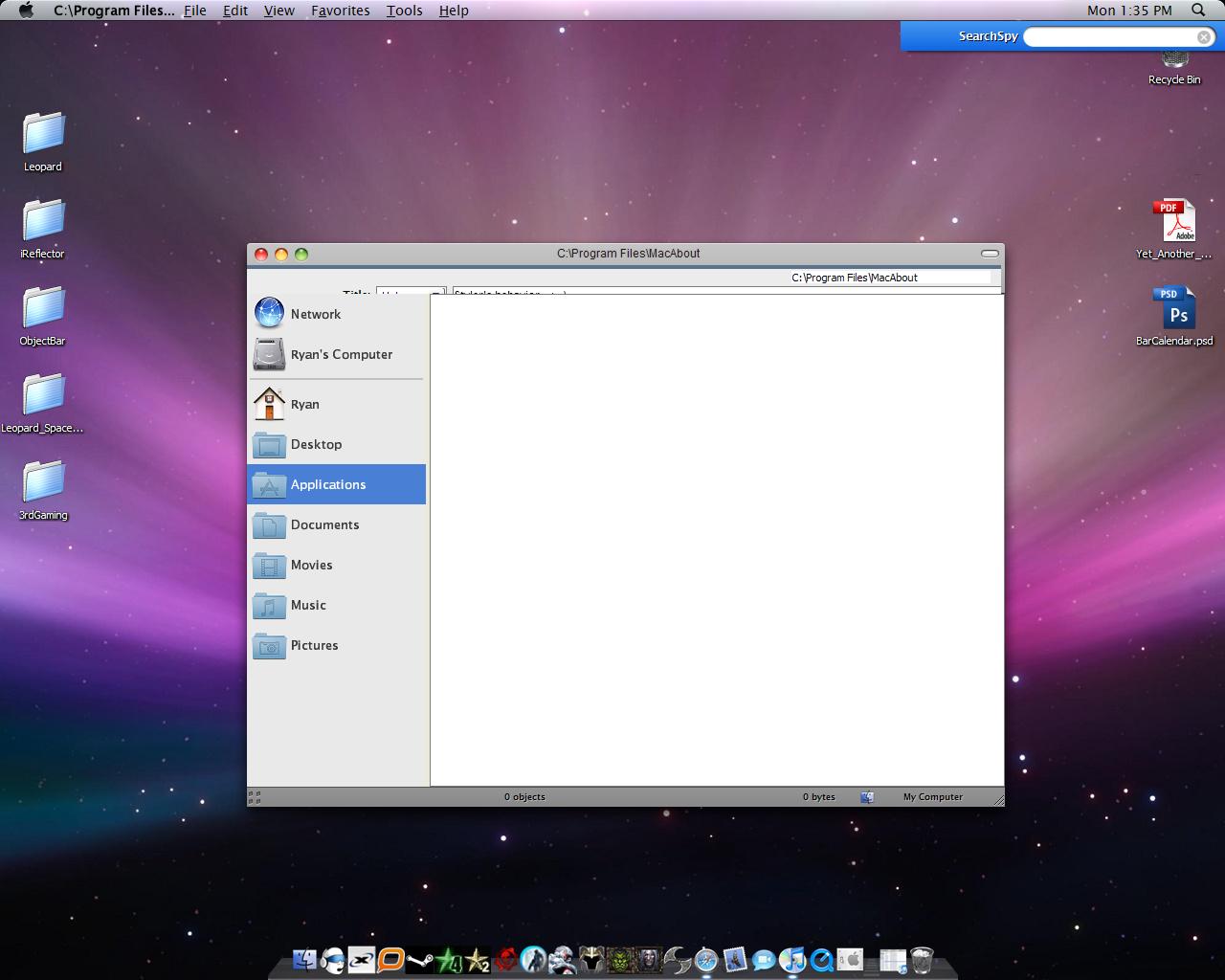
I'm going out on a limb here but, I'd say no! 
^^ i agree. it should not behave like that, unless you have other toolbar apps (or settings) in conflict with Styler. QT addressbar or QT tabbar maybe, or default windows bars open???
no thats all turned of and I dont use any of those programs, Ive tried reinstalling the tool bar a few times now 
There has to be a conflict of some sort...
Did this occur suddenly or after the installation of a certain application ?
no not that I know of, Im attaching my log from HiJack This
hmm...development for styler stopped a long time back (mid 2006). last version is 1.401. the thing with these programs is that there will always be resource or system issues with newer apps and individual pc setups. So in troubleshooting, you have to consider your OS (and version), applications you have running etc. your installer might be corrupted, so try downloading from other sites the latest version. also try using other skins.
you'll just have to be patient, somebody might come along with the answer, or, try other apps such as QT tab bar, where development and support is still very active.
What OS XP or Vista? SP3?
Xp
How about a few more detailed specs ?
What applications are you running ?
What version of Styler do you have and have you tried to apply another theme?
The more information you provide, the easier it will be for us to determine the cause.
ooops i didnt attach my HiJackThis log
you should find most of what you need here, i have the latest stable release of styler
You've not said if your getting the same result using a different theme/style.
Also what styler theme are you using, if you can post a link to it, I/we can load it to see if we get the same result, it might be corrupted in some way.
When you open Styler, have you ticked either of the hide menubar options? On the info pane have you ticked the styler TB mode?
Last but not least have you tried running Styler without Objectbar?
Another question to go with mps69's is are you using a different styler toolbar than what came with the theme? It may be as simple as editing the toolbar config file.
OK ive tried multiple skins with no avail im using styler 1.401, im going to go see if an older version of styler will fix it :S Its just behaving as if it doesnt want to render the toolbar if its on the screen
^^ a lot of sensible recommendations above, do follow all of them.
also from your hijackthis log, many processes running (woot!). you can try this. first disable/disconnect internet connection. then kill all extra processes via task manager, including security apps. just retain the basics. then open Styler...
btw you have PunkBuster on your windows/system32. shouldn't you be concerned? did you allow that?
I just got done playing call of duty 4  im running version 1.4 lets keep our fingers crossed so far so good
I have the same problem as you. As soon as I start a fullscreen game, it make that invisible toolbar. Pretty annoying.
win xp pro (updated)