
Desktop

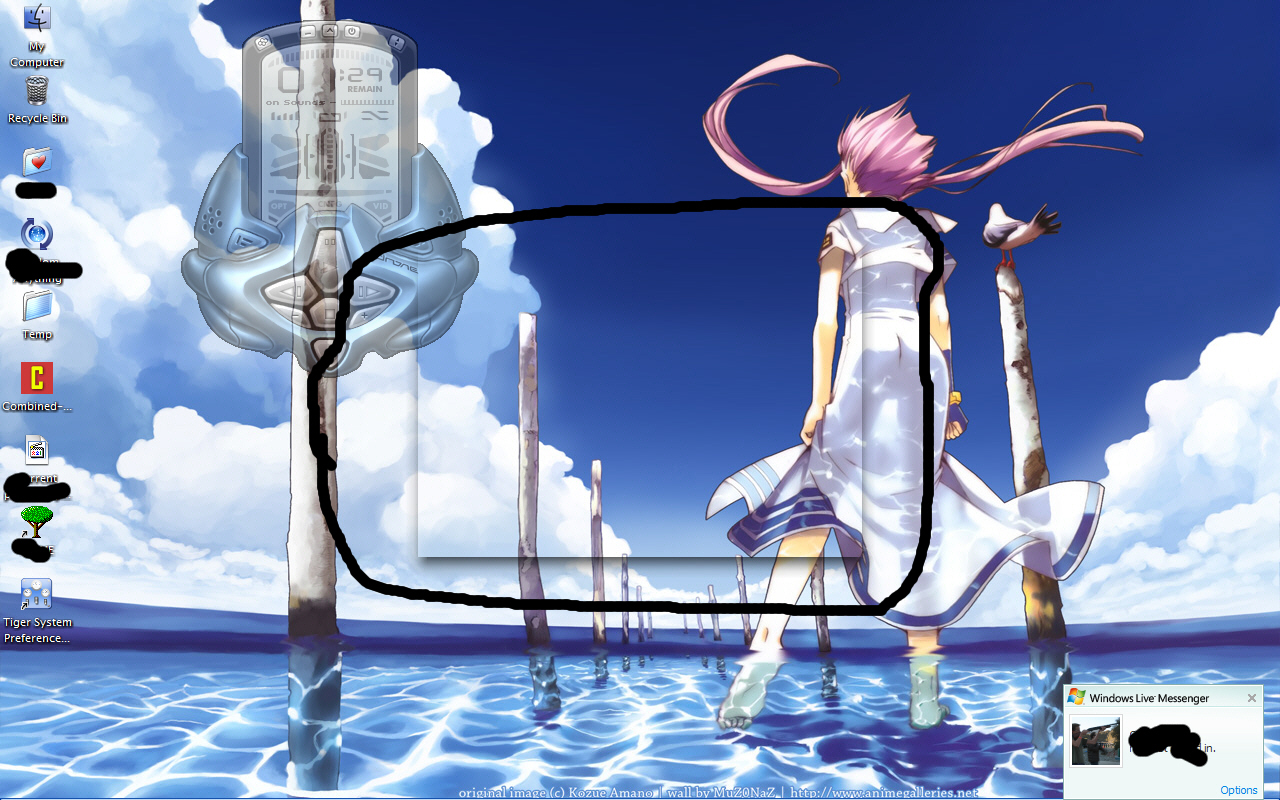
I've been using fak for awhile and I've been trying to find a way to get rid of this, but I just can't figure out how.

There's this transparent box or something which is raised off the background and shows a small shadow. Is there any way to get rid of it? (circled in black)

post-75813-1202453502_thumb.jpg

box.jpg
box.jpg

#490790

it is probably Y'z Shadow, a third party app bundled with FAK setup. check your systray and disable it. you can also disable it from opening during window startup. if you still want the shadow effect, you can try Styler toolbar (free) or buy Stardock WindowFX...

#490800

I take it that your msn used to be where that box is, and now msn is minimized to the system tray. If thats the case all you have to do is open y'z shadow and make it not add shadows under msn. Just add it to the exclusion list.

#490811

it is probably Y'z Shadow, a third party app bundled with FAK setup. check your systray and disable it. you can also disable it from opening during window startup. if you still want the shadow effect, you can try Styler toolbar (free) or buy Stardock WindowFX...

Thanks. problem solved.

#490910