FADING Desktop Wallpapers!!!

Hi guys I have spent so much time making my windows look like a mac and this forum was my guru. Now it's time for me to give something back; the final touch. This may seem like a long process but it's very simple, only needed to be done once and the outcome is fantastic!

If someone else already figured this out forgive me, without further ado, HOW TO GET FADING WALLPAPERS ON YOUR WINDOWS XP OR VISTA DESKTOP LIKE MAC WHILE MAINTAINING ALL FUNCTIONAL DESKTOP ICONS, MENUS ETC....=]

*EDIT* This guide promises no glitches/hitches with your per-pixel borders, desktop icons, desktop menus, start menus, window layering, window dragging, Avedesk/Yahoo widgets, WindowFX or Docks ^^

1. Download 'Vital desktop': Google it

2. Download 'Photo Slideshow Screensaver TRIAL VERSION': Google it (around 1.62 mb)

3. Install both

4. Go to Program files > VitalDesktop > VDConfig.exe

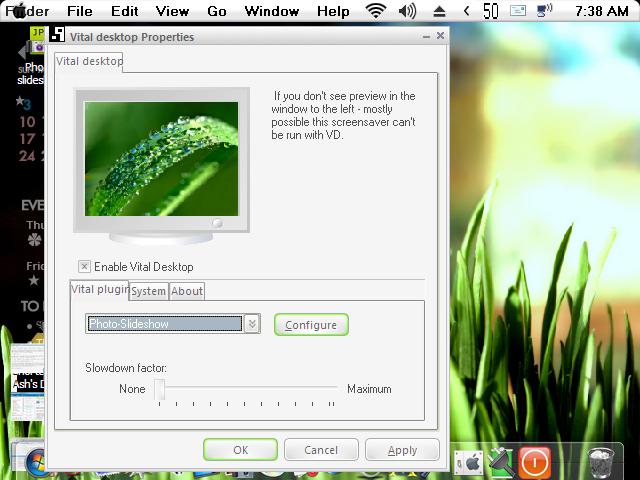
5. Choose 'Photo-Slideshow' from the list of screensavers

6. Now press 'Configure'

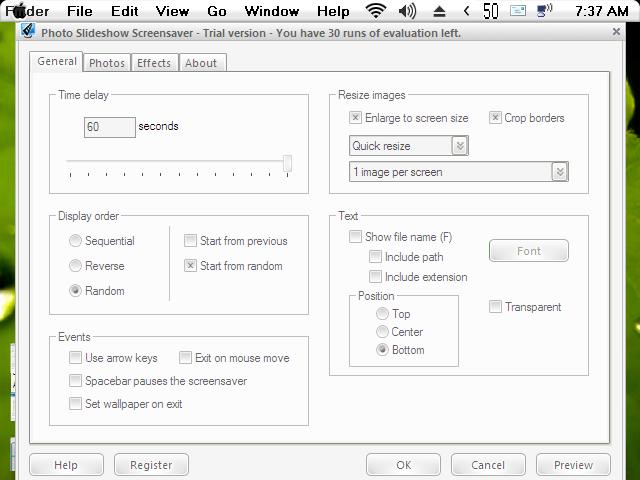
8. It will bring up the config for the screensaver

7. Now we set a few options for the screensaver to make it look like MAC's one (see screenie below)

General Tab:

- under 'Resize Images' : tick "enlarge to screen size" "crop brders" and set number of images on screen to "1 image per screen"

- the rest of the options in this tab I leave you to choose

Photos Tab:

- choose the folder with the pictures you want to display as a wallpaper

Effects Tab:

-Uncheck all except "Fade > Fade in/out" (unless you want other effects)

-Set the "Transiton effect duration" to "1 seconds" (there will be a CPU usage spike everytime it fades so a shorter fade time is better, plus MAC's fade is only a second anyway)

9. Press 'OK'

10. Now you'll be back to the Vital desktop settings, go to the System Tab and tick 'Load at windows startup'

11. Tick 'Enable Vital desktop' and press 'OK' to quit (see screenie below)

12. Enjoy your FADING DESKTOP!!! =D

*NB* Photo slideshow screensaver will be the trial version with 30 limited runs BUT when Vital desktop runs it, it dosent count it as a run so as long as you don't actually use it as windows screensaver Vital desktop can use it unlimited times!!!!!!!

May I suggest DJMattRicks superb sets of HD plant wallpapers named 'Vplants' on deviant art to get you started with that dynamic desktop.

RAM usage: Vital Desktop: 3.8mb, Photo Slideshow Screensaver: 8.5mb (Yeah bit big, but rock stable)

CPU usage: Not Fading: 0% Fading: 44% for 1 sec (2.0ghz core duo)

Cheers everyone! =]

post-67176-1202164458_thumb.jpg

post-15-1202164458_thumb.jpg

Vital desktop.JPG
Vital desktop.JPG
Photo slideshow config.JPG

#490338

not bad but needs some screenshots.

kinda impractical if you get down to it.

#490341

I think http://www.desktopfx.net is way easier.

#490342

I'll try and put screenies of the config when I get my graphics card replaced, can only run in vga mode now 9overclocked and fried it ><. I figured I'd just share what I discovered cos I saw alot of requests asking for a desktop fader =]

#490343

Oo nice progie there Andreas. I guess for those who don't have vista and don't have a powerful graphics card can use this guide. (I noticed you said experiemental XP support and an aero capable card) =]

#490344

not bad but needs some screenshots.

kinda impractical if you get down to it.

Screenies up =]

#490348

I think http://www.desktopfx.net is way easier.

:P lol

#490366

Thanks for the contrib!

#490369

its practical and fun on a mac. but painful on a pc.... its just too slow.

so i dont rly know what to vote in ur poll.

I have leaf backgrounds, all the same picture- just in different colour variations which change every 5 seconds.

#490376

its practical and fun on a mac. but painful on a pc.... its just too slow.

so i dont rly know what to vote in ur poll.

I have leaf backgrounds, all the same picture- just in different colour variations which change every 5 seconds.

Hey Levi, you can adjust all the timings man. A picture change every 5 seconds will eat your CPU alive. Open VDconfig.exe and press configure to configure the screensaver, In the 'general tab' I set "time delay" to 60 seconds so my pic changes every minute. In the 'effects tab' make sure only "Fade> Fade in/out" is selected (not Fade> color)and set the fade time to 1 second. Now you should have a wallpaper that changes every minute by fading to the next one in 1 second.

Maybe there is only 1 picture because when you selected the folder under "photos" tab there was only 1 pic in it, try reselecting the folder or just put "auto refresh" on. =]

PM me if you have any more probs/questions. =]

#490383

Hey Levi, you can adjust all the timings man. A picture change every 5 seconds will eat your CPU alive.

It doesnt on a mac.

It uses the GPU not CPU. Smooth.

#490384

It doesnt on a mac.

It uses the GPU not CPU. Smooth.

I'm not sure on what EXACTLY it uses to fade, the CPU spikes when it fades so I assume it's the CPU.

#490385

Thanks for the contrib!

Welcome ^^

#490387

The GPU versus CPU problem here is within the screensaver itself.

Is there another equivalent screensaver which uses DirectX instead of software rendering?

OpenGL based screensaver could do too, but it would behave badly in some nVidia cards with overlayd windows...

Edit:

Uhmmm... from the page of Photo Slideshow Screensaver:

Photo Slideshow Screensaver uses hardware acceleration when performing effects...that's why it will work fast even on slow computers.

#490389

So you shouldn´t buy Nvidia. Buy ATI...

#490390

This is a directdraw screensaver, thats why it dosen't interfere with the windows I guess. I can run WindowsFX with Per Pixel windoblinds skins and drag them all over while the fading is going on without a hitch. I've tried most screensaver progs, this is by far the best for me at least, that's the main reason I use this setup...more usability...I can't stand artifacts and glitches!

#490391

... simple test, run this on a pc. then try it on a mac.

which one puts more drain on the cpu &/or system resources?

#490393

Hmm there seems to be some confusion here, this was meant to emulate the wallpaper fader built into OS X onto a windows desktop. Obviously the mac fader will run better as it's built in and uses the core animation engine to help it out. This is just an option to those who really want to be one step closer to mac emulation perfection on their windows pc (thus this guide under WINDOWS customization)..I honestly don't see the point in comparing windows vs mac here..

#490394

I seem to remember an app by Sranshaft that did this pretty well except for cpu usage spikes (which seem to prevail with this metod too), so why not use that?

@Ave, I'd like to try DesktopFX, but does the experimental xp support extend to xp x64?

#490399

This is the closest I've seen to the Mac wallpaper changer, Click.

The only downside is it's a bit heavy on resources, but it works like a dream right out the box.

I've tried desktofx, but for some reason it will just not play ball on my PC.

#490407

http://www.desktopfx.net

BEST program i've seen so far, although I use it on a vista OS. (apparently it works on XP as well)

@mps69

did you DL the vs2005 and directx9....(spelling?) lol.

and what OS are you running it on?

#495026

@iranmani113

It would have been the directX version, as I'm running XP home with SP2.

On a side note, I've just installed Picasa and imported all my photographs and wallpapers, this has a nice fade and pan effect screensaver option too, which uses Windows own screensaver properties, so there is no need for extra software. :D

#495065

Don't really like the picasa one cos it changes pics too fast =[

#495084

Your right there is no control over the time factor within Picasa when using Pan and Zoom.

However I found a standalone version here which does allow you to change the time.

I've been given it a quick test run on XP and it's pretty cool, but a few comments on the blog site mentions that it might not be fully compatible with Vista, now there's a shock. :slant:

#495170

yessir.

#495354