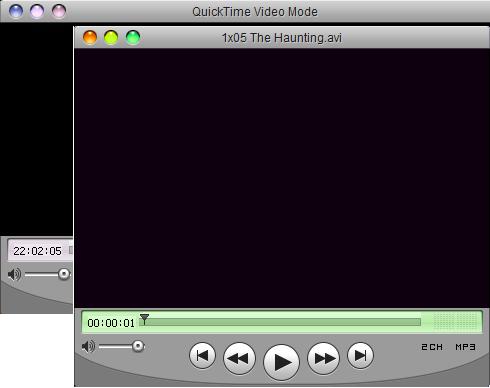
Quicktime 7 skin for KMPlayer

QHifJRYv3Y.png

Quicktime 7 skin

Download here

How to install:

1. Extract the skin to KMPlayer skins folder

2. Copy Lucida Gr font to “Fonts” folder in Windows

3. Enjoy ...

What’s inside:

1. Main skin (for video files)

2. Audio skin (for music files)

3. DVD skin

R9xt31HWT3.jpg

XH0Rg3Nlpt.jpg

KMPlayer:

Download

Comments:

Okay, Some of you would love to have Quicktime open any video file.

Now you can have it. Based on a skin made by Yeshen I have made a skin

that might give you a feel of a real Leopard Quicktime 7 which can play almost any video file.

I added control box and playlist skin from the my QuickLook skin.

Alternative versions:

1. Graphite version

UpfWxt4Drv.png

Download here

History:

050108 - Changed top panel. plus minor fixes.

090108 - DVD error and controls fixed.

100108 - Traffic lights changed. Graphite version added.

140208 - Quicktime style DVD skin added.

080308 - Small fixes.

120308 - Quicktime audio skin added. Some other improvements.

#486243

DVD Error fixed. Now you can have skip chapter buttons in DVD mode.

#487013

nice skin but there isnt a title showing up in the titlebar (just an x)

and the minimize/maximize buttons arent shown correct

#487019

Now it is okay. I had just uploaded the old file.

#487021

Thank you!!!

#487022

Quick time doesnt work for me, it still changes color of skin. Look at the picture

post-44719-1199912725_thumb.jpg

Bez názvu.JPG
Bez názvu.JPG

#487039

RIght-click > Skins > Color Themes > Do not use

#487040

thx, now it works

#487046

Great skins mate, keep them coming!

#487067

Thanks.

Traffic lights have been changed a bit. Plus graphite version has been added.

#487135

When I try to install the included font, Windows tells me the font is damaged.

#487173

Desides

Ok. the problem was that Lucida Gr.pfm font as any PFM font copies its shortcut and without that shortcut it won't be install on your system. I haven't figure out why that happens, but I have updated the rar archive.

Now you can copy 2 files with pfm extension. to your fonts folder. It will show you the error notice. Just ignore it.

I will try to add the more clear instructions a bit later.

#487177

That fixed it. The font copies over just fine now. Thank you for the update and the themes!

#487187

I've never used KMPlayer before. I like it. Your skin is great, too. Nice work!

#487196

Hi alabanco, are you going to make DVD skin to look like quick time player?

#491263

yes. I'm going to.

Updated:

Quicktime style DVD skin added.

080308 - Updated:

Small fixes.

#491433

Very nice work :D

There are a few things that need to be tweaked though:

Smoother Font for the time bar thing.

The distances between the 3 glyphs are not congruent.

Smoother bottom corners.

Besides that, nice work :)

#494465

BapeStar

New update! Audio skin added. Some more improvements and changes.

#494508

Welcome :)

#494517

Nice work, very nice.

Drop Shadow is the only thing that needs to be added and its a 100% in my book

#494528

Beautiful made. Many thanks

#495018