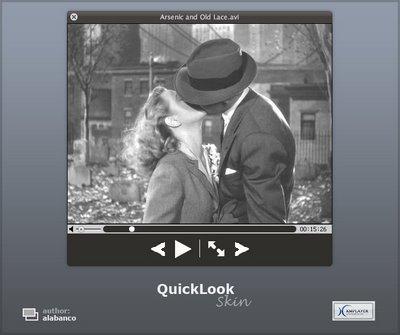
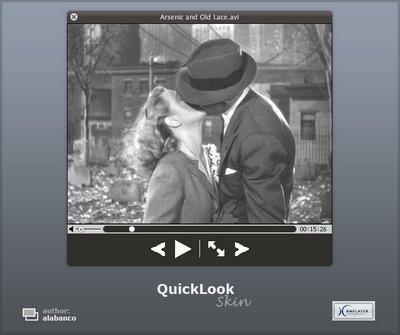
Leopard QuickLook skin for KMPlayer

SDW38vPC5q.jpg

Leopard QuickLook skin

Download here

How to install:

1. Extract the skin to KMPlayer skins folder

2. Copy Lucida G font to “Fonts” folder in Windows

3. Enjoy ...

Versions:

I made two versions for you to choose:

1. VeEvy5I2B1.png

prev and next buttons (lines) - default one

2. RQYY12iqxw.png

prev and next buttons (black ones, so you will see them only when you move mouse over them)

2+ q4RGBSUX0h.png

and one extra version for those, who want playlist and control box buttons. they are hidden and will be visible only when you hover them.

What’s inside:

1. Main skin (for video files)

2. Audio skin (for music files)

3. DVD skin

3vmOiKF4cx.jpg

KMPlayer:

Download

Comments:

I also changed the default KMPlayer control box and playlist. In the future I will make them even close to QuickLook overall theme. As far as shadows and transparency are concerned, I will try to add them later.

It is some kind of a beta skin.

History:

090108 - DVD skin error fixed

100208 - Quicklook style DVD skin added.

160208 - DVD skin optimized. 2 versions added

180208 - Prev and Next buttons added to Video mode. Plus one extra skin with playlist and control box buttons added.

190208 - Control box and playlist buttons problem fixed

120308 - Some improvements. Volume slide. Quicklook style playlist.

#486195

Great skin alabanco,can't wait for the shadow one,thank

#486196

hi alabanco! great!

#486220

Great skin m8 thx for this :)

#486249

Great skin man!

Thanks for sharing!

#486256

Great skin! Will there be a version for VLC?

#486258

matonga

I have not tried to make any skin for VLC :(

But you know what it looks like KMPlayer does its job very good. So I switched to it. It has much more options than VLC. :)

I can try to make QuickLook skin for VLC but I will need time.

#486260

WOW I hadn't read this:

http://www.kmplayer.com/forums/showthread.php?t=63

It is the best feature list I've seen ever. I'll definitely give KMPlayer a try. Thanks alabanco!

Edit:

Ok, I installed it. The only think I don't like of it is has too many options, and opens Winamp all time.

BTW your skin is great, I'm already using it at the moment of writing this Re.

#486273

Great work. Thanx for sharing:)

#486333

Nice player and a very nice skin, needs transparency and shadows but other than that it is excellent.

#486795

Nice player and a very nice skin, needs transparency and shadows but other than that it is excellent.

Yes,don't look good without transparency.

Only my opinion :)

#486804

This looks really great. Thank you. Any chance that future versions can have smoother corners however? Mine look a bit jagged and well, unfinished. Thanks much!

#486995

vitasg

To make corners smoother I need shadows. However it looks like KMPlayer doesn't support shadows and semi-transparency yet. I have already asked KMPlayer developers about that.

#487001

I have started using KMplayer and I like this skin. One question: Can you make this skin for DVD player? When I want to play DVDvideo, KMplayer change skin to default and make some errors. The same with TVtuner

#487002

I will check for errors. As far DVD Quicklook skin is concerned, I will add it later.

#487004

And dont you want to add buttons for skip chapters? In movie playback to play next video in playlist and in DVD to skip chapter. I know, that doesnt look exactly like quick look, but it will be so helpful. Something like this

post-44719-1199899115_thumb.jpg

7w7b4SeRbd.jpg
7w7b4SeRbd.jpg

#487006

jakub.karasek

DVD error fixed. Now the controls look exact like in Audio skin.

You will have skip chapter buttons there too.

I will try to make DVD skin to be closer to the Quicklook later.

#487010

Oh I like it!

VLC has gone - KMPlayer has come

#487020

Awesome skin alabanco.

#487068

For those who had problems installing the Lucida G.pfm

the problem was that Lucida G.pfm font as any PFM font copies its shortcut and without that shortcut it won't be install on your system. I haven't figure out why that happens, but I have updated the rar archive.

Now you can copy 2 files with pfm extension. to your fonts folder. It will show you the error notice. Just ignore it.

#487119

Okay. I have updated the skin and added 2 versions of DVD skin for you to choose.

#491715

Great release :) Thanks for share :)

#491730

If you like the prev and next buttons I can add them to the main skin for movie files

#491732

If you like the prev and next buttons I can add them to the main skin for movie files

That would be cool ;)

This is one of the best skins I've ever seen and maybe the main reason why i switched do KMP. Hidden (or very small) buttons for Playlist and ControlBox/Options would be nice too :)

#491749

Very impressive, good work.

#491761