
Not Getting This Look

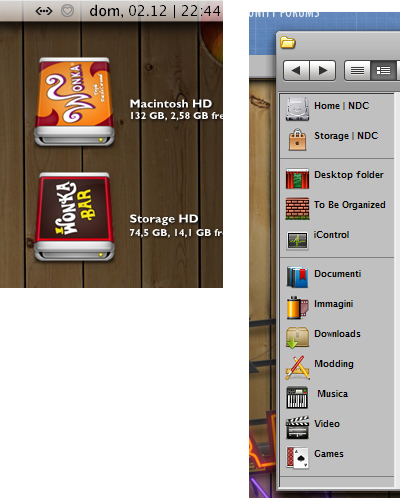
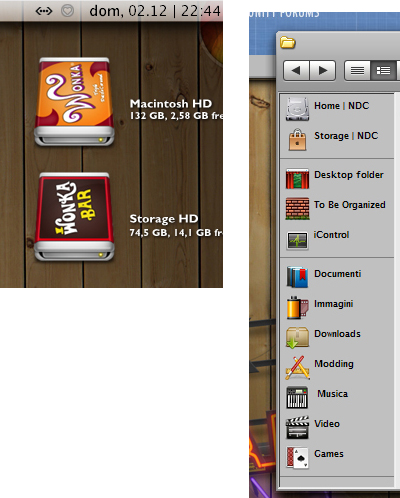
Hi, Semi new to this, but I was wondering how to get the files on the desktop to look like the image shown below (and showing the drive/file info), (oh and I realize how to get the actual "wonka icon")? Also, I have installed most of the programs, but I can't seem to get my folders to look mac'ish (like the image added), was wonderin what program is suppose to do this?

The picture is just a cropped image of a desktop I found in these forums, just to point out what I am talking about.

On side note, I'm not sure if this forum is dedicated to making PC's look like Mac's, customizing mac's, or running the mac OS on a PC. So if I'm posting in the wrong place, I'm sorry. Just let me know.
post-73370-1198008946_thumb.jpg

macicons.jpg
macicons.jpg

#483708

This is the right forum to make your PC look like a mac.

1. The icons on the desktop are Avedesk, I suppose, as I do not use it.

2. The explorer has an extension called Findexer:

http://www.aqua-soft.org/board/showthread....hlight=findexer

Here is a tutorial how to use it:

http://www.markraats.com/FinderXer_Tutorial.htm

Have fun,

Björn

#483710

Awesome! Thanks Bjorn!

Figured I was missing a basic application. One more questions to whoever is willing to help.

What is the recommended size for desklet icons (the HD ones, ect.), and also how do i get the drive information beside it (gigs used, left, etc.?) I tried using the label tab in desklet properties, and %0 to %9 didn't work, once i got to 10 and above it just showed 0 as they are referring to music info.

Thanks again

#483752

What is the recommended size for desklet icons

Guess that really depends on your monitor.

I usually use 72px or 96 px.

As for the labels %2 should give you the hard drive size & %3 the remaining size. That is of course on XP. I've read there's been some issues on Vista

#483759

Assuming you are using XP as per Sir Smiley...

Make sure your desklet/pidlshortcut path (desklet properties - 'shortcut' tab) points directly to your drive and not ANOTHER SHORTCUT to your hd. you'll notice that under the 'Label format' tab, the options/choices are for hard disk (%t, %f etc etc) and not for files/folders (e.g. %0, %1, %2 etc etc). see attached...

hope this helps.

#483773

ah, that was the problem! it was directed at a shell (whatever that means). But thanks, that definitely helped!

I feel bad continuing to ask questions, but wheres a good place to get themes for StyleXP? Or is windowsblinds recommended more?

Thanks Again, my desktop looks awesome thanks to you guys.

#483774

stylexp themes = themexp.org

#483775

seems to me that the themes there aren't that great? maybe I'm looking in the wrong area. I'm looking for the themes like Leopard, tiger, Panther....etc, the ones on that site seem to be more random.

Once again, I'm new to this so what I'm saying could be jibberish.

#483779

you can try browsing our downloads section for that. http://www.osx-e.com/downloads/themes/

All themes on our site are mac os x panther / tiger / leopard looks like.

#483785

I also recommend http://www.deviantart.com/

A lot of great themes there.

If you've never been there before be sure to check out the 'Categories" button :)

#483786

Awesome, thanks for the links, found some interesting stuff.

Are there any programs similar to coversutra for Windows? And is it possible to use the stack boxes by susumu with objectdock? Like when you click on it and the files pop out the top and then retract back in?

Thanks again!

#483873

Awesome, thanks for the links, found some interesting stuff.

Are there any programs similar to coversutra for Windows? And is it possible to use the stack boxes by susumu with objectdock? Like when you click on it and the files pop out the top and then retract back in?

Thanks again!

http://www.osx-e.com/downloads/skins/coversutra.html

http://www.osx-e.com/downloads/misc/cd_art_display.html

#483921

For stacks, Matonga has made a docklet that is compatible with all docks (not Y'z, though) as well as Avedesk...It is a very recent thing so you can simply search for Stacks on this forum and find it.

#483939

I was sure the wonka icons were at DA, but i couldn't find'em!

Nevermind, I got them so here they're (they are .ico's, but you can use converticon.com to convert them into png's):

Wonka.zip

Attachment: Wonka.zip

#483944