 Aqua-Soft Forums
maybe this issue settled now:)
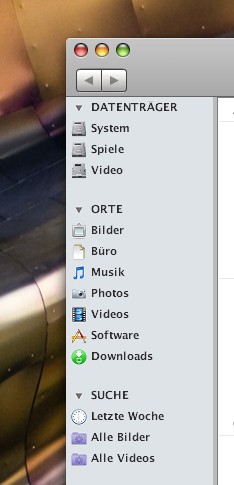
Looking for the real "Leopard" Finder left panel
This is Findexer. Try search. However this is not 100 percesnt real Leopard Finder left panel because you can't make drop down menues Shared, Devices etc.. Raats made an emulation of these drop down things but this is just emulation. Again, use search.
(Hint from me - to make the groups of icons separated like that use separators of the same color as the background is and make those separators big. Pretty simple and genious.
But what we are "really" looking for is for "truly" real leopard finder left panel with
- active drop down headings,
- coverflow thing (made by matonga) included in that finder
- and of course the column view!
Yes Randy, I agree with alabanco, that looks like FindeXer - That's definitely not the way standard Leopard looks.
The tutorial I made is strictly for an emulation sidebar and the drop-down arrows don't work to collapse the menu's as alabanco mentioned.
If you want to read the tutorial on how to set up your sidebar, go here: http://www.markraats.com/FinderXer_Tutorial.htm
If you want to compare standard Leopard with a XP emulation, go here: http://www.markraats.com/OS%20X%20vs%20XP.htm

just thx...i think im extremely foolish 