Aqua-Soft Forums
hi all, I have tried iReflector about hour but i really didnt found a way, how to reflect icon, which I have created. Can anybody reflect it to me?


hi all, I have tried iReflector about hour but i really didnt found a way, how to reflect icon, which I have created. Can anybody reflect it to me?
Here you go this is the one ond only one i will do because it is very simple to do yourself, so here you go.

If you need anymore just ask me I dont mind.
Here you go this is the one ond only one i will do because it is very simple to do yourself, so here you go.
Thx a lot. I know, its simple, I have reflected many icons but i dont know why I had many problems with this icon. Did you do it in iReflector?
For iReflector the icons have to be square size.
No i still use good old photoshop, it has he ability to make an icon look a lot better if you know how to use it.
can anyone please reflect this icon?
I don't have Photoshop and it doesn't work in iReflector...
thanks.


Thanks very much!
but now i have a problem with my calendar docklet:
does anyone know how to fix that?


Which dock are you using? This happened to me with old versions of Rocket Dock.
Quick fix: Just resize the image to make it square size.
Quicker fix: use Ghostwalker's image which he kindly posted above, it's already square sized 
Thanks..now it looks like this:
any ideas to get the date in the middle?
Oh, and i'm using RKLauncher.


which docklet are you using? there are several iCal docklets it would help me if I knew which one you are using.
I'm using the standard calendar docklet, which is included in RK Launcher..
There was no calander docklet in the original dock you are using one of the RKLauncher installers. You need to remove the docklet then go to add docklet click on it and see who the author is and if it is a YzDocklet or Objectdock docklet.
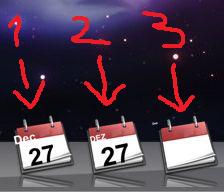
It's an ObjectDock Docklet, but there is no Autor name..(1)
I have 2 other calendar docklets, but theres the same problem with the date..
the first is iCal 1.0 by Paul Andrews (2) and the second is Calendar Docklet 3.4 by Andreas Verhoeven(3).As you can see, the third displays no date.
they're all ObjectDock Docklets.

I have been up all night need to sleep if we cant get your docklet working I will send you one that will. Ok I have been working on a YzDocklet that looks identical to leopard but it uses 365 images so I am not done. While we were talking I was working on Ave docklet but I cant seem to get it to display the month name in all caps but I do have it working. Gonna sleep now and will post a link to the skin for Aves tomorrow I will find the other by paul and see what I can do with it.
Okay, thank you very much and good night
On the 3rd did you use the iCal image 512pix ?,I think iCal calendar can use 128 px only,or maybe you have to edit the "skin.ini "file to work with the image other than 128px
hmm..doesn't work.but thank you anyway 
Now that Hussaini mentions it, and as far as I can recall there is an iCal docklet with a skin.ini o alike where you can adjust text position, font, size and rotation.
Check if any of your iCal docklets has such stuff, and adjust them to fit your icon.
If none of them has this feature, tell me and I'll search that docklet, I think I saw it in this forum or in DockEx, don't remember exactly.
First of all,it's always works on me,I've just done it with this 512px images and works,what do you mean doesn't work,the key is only in this "skin.ini" file
Yeah, there is a skin.ini file, but i have no idea what i have to edit, sorry:D
here is the one i have: i tried to edit it at [icon]width and heigth, but nothing happened...
...
[iCON]
Width=512
Height=512
DayXOffset=9
DayYOffset=16
MonthXOffset=0
MonthYOffset=0
[sINGLE_IMG]
UseDraw=1
BaseImg=cal.png
OverlayImg=overlay.png
DayFormat=dd
MonthFormat=MMM
dayX=64
dayY=90
dayHAlign=1
dayVAlign=1
dayRotation=350
dayFontSize=42
dayFontStyle=1
dayFontColor=0
dayFontName=Arial
monthX=7
monthY=49
monthHAlign=0
monthVAlign=0
monthRotation=348
monthFontSize=21
monthFontStyle=1
monthFontColor=16777215
monthFontName=Arial
...
I will be releasing several different docklet skins later today with the 512 images reflected and standard that way everyone can have one whether it is object dock, Yz , Rk or Rocketdock.