 Aqua-Soft Forums
I need help with mac emulation
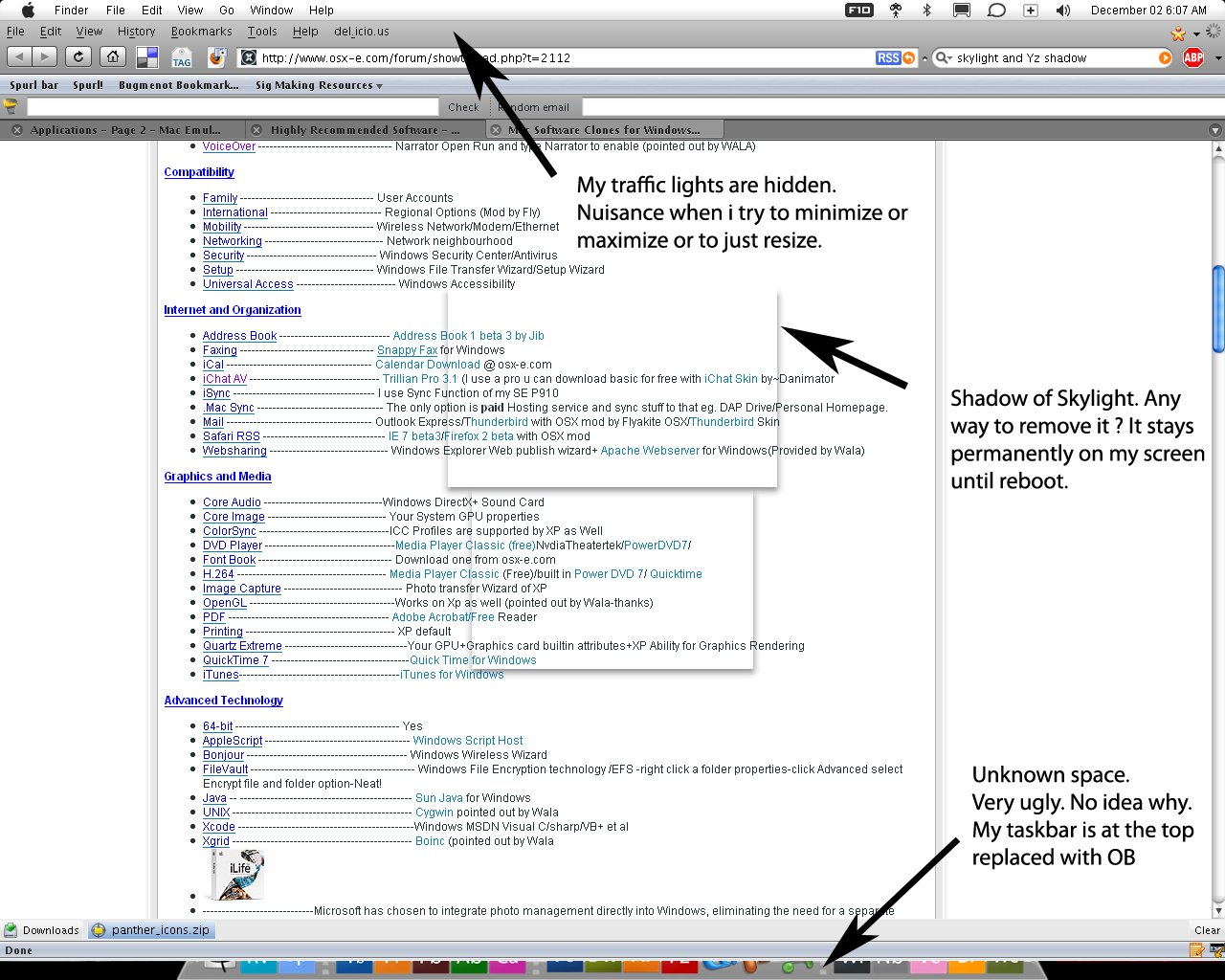
That shadow space is caused by Y'Z Shadow. You'll have to disable it, I believe. I think Styler is the popular choice nowadays.
-NC
i had a similar problem with Object Dock when I emulated. Turning off "Reserve Screen Space" (i think that's what it was called) fixed the problem for me.
the hidden trafic lights where always a problem for me when using window blinds... no idea why it happens
they arent hidden, they are behind the OB bar
yes i know but this used to happen to me even tho i didn't use ob
your setup assumes that your taskbar is still at the bottom, that's why the empty space at the bottom and the covered traffic lights above. check your settings again for conflicts....
.try closing the topbar and dragging your taskbar bak to the bottom, then maximize windows etc etc....(sometimes happen to me after a lot of desktop tweaking, with traffic lights/titlebar partly covered by objectbar when i maximixe windows ...)
the shadows are probably caused by y'z shadow, as per above comments...
yes it is caused by Yz shadow. I'll try to use styler...
The traffic lights still continue to be like that
the problem you have with OB, I have the same problem, but with windowblinds
I don't use OB, but windowblinds does it for me, which I can't fix either...
I'll try to move it down and up again to see what happens.
I'll post anything that works that might also help you even though you use OB.
PS: I typed this on my new iPod Touch. It's VERY sweet. I recomend one.
cool iPod touch is Wifi right? heh. Oh btw.... i found out that by using win key + d to show desktop and minimize all then alt tab to open firefox again it fixed it. But manually maximizing it hides it again
{{EDIT}}
When i install styler it says it cant find unrar.dll =/
what dock software are you using?
I'm done now with the unrar.dll just downloaded it from dll files. Im using 7zip so i dont have unrar.dll
Umm i'm using rocket dock
I found a solution. I don't know if it will work for you, but you can try.
I uninstalled WindowBlinds. I put the Luna theme on. I put my taskbar at the bottom. Restarted.
Then I logged on, and moved it to the top. I then installed WindowBlinds and applied my Leopard theme. Fixed.
You can try it with OB, but like I said, I don't know if it will work. 2 totally different applications.
Good Luck!
EDIT: I remember something about my OB experiences.
Some OS X themes I got wouldn't move the taskbar up, but hide it and apply a skin up there. Put the default Luna (XP Blue) skin back, and make sure its on top, not on the bottom. Then re-apply your skin.
Again, Good Luck!
hmm i unloaded my WB and sure enough the taskbar was at the bottom
i moved it up and offed my OB. Then start WB then OB. Now the winkey + D then alt tab dont work anymore. I'll try to restart my computer
{{EDIT}}
Can anyone help me with this ?