Kk Menu: Leopard Stacks-Grid

Windows emulation of the grid shaped verison of the Stack menus in Leopard.

You need Kk Menu installed to use this skin.

Download Kk Menu here: http://www.aqua-soft.org/board/showt...t=33710#373641

And then you just copy this skin into the DockletsKkMenuSKINS folder

Download: http://skyjohn.deviantart.com/art/Kk-Menu-...s-Grid-68580220
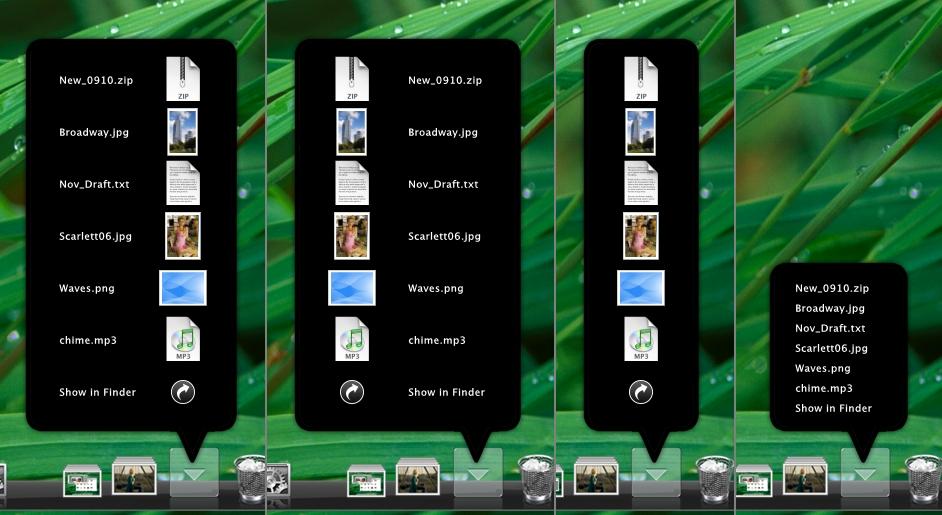
post-71050-1193740151_thumb.jpg

grid screenshot.jpg
grid screenshot.jpg

#478516

could you please be more specific at install skin guidelines ? I have already some files in skins folder. and when I just add your files nothing happens. If I delete my files and paste yours - an errors occurs. If I add another kk menu stacks to the RKLauncher it tells me that this class has already been added to the dock and shows me nothing. So what exactly do I have to do to have this look.

#478517

I haven't tested it in RKLauncher myself but it should work fine.

I think I know where your going wrong though.

You can't just paste over the skin that comes with RKLauncher and hope for the best.

Once you've put it in the DockletsKkMenuSKINS folder you'll need to select the skin from the kk menu docklet settings (the skin setting are under under "general kk menu setup" area).

#478518

thanks for this guide. although I still don't get it. it seems like I need to create another kk menu docklet. If someone happens to know the precedure please share this knowledge. Even if it is an already-known fact, but it will prevent dozens of posts starting how can I do that or how can I change it etc.

#478519

Just tested it on RKLauncher and it works fine.

1, Copy the skin files into the SKINS folder.

2, Right click the KK menu/Stacks icon to open the settings menu.

3, Click "General Kk Menu Setup"

4, Select the skin you want from the menu, and click OK.

#478521

Wow SkyJohn this is awesome,just another suggestion,could you make the black background a little bit transparent,it will be nice,thank's a lot

#478524

I don't think there's any way to make the background transparent without making the text and icons transparent at the same time.

I can make you a transparent version if you want but it'd look a bit of a mess.

#478550

Nice work, looks better than the real thing :(

#478551

I don't think there's any way to make the background transparent without making the text and icons transparent at the same time.

I can make you a transparent version if you want but it'd look a bit of a mess.

I know ! It is very simple. just open grid background.png in photoshop and change the fill of layer or any part of it in layer's panels and that's it. I have already tweaked that for myself. works and looks just fine it took me about 10 seconds. about 6 of them I spent on opening photoshop and saving file.

#478552

Why didn't I think of that.

/slaps head.

I'll try that and some more ideas of got for the skin when i get home, not got photoshop here at work :(

Timan, how is it better than the real thing? And why is that bad?

I haven't used Leopard myself yet.

{{EDIT}}

Transparent background for whoever wants it.

Just overwrite the other background file with this file.

post-71050-1193830836_thumb.png

grid background.png
grid background.png

#478664

I'm really diggin' this one, great work!

Would you be interested in creating a small tutorial on what the different values in the skin means, so that people can tweak it to their own tastes? Considering the amount of time you've invested in crafting these wonderful skins I would assume that you would be the perfect candidate for it.

I tried messing around with the different values a bit, but it's not exactly the most intuitive of skin formats out there.

#478686