Findexer eject tweak

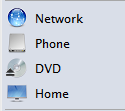
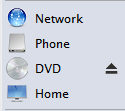
In the Findexer nightly build v1.1.0.4 a new feature was added - eject button. The problem: the eject button is stuck to DVD icon. I want ito move it to the right.

I change it to black one using ResHacker. However I couldn't moму it to the right. Does anyone can help me with it ?

tired of questions and abuses I have deleted the attachment. Farewell my friends. Stay in your wonderland.

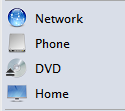
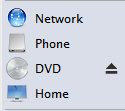
Here are the screems
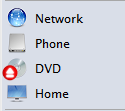
post-56585-1193081701.png

post-50-1193081701.png

eject_default.png
eject_default.png
eject_mod.png
eject_mod.png

#477487

Edit the icons directly, or find/make your own icons, either in .ico or .png formats

#477539

kinsemon

what you mean by edit icons. that eject button is the icon which is placed by this build of findexer over your DVD icon. I guess you didn't get the idea.

The problem is that I don;t know how to move that eject thing to the RIGHT side like in Finder.

#477541

I'm not sure he wanted this version publicly available. At least it's not on the website and I remember him saying he thought it was 'rude' when someone else made it available without his permission.

Just saying... :)

#477542

kinsemon

what you mean by edit icons. that eject button is the icon which is placed by this build of findexer over your DVD icon. I guess you didn't get the idea.

The problem is that I don;t know how to move that eject thing to the RIGHT side like in Finder.

oops, sorry about that... what you can do is make a shortcut to your cd drive (e.g. C:CD Drive.lnk), hide it somewhere, then drag and drop it to the left findexer panel. you can then repalce the icon of that shortcut...either search the web or make your own image, either in .png or .ico formats...extract the cd image from shell32.dll and add the arrows...

#477639

Ok. again misunderstanding. I want this

post-56585-1193208693.png

eject_mod copy.png
eject_mod copy.png

#477642

Ah, i see... well probably what you can do is use the special characters in the particular font you are using. Lucida Grande has some characters that can be substitutes for the image you want...if you can hack the fonts, well...you can insert your arrows.

#477647

kinsemon

that's going to be a ridiculous converstation. I want it to work as eject feature not just text or symbols or whatever. that eject thing which was added to this version of Findexer makes it as an additional level or smth, which is put above the icon. I want it just to move it additional level to the right. that's it!

#477649

i see, well good luck in your search, although i doubt it if you can find a solution for that, unless you make your own app which is similar to findexer.

#477651

this eject thing doesn't work for me. my usb drive doesn't "savely remove" and I can still see it under my computer. If I unplug the drive, close explorer and open it again the icon for my usb drive is gone. when i plug it in again the icon not shows up like on mac. Am I doin something wrong..?! mhh

Are there some other new features - I only recognized this one...

#477652

larzon83

this is not an official release. so I don't think there are any changes.

#477654

larzon83

this is not an official release. so I don't think there are any changes.

so why are you releasing it for everyone to use? do you own the rights now?

maybe there is a reason if it has not been released... :slant:

#477660

okay. the topic is closed. the question is still unanswered and I'm tired of explaining every single one the reason of my post. I'm not releasing. I was asking for help.

#477662

Can't be done the way you want.

Simplest explanation: Since it overlays the icon and the icon is in a set area it is not possible to extend that area to include/overlay your text label. Most likely it would mess up your icons.

Second, don't get pissy posting a hacked version of an unreleased version is still wrong. If we don't respect developer wishes then eventually no one will want to release anything.

#477689