 Aqua-Soft Forums
However, for some reason if you use a custom png instead of an icon then the overlays don't seem to show up.
Yes that bites, also hope they fix it or add it whichever the case may be.
However, for some reason if you use a custom png instead of an icon then the overlays don't seem to show up.
Yes that bites, also hope they fix it or add it whichever the case may be.
Great Application, planing to leave regular docks behind.
Does any one knows how to change Drive Icons? System ones look nasty
Is the Sheet Image like the dashboard effect? Like a dark transparent background behind the circle, or just an icon?
I think I saw somewhere a clone of this app, for windows also. Does anyone know?
I think I saw somewhere a clone of this app, for windows also. Does anyone know?
You might be talking about orbit
http://www.ecocardio.com.br/orbit/
but the last time I used it I believe Magic Formation is much better
The last time I tried Orbit it was packed with the nasty Ad/Spy ware.
Does any one knows how to change Drive Icons? System ones look nasty
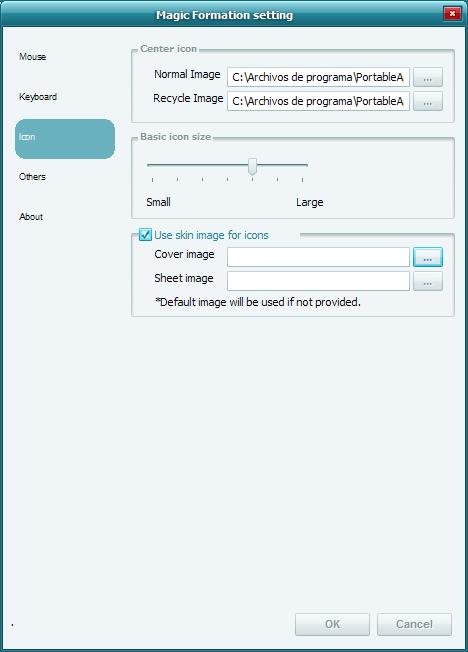
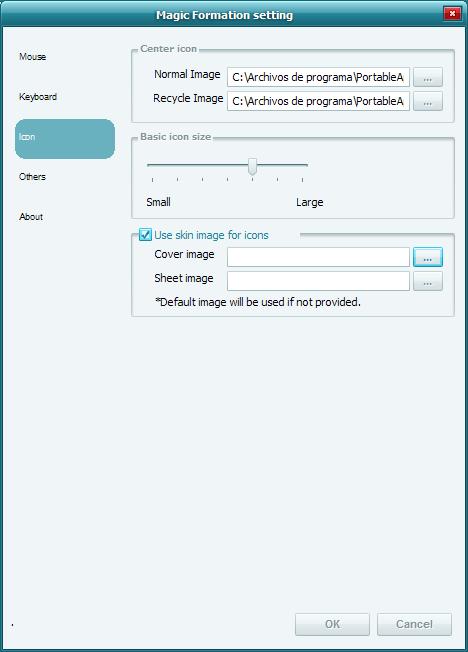
Right click, then select options. Icon setting is the last one in the input box.
The last time I tried Orbit it was packed with the nasty Ad/Spy ware.Right click, then select options. Icon setting is the last one in the input box.
I don't get it, The only option available to replace icons is the "use skin image for icons"
That is cover image and sheet image.
What I want is to replace the icons shown when you switch to the drives page.
The idea is to have new icons for HDD, Cd drive, usb sticks, etc.
not the system's ones
Any Idea SirSmiley?
Oops, should've been clearer on that.
Move the mouse over the shortcut you want to change then right click. You should get a menu with these options: Duplicate, Delete, Open The folder, Options.
Oops, should've been clearer on that.Move the mouse over the shortcut you want to change then right click. You should get a menu with these options: Duplicate, Delete, Open The folder, Options.
Nope
The only thing you have on context menu on drives page is disconnect usb device, which is obviously dim if you are right clicking an internal HDD or Cdrom drive.
Problem is a bit more complicated, it needs a tweak on config file or maybe is not possible at the time.
Can we start new thread with Magic Formation in its title where we can continue discussing configuration and tweaks? I really believe this application deserves it, as it is the lower resourses consumer launcher I' ve tried so far, not to mention that is good looking and responsive.
NopeCan we start new thread with Magic Formation in its title where we can continue discussing configuration and tweaks? I really believe this application deserves it, as it is the lower resourses consumer launcher I' ve tried so far, not to mention that is good looking and responsive.
I agree it's a great launcher, but isn't this thread already titled "Magic Formation" ?
octaedro7, I'm not sure how or where you're seeing those options from?
On my drives page I can still change icons the same way as any other page. See attached image.
To answer your question about starting another thread, I have to say no unless it was some sort of skinning or major hack of some sort.
A couple of good examples of why sticking to one thread works are the Stacks docklet & FindeXer. It's really easy to find/get answers, etc.

octaedro7, I'm not sure how or where you're seeing those options from?On my drives page I can still change icons the same way as any other page. See attached image.
To answer your question about starting another thread, I have to say no unless it was some sort of skinning or major hack of some sort.
A couple of good examples of why sticking to one thread works are the Stacks docklet & FindeXer. It's really easy to find/get answers, etc.
I see the difference. You made a regular page with links to each device.
If you look in options/others, there's a drives page link. In that page you don't have the option to change the icon. In this page you can access to context menu to safely disconnect an usb drive (right there, don´t having to go to the taskbar) and its updated so any new device plugged instantly appears here. Maybe (and I hope so) in the future author plans to give the option of more information, like total/free space available, etc.
firecracker6, can you invite the author to participate here?
(Maybe it sounds fresh (shameless) but I don't want to ask for links to other forums)
[Tip] To those of you complaining about the letters overlay. I discovered that they come out when you activate keyboard shortcuts.
Question: Is the sheet some sort of background? is it individual or it goes behind the hole circle?
BTW: SirSmiley: Which app do you use to capture MF?, tried snagit and mwsnap to no avail.


Ah, I'd forgotten about that.
Select the drive icon you want to change and hold down the shift key.
Drag & drop the new icon/png onto it. For some reason the dropped icons still show up crappy so, I just stick to the png's.
Winsnap is what I use the most for screenshots.
Thank you very much SirSmiley
Is there a way to change pages order graphically, without having to edit the .ini file?
Not to my knowledge.
The closest I've gotten is you can drag individual shortcuts between pages.
Which I posted on the first page. It only works from the Ring Formation.
can i get a working link of the program please?
i would really like to give this one a go
thanks in advance
Link worked fine for me in FF3 & IE7.
Try this one it goes to their blog post http://tokyodownstairs.blogspot.com/2008/0...-formation.html
on i've seen these programs before. there was another good one that i can't remember the name of right now.