 Aqua-Soft Forums
Why when I use the borderless skin it is showing a mix between the stock VB icons and the Aqua soft one?
Borderless
1. First upload the as3 folder of images to your site. ( ~/forums/images/ folder goes here. )2. Next Login to the admin panel of your forum. Select Download/Upload which is under Styles.
3. Once there, select the browse button and find the file Aqua-Soft v3 Style.xml.
Note: If you are uploading the Graphite version of the skin make sure you have uploaded the Aqua (Aqua-Soft v3 Style.xml) one first. If you've done that, select Aqua-Soft v3 Style Graphite.xml then down at the bottom select Aqua-Soft v3 - Aqua as the Parent skin.
4. After that go ahead and press the Upload button. And then the style will be installed.
5. To make the skin the default skin, click Modify under Styles and find the Aqua-Soft v3 skin and set it as the Default skin there.
For more support you may post in the Aqua-Soft Skin Discussion, e-mail me at Tim@vastyles.com, or catch me online via msn Unsanity@cox.net, and I will try to help you as much as I can with this skin. Thanks again for donating for this skin its really appreciated.
You have to import the Original Aqua-Soft skin first, then set the Borderless skin as a child to it. Just like the graphite version as stated in the readme.
Will there ever be a borderless version that would use the unified sub-themes as a base.
I experimented a bit (or not sure if it's supposed to be done that way to begin with):
Normally since the borderless style is a subset of the main style, it would obviuosly take on the colors/icons of the default aqua interface (blue) and not graphite.
I went ahead and imported the style as a SUBSET of the subset styles (e.g. subset of graphite) and it seems to work without any problems.
I tried it on the unified themes but that's where it seems to be broken, it applies the borderless layout, but doesn't use the unified icons)
So my question, reiterated is: is there a borderless style or hack that can make it use the UNIFIED graphite theme?
The current unified theme uses unified_icons.gif, so make sure you're still using those in the CSS.
I plan on using pngs in the next version to solve a ton of problems with icons.
Hi Timan, thanks, but one problem though.
It seems that the HTML of the "borderless" theme has different code from the unified theme. I guess I didn't clarify my question.
For uniformity's sake, AFAIK, there are TWO layout styles: Aqua and Unified.
Then the blue or graphite versions are subsets of them. So we've got FOUR variations (aqua blue/default; aqua graphite; unified blue/default; unified graphite) Then FIFTH "borderless" version uses the aqua code base.
Going back to my post, what I did was I tried applying the borderless as a child to the Aqua Graphite substyle instead of the parent [Main/overall] Aqua parent style. And it used the graphite icons (success!)
Logically, I tried doing the same to the unified substyles. But I noticed it was still using the HTML (not only CSS) of the main aqua style. In fact, when I dug to the CSS of the borderless style, it only I only hit the the toolbar_bg.gif on a search for the relevant "replaceable" code.
I changed it, but while it did change the bg, the toobar itself was all wrong since it was probably stuck with an aqua HTML layout. I stuck a screenshot of the area in question. Notice how the toolbar bg changed, but not the buttons (cuz I couldn't find the tags for them in the borderless layout HTML... nor the other elements)
This leads me to believe that it's not enough to just swap out the images, because the HTML apparently is different as well as it seems to inherit from the main aqua theme EVEN if I set it as a child theme of a unified substyle.
Does that make sense?
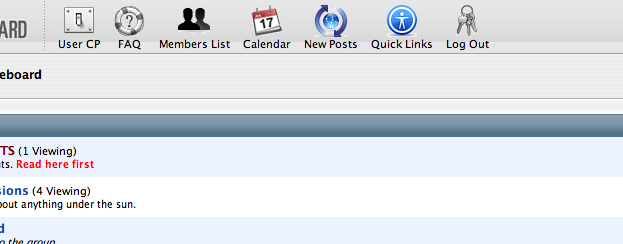
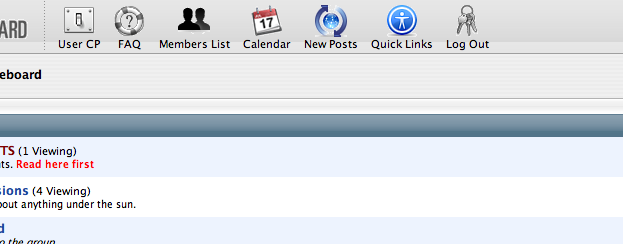
Still a tiny bit confused, but yes there are 2 html templates that are different in the Borderless version, its the header and footer templates. I've removed The caption bar div and the divs used for the shadows.
You don't "have to" edit those templates to get the borderless effect, you should be able to just do css changes, but then you're left with unused html.
#toolbar, #collapseobj_toolbar { background: url(images/as3/toolbar_bg.gif) #f4f4f4; border-bottom: 1px solid #9f9f9f; height: 55px; padding: 0 6px 0 6px; }Should fix the background issue on the screenshot you posted.
If I still didn't answer your question, let me know. I'm still not 100% sure what you're asking.
Hi Timan,
Unfortunately, that code snippet you used simply reverted it back to the Aqua toolbar, but remember the goal was to apply a borderles UNIFIED theme overall. Also notice that while the toolbar is unified (though messed up) the rest of the "bgs" are still Aqua... this is because there isn't any instance of that image path on the borderless CSS.
The short of it is that simply changing the image filenames on the CSS references (adding unified_ to wherever possible) doesn't work because it ends up looking like the screenshot.
You're welcome to try it yourself to replicate the problem, basically what I did was assign the XMLs in this heirarchy (parent -> child -> child):
Main Aqua XML (required) -> Unfiied Graphite -> Aqua * (the borderless XML, since there's no borderless Unified so to speak)
Would it be ok to message you via IM so we can discuss it in detail?