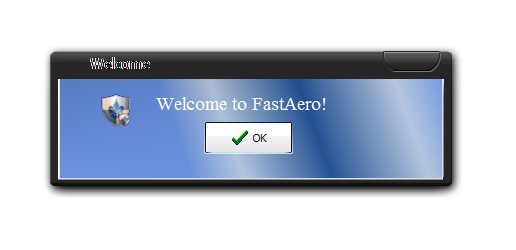
FastAero: Glass Blur in XP

Hi there -

I stumbled upon this little app, which might be useful for everyone who likes glassy windows and doesn't use windowblinds (well, I still do, but anyway)...

It's still beta, but as far as I can see it'll support themes - so you could use it with your visual styles for adding smooth borders and shadows...

http://fastaero.wordpress.com/

It looks to me like a good alternative to VystalVivid (better effects, but as far as I know no themes & shadows)

(http://vystal.de.vu/)

#464785

looks awesome! thanks for the link

how hard is it on your system?(intrusive?)

as far as uninstalling goes...

I don't want it royally screwing my system/registry/etc settings I've worked so hard on..

#464788

Hi -

it's only a zip-(well 7zip-)-file, that you unzip in any folder...

No installation, just running the included exe, so I guess there are no problems with trying out if you don't autostart it with Windows at once.

System ressources seemed to be o.k. (difficult to judge as it's a fast PC).

The buttons of the included skins are not the prettiest ones, but it seems that you can do your own skins (at least with future versions, haven't tried so far).

Effect doesn't happen at once to opened windows on your screen, just minimize them or so that they are redrawn and that's it.

To me it looks like a nice little app that can be combined with visual styles to give them an alpha-blended look...

#464921

Cool find. Thanks. :D

#464952

I tried this just now... in about 5 mins I closed it, deleted it from my HDD.

It works as it says, it's pretty fast and responsive but looks utter horrid.

Your mileage may vary, it's a matter of choice.

#464959

Have to agree with iGo on that as I had consistent resizing issues (overshooting the transparent frame,etc) with multiple apps. :(

Keep in mind it's a beta, so maybe these issues are being worked on?

#464991

Resizing wasn't my only concern, I understand that it is a beta.. that's why I didn't comment on bugs I faced with it.

In General, the thing was shabby. The buttons were too friggin huge (even on 2560x1024 res) and ugly ... and when combined with different VS apart from Vista like ones (I tried with Brushed Panther and Tiger VS), the overall UI looks bad to disgusting.

#465002

Hi there -

well, as I use windowblinds I didn't test it too much -

but the thing that's great about this little app is not how it looks at the moment (which is indeed a bit shabby)...

It is the only freeware I know, that uses alpha-blended window borders AND is skinable!

So "can be combined with visual styles" didn't refer to trying its default look with Brushed Panther and Tiger VS -

what you can actually do, is to apply e.g.Brushed Panther VS,

open the button and window border images in e.g. Photoshop,

smooth the edges of the window a bit (roundes edges look bad with VS),

apply a drop shadow to the image and use these altered ressources with FastAero =>

You got alpha-blended, glassy, smooth, shadowed windows with XP using only freeware.

At the moment this app is still a bit too buggy, but once it's finished it might have a great start.

Its skinning interface isn't finished so far (buttons and borders are of a fixed size so far and the PNG to 32bit BMP converter that comes with it has problems with the directories + I couldn't disable text blurring), but here's a quick example (just a quick one - I don't use it, so I wasn't interested in a good skin)...

post-30044-1185200671_thumb.jpg

Preview.jpg
Preview.jpg

#465472

thanks for breaking it down thewer... it would be nice if interest sparked further development. I'd be great to see this continue and have an active following.

#465490

the other thing is that it is also skinnable and I'm sure someone maybe could do better than the default?

#465495

Super post, thewer!

I just came across a third app - TrueTransparency - for achieving the glass border and to say the least, I'm impressed. It's super small, efficient and ridiculously easy to skin, and there's even an option to put the glyphs on the left!

Of course, it's not perfect, but it really does the job.

#465731

TrueTransparancy doesn't seem to work on monitor two of my dual monitor setup and doesn't behave properly on normal user accounts - even when "run as" admin...it drew separate borders around all my windows - so for example I had two titlebars, one normal Luna and one transparent on top of the Luna bar...not quite ready for primetime yet

#465831

Really? That's weird, it worked flawlessly on my system. What graphics card do you use?

#465867

Okay yeah I agree...

FastAero gets a star...those huge aXX buttons..uh hhuh no way...Good glass effect but no go..

VystalVivid looked excellent however response time and double bumping the windows with a huge time delay...but excellent and appealing interface and design..with even a better idea on the appearance side of the windows...I don't know about everyone else but mine came with an extra German Vista Start Menu Bar..like someone virtualized right over my running XP .. I might add that t did not have any applications inside and would not , and did not have any settings to remove it.. while my addtion'l start menu bar( TaskBar ) still on the right side of my screen from top to bottom got the Transparency effect

I have used Glass2K in the past which is no longer n development and abandoned by its original author but; it as well as most transparent programs I have found double bump windows and do nothing for the tweaking of my system..

I use UXtheme patcher not windowsblinds and I use direct .msstyles files and shell so I really have no clue how these would effect machines running those programs..

#466915

Really? That's weird, it worked flawlessly on my system. What graphics card do you use?

ATI Radeon X1300 on Win XP SP2

#466937