 Aqua-Soft Forums
Leopard OSX has a thing on its dock called stacks- basically it is a folder and when you click on it it comes up with a list of whats in it. Does anyone know where i can get a docklet like it for rk launcher?
Stacks docklet
search here or google for 'kkmenu.'
ive downloaded it - put it in the docklets folder but it doesn't show up when i go to add docklet..
Look thro' this thread for KK menu help
This has been discussed on OSX-E.com, and from what i've seen, it can't be done without ObjectDock plus, the only thing is that it's not exact. Sorry if this is an inconvenience for you.

It's been a while since I've done this so i'll try and explain how mine is set up.
Within my RKLauncher folder I've got a file called docklets and in there is my KKmenu file, again within that file is one called skins. I've placed all my KK menu skin there and if I remember correctly I could access the different skins from there.
Hope that helps.
Okay, heres what happens. I select the skin from the general menu options and then close the dialogue box. I then click the icon on rk launcher, but an error message comes up and crashes rk launcher
alabanco, you could try sending guitarhero a private message if you still haven't heard from him.
-NC
here is my try
Hi,
here (http://www.newspiritweb.org/oliver/kkmenu_flyout.png) is my try.

@Cruzar...can you please tell, how you get the black backround for the text?
Would be great.
Thanx
Oliver
[[Edit]]
Nevermind....found it....Shadow-width
I modified a little...now with half transparent black backround for the text...
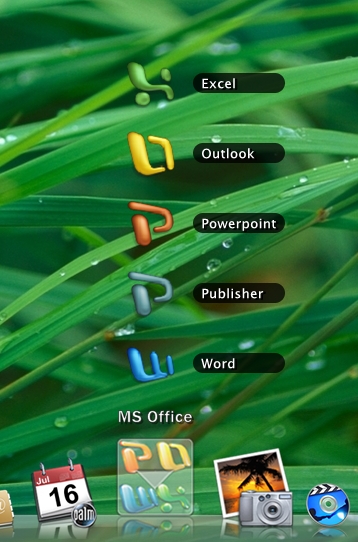
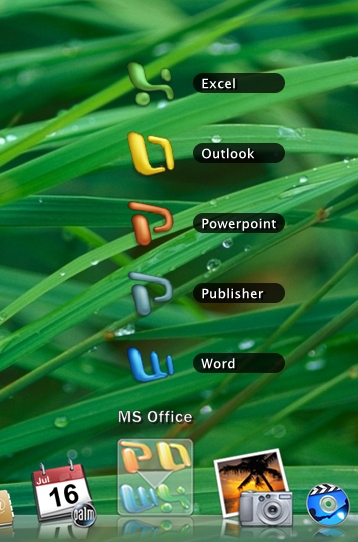
Could sombody be so kind and explain in a step by step guide where to download the application and how to get it working?? It could be great and appreciated by nOObs like me.
Thanks
The download is in this thread-->http://www.aqua-soft.org/board/showthread.php?t=33710
Also, search the forums for kkmenu, there is quite a bit information available.
Ollims, can you please tell, how you get the black backround for the text?
@cruzar
I changed the skin with KKSkinner, but please don´t ask me how :-), I worked with Skinner for a few hours and understand only a bit of the software, by the way...does anybody know if there is a toturial for KKskinner around???
ok, cruzar, i can send you the ini-file, if you like, than you can have a look.
This skin works for me without submenues, i don´t know what happens with the skin if you want some.
Greats
Oliver
Ermm, OK guys after reading for hours I somehow got it to work. The problem is that it doesn't look like the screenshots posted here the nice stack icons that pops up ...
I can't even see the icon in my Dock
Here is my screenshot...

Can you guys help me, please?? I'm trying to get this to work so I can build an installer with all language packs included + refective icons and this nice stacks...
Please guys give me a hand or send me your RKLauncher folder zipped at ralphy5002@comcast.net as I can customize icons and other stuff before building the installer.
Thanks
Had this problem before. Go into your settings file & change the back slashes "" to forward slashes "/" or vice versa...just for the KK Menu Icon. Strangely that worked for me.
Had this problem before. Go into your settings file & change the back slashes "" to forward slashes "/" or vice versa...just for the KK Menu Icon. Strangely that worked for me.
Ermm... No luck so far... I just don't know which files to edit or what to open it with. I have never messed with RKLauncher  Sorry for being such a nightmare
New Installer coming soon... I'm now downloading those language packs so I can include them...
Screenshot:


Scroll down about 3/4 of the way in this thread: http://www.aqua-soft.org/board/showthread.php?t=33710.
Knew I'd posted that before.
Nice screens by the way.
Scroll down about 3/4 of the way in this thread: http://www.aqua-soft.org/board/showthread.php?t=33710.Knew I'd posted that before.
Nice screens by the way.
No luck... I can't get it to work... Anyways, I have here the new RKLauncher installer with Reflective icons and Leopard Shiny Dock...
Hope you guys like it
New Instaler (Leopard Shiny Dock with reflective icons) http://windowsedge.com/fileuploads/index.p...sh=S57V2YXzrqsu
Screenshot:

Don't ask where I got it,I found it from DA I think,good luck
Mine :http://www.osx-e.com/gallery/showimage.php...&imageuser=3657
Skins are nice but for some reasons I can't get the text to be displayed in Leopard skin & Stack skin PLEASE HELPPPPPPPPPP

Edited
Never mind guys, manually configured the skin and now shows up fine... Shadow border under text menu was the problem...
Thanks