OS X-like scrollbar buttons order

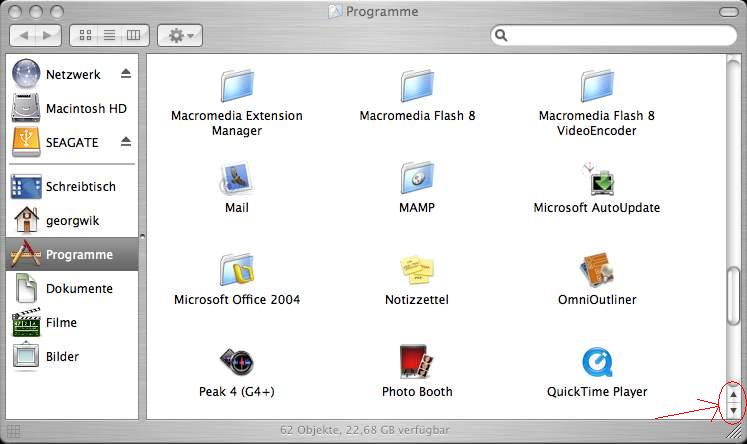
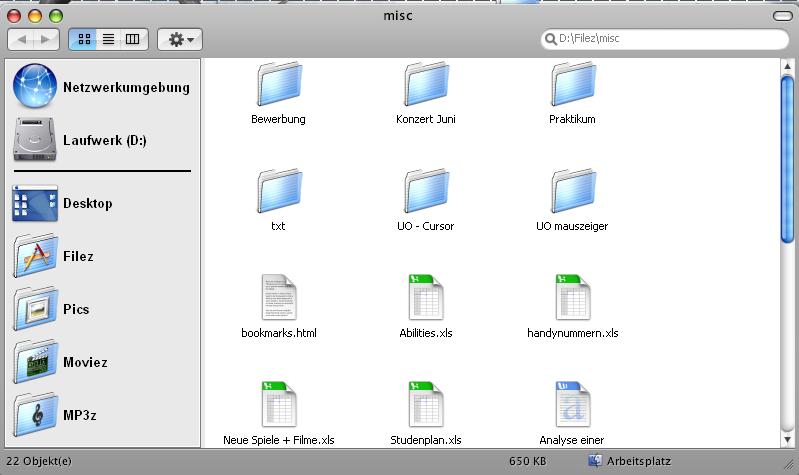
This is how my folders currently look like. The next step to come closer to perfect OS X emulation ist to change the scrollbar buttons. I've read several threads and found out it might be possible, but in no thread was any anwser how to chance them. Expect one thread where it was explained how to change them in Firefox.

Well, you'll find attached a actual screenshot of my explorer folder.

Is there any way to edit a current theme for personal use (I'll ask before for permissions) with SkinStudio? And how I should do it?

Or can I modify some files with Reshacker to change them?

I think there are many users who would like to know how to chance them, to complete there own emulation experiance, too :)

The 2nd attached screenshot is taken from original OS X Finder.
post-61716-1177860209_thumb.jpg

post-15-1177860209_thumb.jpg

Unbenannt.JPG
Unbenannt.JPG
finder.JPG
finder.JPG

#454458

I see you bought Windowblinds. That's a good thing to do ;)

It is possible to get the scrollbar buttons together at the bottom like that, but the 'go upwards' button will not work. I know this because i've asked this exact question.

Next time, search ;)

#454461

Windowblinds is a very good software, thats the reason why I support its development with buying it.

Yes you asked the exact question but there is no anwser how to chance them i your thread and i'ts an old thread, I didn't want to bump it.

Well, it doesn't really matter if the 'go upwards' will work anymore. But let me guess, you don't know exactly how to put them together, or? ;)

#454464

If u r using Nexplorer, you can get the scrollbar order (Horizontal does not work)

#462080

well, what you need to do is find a skin with a scrollbar like that, or edit the skin on your own via SkinStudio.

also, off topic but another way you can get closer to Mac emulation is to use the font Lucida Mac Bold at 9px for icon titles and in your findeXer.

#462083

Hehe, do you mean get the scrollbars like I did?

screenshot1gd5.jpg

#462752

@ Stony: How have you made it, looks nice? And do the buttons really work?

#463049

@ Stony: How have you made it, looks nice? And do the buttons really work?

!!Same here

#463242

Hehe guys, I'm sorry to disappoint you, but I'm on Mac OS X. This isn't Windows at all.

#465010

I don't suggest you tease people like that, Stony ;)

#465025

Well, anyways i am also looking for a Leopard Grass wallpaper like yours (Stony) How it is brighter.

Can you send me a link?

#465039

hmm .. u know.... i dont think theres anyway in windows to do what you want.

But If it helps you sleep better at night, in Mac OSX there is an option to have the scroll arrows at the top and bottom (rather than grouped together as they are by default).

SO you could just pretend (to yourself) that hypothetically you selected the mac osx option to have them set like that :P

#465055