 Aqua-Soft Forums
Hi, is there any safari type skins for firefox 2? all the old ones aernt compatible...
Skins for Firefox 2
ifox and ifox graphite... its right on the firefox site, im pretty sure that its one of the top skins... please search before posting things like this
Truth-K... If you use it with an OS X skin in WindowsBlinds it will have the *colors* of the theme in it such as brushed, leopard...
that is great! thanks
This is a great theme but i still have problem... does exist solution how to make the lines with bookmarks and tabs grey, not white???
I cannot find the real Safari theme for Firefox 2 :-( I thing, that it doesnt exist

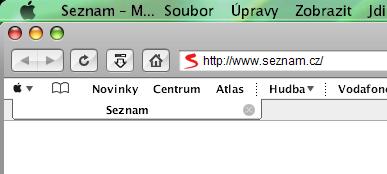
thats how the skin is man unless you can change it via chrome, if there is a code to do that then i'd like to know as well.
So I try to ask easily: DOES EXIST REAL SAFARI SKIN FOR FF2??? I am totaly desperate
iSafari and Vitae are both compatible with FF2. Too lazy to look up links for you, but a quick search should point you in the right direction for a download.
Re: Skins for Firefox 2
Here is a link for mac emulation's website. Registration is free and there are numerous things to download. Have a great time.
http://www.osx-e.com/downloads/
cheers,
nhborn57
iSafari and Vitae are both compatible with FF2. Too lazy to look up links for you, but a quick search should point you in the right direction for a download.
I know this both, but no one doesn`t look exactly like Safari... iSafari has a small buttons and Vitae has a diferent style of tabs. I have searching everywhere, of course on http://www.osx-e.com/downloads/ too. But nowhere I have found the real skin for Firefox 2
Here's what I've done when I was on windows xp. There's 2 skins in the archive the brushed one use gradient tabs
and both matches the color of the VS.
Its amazing, thanx you a lot...
But i´ve still one problem (but is not so necessary for me):
Can you make it friendlier to plugin Fission (on the picture)?
And another one detail... plugin Compact menu is not in skin looking like apple but like title MENU
But how I said, its not so necessary, thanx for this beuatiful skins

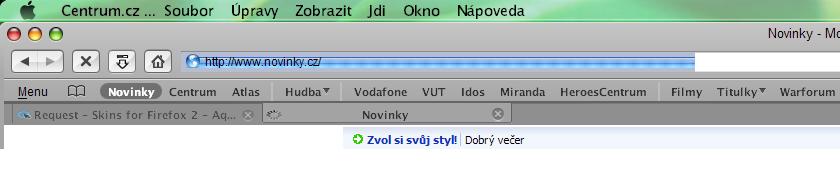
I've uploaded my fission background which look more like the real one and work great for me.
To have the apple icon just add the 3 icons into the folder global/icons of your firefox skin.
Here are other tweaks for stylish:
Change font for the adress bar and searchbar (need Lucida Gr font):
.textbox-input-box {
font-family: LucidaGr !important;
font-weight: normal !important;
font-size: 9pt !important;
margin-bottom: -1px !important;
color: black !important;
}
Hide tab icons:
.tab-icon {
display: none !important;
}
Remove separators between toolbar:
#toolbar-menubar {
min-height: 12px !important;
padding: 0px !important;
margin: 0px !important;
border: none !important;
}
#nav-bar {
border: none !important;
padding: 0px !important;
}
#PersonalToolbar {
border: none !important;
}
#navigator-toolbox {
border-bottom-width: 0px !important;
}


I have comparing your safari skin and original Safari and I saw, in Safari is separator up to bookmarks.. but I want to ask you, if you can write tweak for stylish to remove separator under the bookmarks (up to tabs) like in safari.. look at the picture.
And if you want to make fission progress bar like in the Safari, set on fission the 2nd enclosed picture in this post


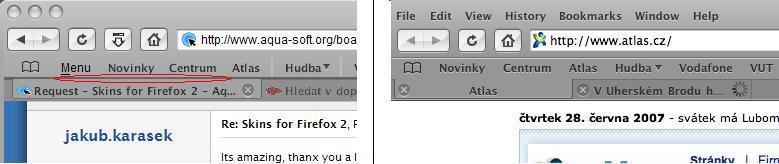

This line is caused by the windowblinds skin. If you're using mac os x leopard by blitzr you need to remove the dark line in the bitmaps finderaRebar2 and finderaRebar4.
You have to rename the .wba skin in .zip, and modify these bitmaps.
@rom_1
thx for the code! Now I have no toolbar seperators and lucidamacbold on the adressbar. 
Maybe you can tell me where do I have to set this font-code to have another font for the bookmarktoolbar and the tabs?! I use ifox graphite. When I unzipp the *.jar file, I have soooo many *.css files in the folder global. Duno which to edit... 
EDIT: I got it using the extension stylish... 