Aqua-Soft Forums
Is it possible to remove the yellow box surrounding the albumart in this picture:

(To clarify, these are folders containing folder.jpg files)
Update:
View Post #3 for tutorial
Is it possible to remove the yellow box surrounding the albumart in this picture:
(To clarify, these are folders containing folder.jpg files)
Update:
View Post #3 for tutorial
I'm not 100% sure on this one... but I think folder icons are in Shell32.dll... so if you can replace the iconset for folders in Shell32.dll.. one blank icon in position for thumbnail folder resides, you should be able to remove it.
Thanks for your answer iGo.
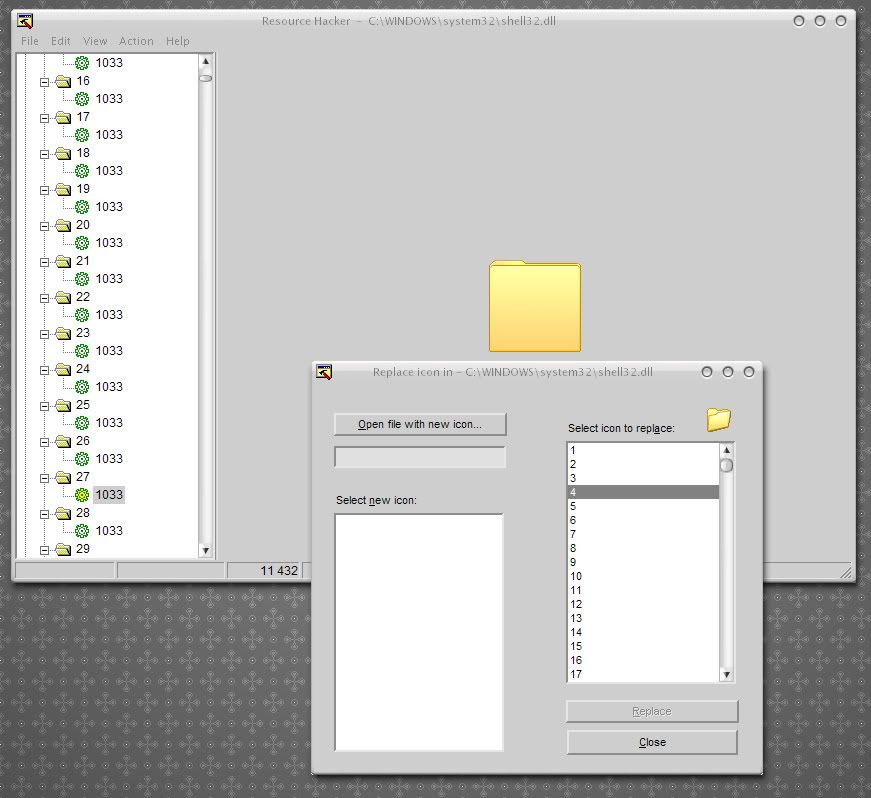
I looked into c:windowssystem32shell.dll with ResHack.
Under 'Icon' I found 27 and 28 contain the same image as displayed in the background window:
So, I'm completely new to ResHack, but my instincts tell me to create a transparent image in Photoshop, save it as *.ico file and try to replace these two.
The thing is, When I rightclick them (27 & 28) and select replace icon the Dialogwindow in the front pops up, and that looks like a completely different icon to me..?
I was thinking I'd just try and replace it with the *.ico file I was talking about earlier, but I wanted to check in with you guys and see if you had any 'heads-up' on things I could screw up.
Further guestions:
* What resolution should the ico be in? 48x48?
* I realize backing up the shell32.dll file is a clever thing to do, but do I have to disable file protection or something like that?
* UPDATE 1 *
I read this over at Winmatrix and decided to give it a go. So I opened shell32.dll in IcoFX and extracted IconGroup 4 which contained the different icons that got me confused earlier in the post. I erased the pixels from the 96x96 icons (which were the ones that looked like the folder I want to remove) and saved the ico, imported it back into shell32.dll with ResHack and added the new dll file to my system with Replacer. So, I rebooted, rebuilt my Icon Cache and the result:
Didn't do shit 
Just to check I opened the shell32.dll with IcoFX and extracted Group 4 to check if Replacer had done it's job, and sure enough, the 96x96 folders were blank.
Any ideas?
* Update 2 *
Apparently, this doesn't work if you've enabled caching of thumbnails. If you disable this (Folder Options-> View files->Do not cache thumbnails) it will work 
* Update 3 ("The final how-to") *

I've attached the modified shell32.dll to make this operation easy if you want to try it:
1. Replace your c:windowssystem32shell32.dll using Replacer with the attached one (remember to backup your original)
2. Reboot
3. Rebuild Icon Cache (with TweakUI or Folder2Ico)
4. Disable caching of thumbnails (Folder Options->View files->Do not cache thumbnails)
I've also included the shell32.ico if you think it's safer to ResHack shell32.dll yourself, otherwise, you don't really need it.
Hm, attachment is not working, I put it on putfile (will disappear after 30 days if noone is available to attach it for me or host it)
Glad you got it working... 
without that damn grey border it would be even nicer
is it possible to get rid of the borders as well?
That gray border is a part of the classic windows colorscheme. One of the colors Xp uses for windows colors is also associated with that gray frame broder. Change the color of that to white and u can get "rid" of it. If you run windowblinds it can be edited in the themes config file under Colours section.
what do you have to change under the Colours sections for windowblinds? thx
WICKED
I've always hated those ghastly yellow folders, and whenever i customise its been the one thing I cant change and looks outta place.... finally I can
PS- how reliable is this?.... as in, do they ever revert back? or is it totally permanent?
Not sure exactly witch color represents that gray border but do a little bit of trial and error testing until u track it down. Change one, reload skin, change another, reload skin and so on ^^
I did some research on how to remove the (gray) borders as well, here's how you do it:
1. Enter Display Properties (rightclick desktop)
2. Click the Appearance tab
3. Click Advanced
4. Select 3D Objects from the dropdown menu
5. Select the same color you use for a background in the explorer window in the box titled Color 1 (In my case that was white)
That should do it. Unfortunately this also changes alot of other things, and that might not fit with your visual style. (It didn't in my case) If anyone else comes up with a different solution that would be great
PS- how reliable is this?.... as in, do they ever revert back? or is it totally permanent?
I've been using this "hack" for over a month now, and never experienced a glitch. Running smoothly as ever...
Hey warius!
Thanks a lot for the how-to to get rid of this kind of background in the thumbnail view.
I had the flyakite installed and had a blue folder background which matched. Now I installed a Bricopack with Vista Inspirat 2, and the blue background folder didn't changed. I looked up in the shell, and saw a yellow background, so the shell was ok. I just had to set the folder option "do not cache thumbnails" disabled. It changed immediately. Thanks a lot for posting this "how-to"!!!
Glad you found it of some use!
Need a link to the shell32.dll, link is dead! =[
does anyoone have the shell?
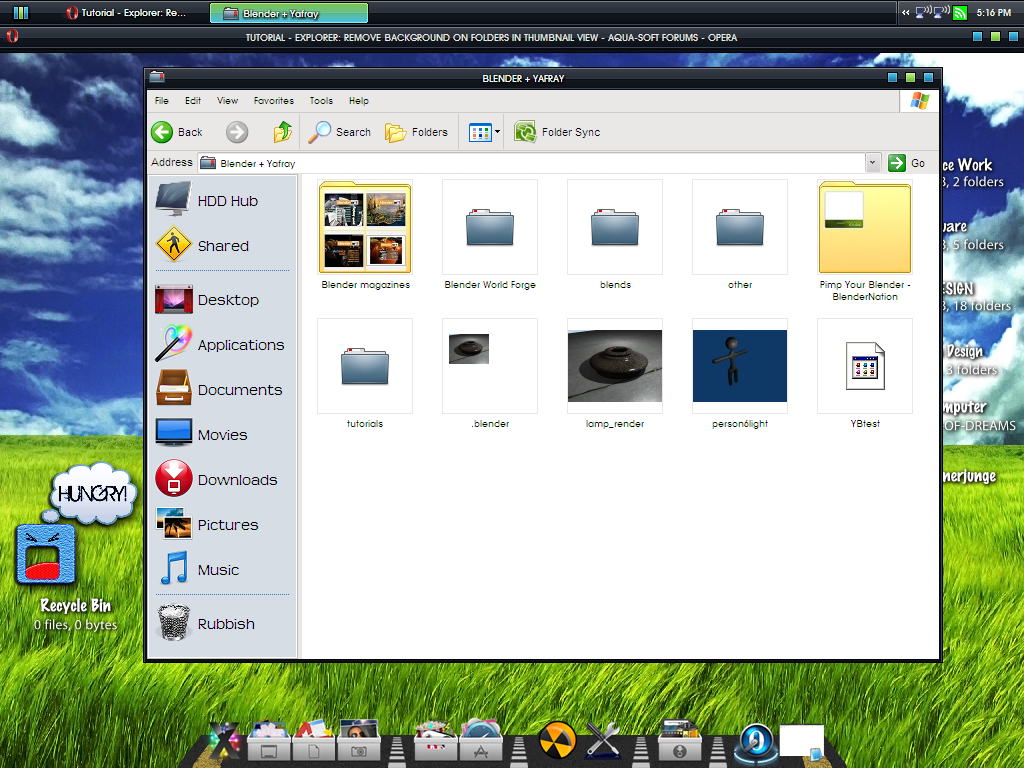
well, i followed this tutorial and then decided that i liked cached thumbnails, lol. the thing is though ... my computer will switch from having the yellow folder to just having that thin gray line, it's weird. here's a shot:

hey. are you guys using mac or windows?
um ... i think it's pretty obvious that we're using Windows [but of course, it's skinned].
hey. are you guys using mac or windows?
of course its windows. look at the SS and Explorer lol
sorry for my ignorant question, but how did you skin it that way? Windowsblinds?
So it doesn't work at all with cached thumbnails? What I'm thinking is that they can be enabled, but that you delete the thumbs.db file that's in every directory, this will rebuild the thumbnail preview. Furthermore, once the new thumbnail is cached, it'll remain modded?
you are right. once u delete the thumbs.db file and the new thumbnail is cached, it will remain modded (from my own experience).
Sweet, can anyone up the file?