Mint 2.0

mintscreengs6.th.jpg

Mint 2.0 is a GTK Theme by Lokheed

This release is a Visual Style port of Lokheed's great Mint 2.0 theme.

I have also added his Winamp (XMMS) Mint Skin into this pack.

Font options:

HaxrCorp+Corbel

Verdana

Tahoma

All credits to Lokheed! Honor to whom honor is due...

As stated by Lokheed his theme was released under the CC Share-Alike 2.5 [link]

Enjoy

DOWNLOAD

#444384

great work

using it now :)

#444387

Amazing theme, I love it! Just one question though, when using this theme (as well as TempHmmXP, which is another favourite of mine) I notice that the panel to the left of Explorer windows disappears. It's that panel where there's usually a list of common locations (C:, D:, My Documents) and common file tasks (cut, copy, delete) as well as some details about the highlighted item (e.g. if I highlight a disk drive it shows the total space and free space). Is there a way to get it back? When I use other themes besides Mint and TempHmmXP, the panel is there as usual.

#448371

1) Open an Explorer window

2) Go to "Folder Options" under one of the 'file.. edit.. view..' menu items (i forget which)

3) Under the 'General' tab, select the radial button to the left of 'Show common tasks in folders' and hit 'Apply' then 'Ok' and you should be good to go.

#448381

It's hard to tell when someone is messaging you in the taskbar!

#448384

1) Open an Explorer window

2) Go to "Folder Options" under one of the 'file.. edit.. view..' menu items (i forget which)

3) Under the 'General' tab, select the radial button to the left of 'Show common tasks in folders' and hit 'Apply' then 'Ok' and you should be good to go.

I've tried that, but the panel still doesn't return. When I use other themes it shows up without any trouble, which makes me think it's something built into the Mint theme somehow... thanks for the help, though!

#448386

How about:

Go to your:

C:WINDOWSResourcesThemes

and confirm that you have:

C:WINDOWSResourcesThemesMintShellMintCompshellstyle.dll

if you don't, copy a shellstyle (preserving the path) of another theme which works, to your Mint folder and cycle 'Applying' between the two themes.

Does this do anything?

edit: funny, the above will not allow sh*ellstyle.dll

#448398

How about:

Go to your:

C:WINDOWSResourcesThemes

and confirm that you have:

C:WINDOWSResourcesThemesMintShellMintCompshellstyle.dll

if you don't, copy a shellstyle (preserving the path) of another theme which works, to your Mint folder and cycle 'Applying' between the two themes.

Does this do anything?

edit: funny, the above will not allow sh*ellstyle.dll

Nope, still no luck I'm afraid. I already had that file, but I tried copying another theme's shellstyle over anyway, and it still wasn't working out. Just to check, when you say copy a shellstyle (preserving the path), you mean copying everything over so the final file path of the copied shellstyle.dll is

C:WindowsResourcesThemesMintShell[theme name]shellstyle.dll

Is that right? When I did that I couldn't find an option to cycle to that theme - it was still just Mint and MintComp.

#448423

looks clean and neat! kudos!

#448501

hmm.. odd, I don't remember the mint theme having issues with my setup but then again, I think I use findexer so I might not know if there's an issue. (I can't remember which of my computers I'd installed it on.)

I would suggest trying to confirm one thing at a time maybe.. see if you can get the default luna shellstyle to work, maybe take:

...ShellNormalColorshellstyle.dll

copied from:

C:WINDOWSResourcesThemesLunaShellNormalColorshellstyle.dll

and place it here:

C:WindowsResourcesThemesMintShellNormalColorshellstyle.dll

and see if you can even get that working. Then play around with getting a shellstyle you like replaced. But I'm sure you've already tried different combinations such as this.

Anyone else care to weigh in?

#448520

hmm.. odd, I don't remember the mint theme having issues with my setup but then again, I think I use findexer so I might not know if there's an issue. (I can't remember which of my computers I'd installed it on.)

I would suggest trying to confirm one thing at a time maybe.. see if you can get the default luna shellstyle to work, maybe take:

...ShellNormalColorshellstyle.dll

copied from:

C:WINDOWSResourcesThemesLunaShellNormalColorshellstyle.dll

and place it here:

C:WindowsResourcesThemesMintShellNormalColorshellstyle.dll

and see if you can even get that working. Then play around with getting a shellstyle you like replaced. But I'm sure you've already tried different combinations such as this.

Anyone else care to weigh in?

Nope, none of that seems to work... I'm thinking it's probably a deliberate feature of Mint?

Thanks very much for your help though, it's very appreciated!

#448769

this vs has a shellstyle which disables the "common tasks".

to get it back just delete "shell" folder from the theme.

#448923

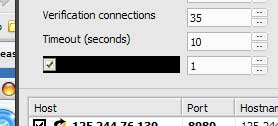
i have a small error with mint and also with tempura and temphmmxp

the black square...here must be a text

its not there with other vs and "orginal" xp skin. t

post-36273-1174979502_thumb.jpg

mint2error.jpg
mint2error.jpg

#449029

which application is that?

the black square looks strange.

#449048

this is "Anonymous Proxy List Verifier" .. currently the only app where i discovered this glitch. but its only with mint and temp/hmmxp :(

#450220