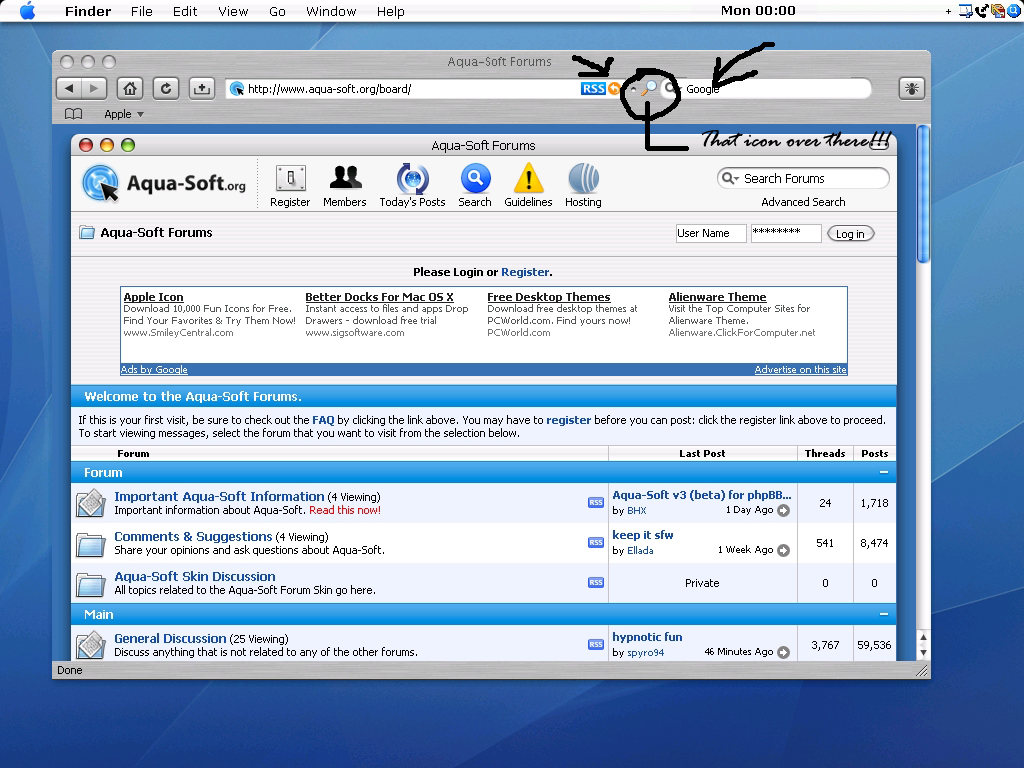
A little icon between the address bar and search bar

About a week ago, I was searching around the forum on a possibility for Safire mod theme to work on Firefox 2. Actually it's not really FF2, but rather it's "Lolifox". Check its website http://lolifox.com

The reason I used "lolifox" is because I wanted my Firefox to be Firefox while my other browser which is lolifox to be Safari. It didn't work at first because the Safire theme was not compatible on lolifox since it is (currently-as I post today) customized version of Firefox 2.

Thanks to Nightly Tester Tools, it made Safire theme to be compatible in lolifox.

As you can see, I provided a screenshot underneath my post of how I modified my lolifox to look like Safari.

There are two things I wanna ask;

1. Is there anyway to take that glass icon between the address bar and the search bar?

2. On the tabs, is there anyway to take out the website icons permanently and also reverse the position of the close button in a tab from right to left just like Safari.

3. Lastly, as you saw the screenshot underneath....could you tell me any more things that for me to add customizations and stuff to make my lolifox browser look exactly as Safari.

Also I used this one on the topic here>>>http://www.aqua-soft.org/board/showthread.php?t=39426 to round off and to make the search bar in the Safire theme look like the one's in the Safari browser.

Once again the screenshot is underneath -vvvvvvv-

post-58414-1170004827_thumb.jpg

lolifoxcapture.jpg
lolifoxcapture.jpg

#440045

Go into Customize Toolbar and drag that icon into the window

[offtopic}Nice Desk, All you need is Lucida Grande and it's done[/offtoptic]

#440054

You should also Check out LucidaMACBold and LucidaMAC, and you should set your Message Font Box (right click desktop>properties>appearance>advanced) and change your message box font to LucidaMACBold. The reason to do that is because it looks almost exactly like the Bookmark font in Safari, and its useful for other things. I know its a small touch, but i think its important =)

#440069

Go into Customize Toolbar and drag that icon into the window

[offtopic}Nice Desk, All you need is Lucida Grande and it's done[/offtoptic]

Thanks but there's a problem...

That icon over there is attached to the Search bar, which means I can't take it off or I will have no search bar in my browser.

That small icon is the one who manages the search engines in the search bar.

So how am I going to take it off without getting the search bar attached to it?

You should also Check out LucidaMACBold and LucidaMAC, and you should set your Message Font Box (right click desktop>properties>appearance>advanced) and change your message box font to LucidaMACBold. The reason to do that is because it looks almost exactly like the Bookmark font in Safari, and its useful for other things. I know its a small touch, but i think its important =)

About the suggestion for my fonts. Thanks you two!

Still waiting for the answers on my questions though....

--------

No worries now....I fixed it :)

Staff can close this now....

(Screenshot)

http://img246.imageshack.us/img246/4117/lo...xcaptureqi6.jpg

#440384