
power buttons

what do i do to make the restart, shut down, and log out buttons to work under the apple menu in OB? i have searched and came up with this http://www.aqua-soft.org/board/showthread....hlight=shutdown but it is too confusing and i believe its purpose is not for making it work, but to make it look prettier. (although it is an alternative) But i dont want anything pretty, just for the buttons to work.

perhaps i should change the links (see attachment) to some other command?
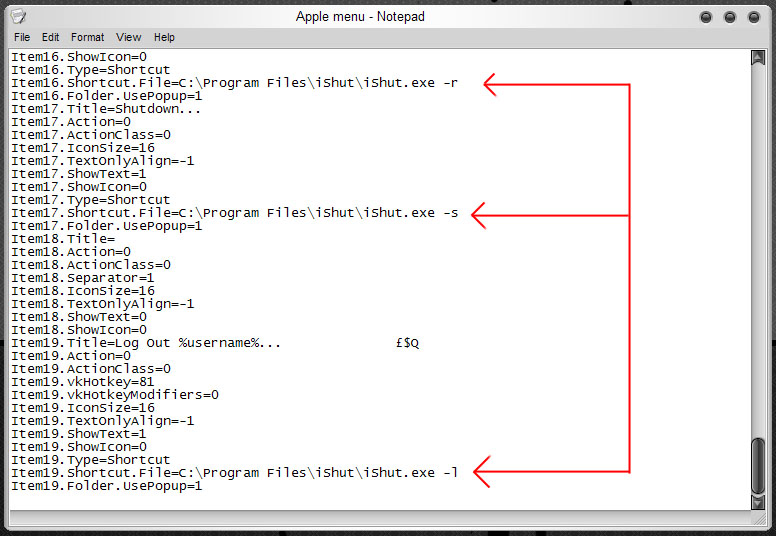
post-58509-1169961390_thumb.jpg

OB power buttons.jpg

#439972

If you look hard enough there is a choice to Restart, Sleep, or shutdown in OB. You just need to tell OB that its a system command>restart, shutdown, or sleep. Or if you want to use iShut, make it a shortcut to iShut for each of the commands, and everything will go well.

#439976

is this something i type in the file in the screenie? so i like replace "ItemXX=Shortcut" with "ItemXX=Command"? and where exactly should i "look hard enough".

my first impression to what you said would be that i would change the line for items 16, 17, & 19 so that it would look as it does above (command) then i would replace "ItemXX.Shortcut.File=C:Program Filesetc..." to "ItemXX.Command=restart, shutdown or logout (one of those for each)".

correct?

#439978

Wait wait wait...why are you editing your Objectbar by means of the .INI file?

Just right click on it, and there's a ton of options to choose from!

#440034

i know! i've already spent hours studying that ever since i've had OB! i just can't fix the buttons:( i found that all those options are the general options and do not point to a specific selection within the .ini. il take another look at it though.

OK just found it. i kept right clicking the bar, not the selection within the drop down menu. il see what i can do.

#440052

Right click the actual "bar" and click Proprities. The theme editor will appear. Open the apple menu, go farther on "Undocked bars" and click Apple menu. You figure it out from there

#440056

ok fixed it:) and i fixed alot of other buttons to:) thanx all

#440065