Aqua-Soft Forums
Hi everybody!
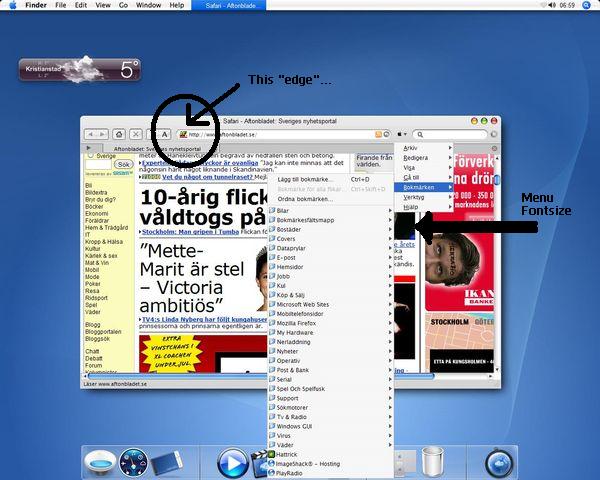
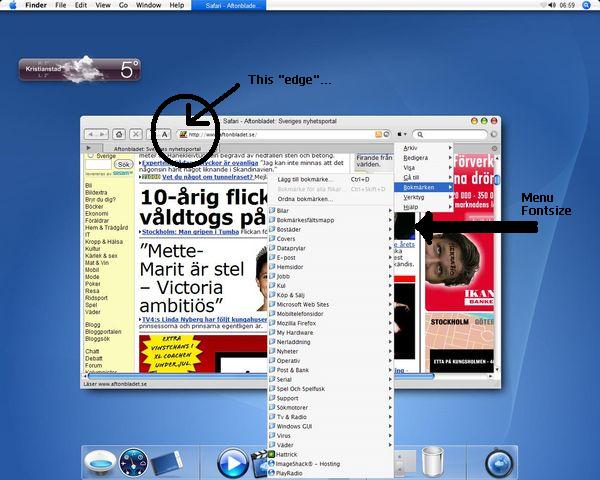
I´m not surprised if this has been posted numerous times before, but I cant get the hang of it really. My biggest problem is the fontsize on the compact menu and the "rightclick-menus"... I use the "Acua"-theme but this the fontsize is really bugging me. Is this a modification I can make in my userChrome.css or is there another way? Please help me with this baby....
My other problem, with is not really seen on my screenshot, is that I wanna use rounded corners on the adressbar... I added the usual line in my userChrome.css, but it´s like it wants to draw a line just after the rounded corner on the left side of the adressbar... can I mod this? How?
I use Dobees Tiger Vs 2.4... if it matters...
Merry Christmas and a Happy New Year!
Manneman, Sweden.
Edit... Never mind, I found it myself