 Aqua-Soft Forums
Version 1.15
This is the final Version of ChaosShut.
New Features:
"About ChaosShut" Dialog
Accessable from the new context-menu.
Integrated, english Tiger skin
In case of a lost skin folder...
Windowfading
Windows will be faded in and out now. Change Fade-In or Fade-Out speed in the ChaosShut.ini. Values are in milliseconds.
Username in messages
If you set %u to a message, the current username will be shown.
Ini-file restructured
The Ini-file is now better structured. Keys are now in new groups. Old Inis doesn't work anymore.
Bugfixes:
Hibernate bug fixed
ChaosShut will now be endet, when hibernate-mode is used.
Timer bug fixed
ChaosShut's timers where only working fine, when they where devideable by 60.
Skin bug fixed
The ugly black frame at the buttons while hovering them is now history. Lets thank YellowRider for the bugfixes at the API-wrapper.
Cerebro-Skin
Fixed an one pixel jump in the Cerebro skins logoff-image
Download
Version 1.11
Someone from OSX-é requested window positioning, so here we go...
Window Positioning
To use window-positioning open the chaosshut.ini, search for the WINDOW group and change key centeronscreen = yes to centeronscreen = no. After that the windows position will be saved to the ini.
Download
Version 1.10
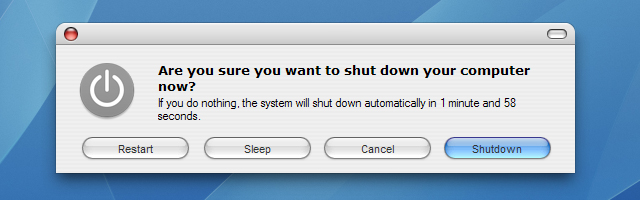
Now there are finally also time-controlled actions possible. You can set a countdown (in seconds) in den chaosshut.ini, after which the dialogue shuts down the system, puts the system in hibernation mode, restarts the computer or logs off the user. This countdown will be displayed as text in the dialogue. If you don't want to use time-controlling, simply set the value to 0.
Timers
There is one timer for each mode. To change them open chaosshut.ini and search for the TIMER group. There you will find some new keys. Most of them are language or skin based keys, but the first five are the timers for the modes. Change the values as you like, but beware, that they are in seconds. Setting a timer to 0 will stop showing it in the main Window.
Hibernate-Mode
I've added the ability to use hibernate instead of standby. This is currently a bit buggy, since I haven't found a solution for closing the window before forceing hibernation. Currently ChaosShut is still running, when you awake your system from hibernation. To use Hibernate instead of Standby oben the chaosshut.ini, search for the CUSTOM group and change key use-hibernation = no to use-hibernation = yes.
LogOff-Mode
Soniku requested the ability to use LogOff instead of Standby in the main window. This version provides this too. To use LogOff instead of Standby oben the chaosshut.ini, search for the CUSTOM group and change key use-logoff = no to use-logoff = yes. Also there is a new commandline parameter for Logoff wich is called '-logoff'. Unexspected, isn't it?
New Screenshot
Download
Version 1.00
Hello
I used to have stress with pixelperfect WindowBlinds Skins and iShut, so I decided to create my own skinable MacOS-Shutdown-Clone.
In this Version 1.00 ChaosShut cannot execute time-controlled actions. So it just can be used manuelly.

ChaosShut with the Cerebro Skin (in german)
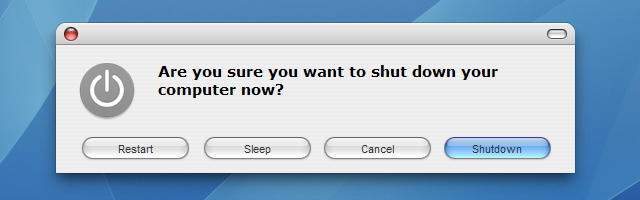
ChaosShut with the Tiger Skin (in english)
System requirements
WindowsXP and WindowBlinds or VisualStyles , since it looks horrible without it.
Download and more information
here...
~edit1~ Added the Screenshots...
~edit2~ Added Version 1.10
~edit3~ Added Version 1.11
~edit4~ Added Version 1.15 (final)


 ...