 Aqua-Soft Forums
i don't know how to let the folders (in the thumbnails view) so that it should not show the image files inside it. As it is showing it in the pic below.
please help me?
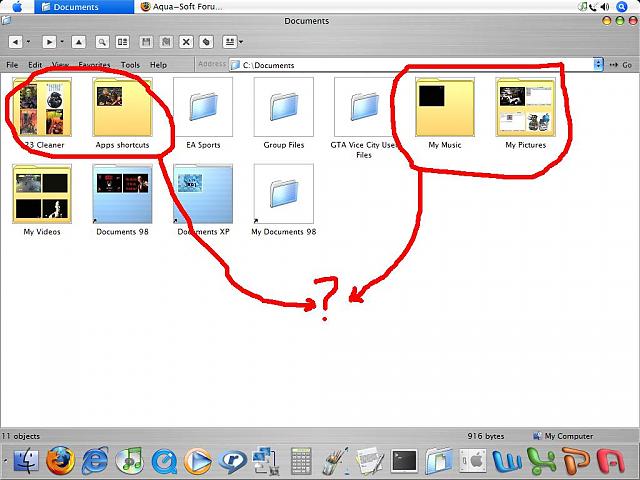
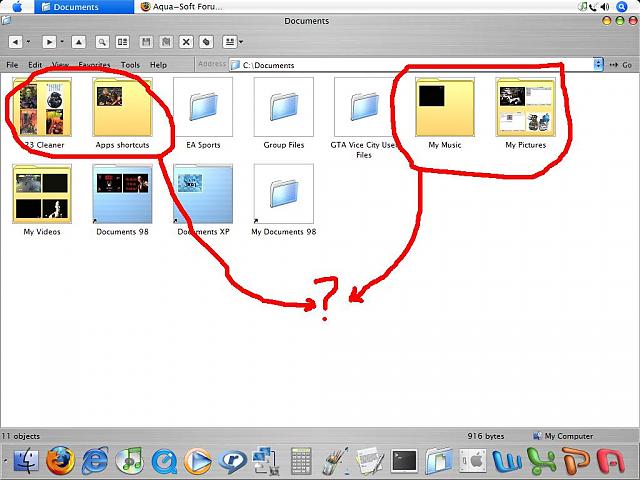
i don't know how to let the folders (in the thumbnails view) so that it should not show the image files inside it. As it is showing it in the pic below.
please help me?
Just switch to icon view, instead of thumbnails. rightclickviewIcons
wat u could do is create another folder inside of it then the pix won't show, i haven't try to
figured this out yet but i think u should try Tweak UI maybe some option there for u to do so.
folder inside folder won't work.
thumbnail view is like a preview of sorts & I've never come across any way/tweak to adjust that specifically. It perhaps is possible.
If you want larger (flat) folder icons then change icon view like vale46 said. Or check out Xentient Thumbnails.
It sounds like you want thumbnails without the subfolders preview, Xentient will accomplish this in Icon/Tile View
If you are just trying to change the yellow folder to blue then just add another image to the folder and it will force Windows to remake the thumbnail with the proper blue background, those folders with the yellow background were probably there before you ran Flyakite right? so it was before Windows was using the blue folder.
have you tried, do not cache thumbnails option on : tools/folder options/view/ ?
"do not cache thumbnails" will work for me
bcoz it makes all my folders turn blue
thnx everybody
thank u v much