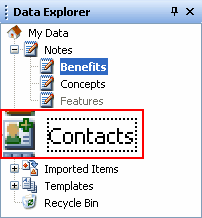
Focus Rectangle Remover Patch

focusrectangle.png

Since Windows 3.11 or even earlier, we had this ugly focus rectangle shown in almost every window, and most annoyingly, on items that are selected and have different signs to tell us they are in focus.

So I've patched USER32.dll to remove that thing.

Notes:

  • If you don't know how to avoid Windows File Protection and replace system files, don't uses this patch.
  • It is only for Windows XP SP2, the version of the patched USER32.dll is 5.1.2600.2622. If the version on your computer is different, results are unexpected.
  • The patched file contains icons from FlyakiteOSX v3.5. Credits to Flyakite for that.
  • A universal patch for every Windows version (including Vista) will come soon, and won't require messing with system files.

Enjoy :)

user32.zip

Attachment: user32.zip

#430211

Wow, I've been wanting this!I don't want to change my icons though, and what do you mean in the first bullet? Is this hard to install?

#430216

WHOO HOOO!!

you're amazing localhost million thanks for this :)

#430219

how about a before and after screenshot hehe

#430227

thank you, i've always despised that 'feature'

#430231

This removes the rectangle on the dialog buttons as well? Damn, great job man.

#430243

Sweet--you're branching out :D.

-NC

#430253

focusrectangle.png

Since Windows 3.11 or even earlier, we had this ugly focus rectangle shown in almost every window, and most annoyingly, on items that are selected and have different signs to tell us they are in focus.

So I've patched USER32.dll to remove that thing.

Notes:

  • If you don't know how to avoid Windows File Protection and replace system files, don't uses this patch.
  • It is only for Windows XP SP2, the version of the patched USER32.dll is 5.1.2600.2622. If the version on your computer is different, results are unexpected.
  • The patched file contains icons from FlyakiteOSX v3.5. Credits to Flyakite for that.
  • A universal patch for every Windows version (including Vista) will come soon, and won't require messing with system files.

Enjoy :)

I have version 5.1.2600 I am going to give this a try aafter i make a restore point and backup the original user32.dll, there is only one copy right?

#430256

Definately need a before/after shot...

#430257

i found out that there is more than one copy of user32.dll, so which one do i replace?

#430259

Very sweet.

#430358

Um can you make one so that it WON'T change any icons? I kinda like the icons I have now :P

#430361

Seconded, also how do you install this?

edit: Anyone?

#430376

it didn't change my icons and it worked like a charm even my computer's version is different than this patched version. Thank you so much Local :)

#435766

Can someone do a writeup on how to install this?

#436795

For the updated version with installer instructions, point yourself to:

http://www.neowin.net/forum/lofiversion/in...hp/t532256.html

I've not the slightest why he hasn't updated it here. Have fun.

#442793

sweeeeeeeeeeeeet! finally i can try this muahahaha

does anyone by chance have this file? it's not on neowin anymore

#442814