[help] port themes(OS X > XP)

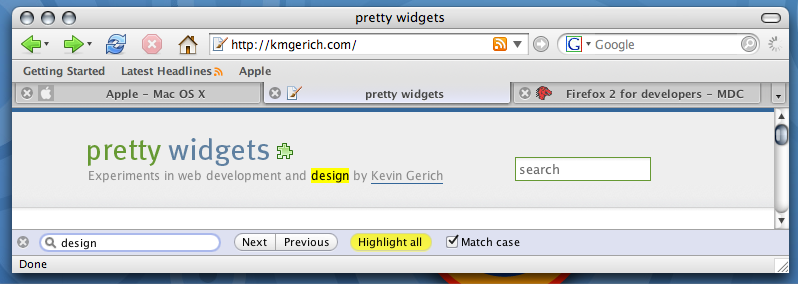
This theme needs to be ported to XP:

[img]http://kmgerich.com/archive/images/pinstripe-2006-09.png%7Boption%7D

Its for Firefox 2 on OS X. But its just so nice it needs to be ported.

It'll install and work on Xp, just with many errors here and there, such as .. theres no menubar, black contextmenus and such.

How hard is it to port such themes??

o and heres where to get it

http://kmgerich.com/2006/09/27/pinstripe-f...more-macintosh/

#425080

Here's a quick port I did, it's very rough.

You need CompactMenu BEFORE YOU INSTALL!!!!!

This skin gets rid of the menubar. That means, get compactmenu, and leave the navigation bar and bookmarks toolbar OPEN, then put compactmenu preferably to the right of the google search.

After the skin is installed, you won't be able to access the menu.

http://www1.uop.edu/~aevins/images/pinstripe_firefox.jar

EDIT...I just realized, that you did probably exactly what I did.

#426381

The normal OS X theme works on windows firefox, it just has alot of errors. I don't see what the difference is between your port and the osx theme

the biggest error is the black menu/rightclick menu, which happens on every mac theme when used on XP, if someone could fix that it would be much more usable.

#426416

I've been working on it. Mac theme structure is different than the windows version, so I'm looking for the css key that causes the black background.

#426466

hey, maker: where's your manners? virstulte is working on it. he said it's rough. doesn't he even get a 'thank you'?

#426472

My apologies, thank you for replying and working on a port. I didn't mean to be rude

#426474

maker, you're a good kid, thx!

#426481

Would it be best if I made the skin keep the menu bar?

Right now, there's a snippet in there that removes the menubar, and only leaves the nav toolbar and bookmark toolbar up. I can get rid of that.

EDIT - Fixed black menu problem: http://www1.pacific.edu/~aevins/pinstripe_firefox.jar

#426507

so, i tried this theme. there's something you might wanna look into. i have my navigation stuff on my filemenu bar, and my bookmarks on my navigation bar. and, i have my bookmarks bar turned off. by doing this, i have more real estate for viewing pages. with this setup (which works with every theme in ff1.5 and now works with the updated ifox in ff2.0) my ff looks like this. but when i apply your theme, i get this.

just thought you should know. keep up the good work!

#426549

I have navigation on the menu bar and have my bookmarks on the bookmark bar, and get rid of the navigation bar. So yea I think the menu bar should be made visible.

One other error is the downloading bar, it just seems to stay white. thats the only other thing I notice.

Great work getting rid of the black menus!!!

#426552

Thanks guys, yeah, there's a lot of work to be done on this guy. Namely, preference window, download window, and I have to change some of the buttons so that they are visible, right now the CSS gives them a #FFFFFF background, which I find odd. Maybe it's necessary to keep the widgets from OS X? I have no idea, but I'm working on a way to implement native windows buttons (or the buttons used in the VS or WB theme).

#426606

Hows it going?? Any updates??

#428007

Maker,

I believe the theme you are referring to has already been ported. It's Macfox and Macfox Graphite, available at Mozilla's Add-ons page for ffox 1.5, and at the author's page: http://webether.com/macfox/

for fox2.0. It's expertly done in my opinion.

Enjoy

#428345

Sorry, midterms struck :)

Fixed most of the Extensions menu, trying to get buttons to work, sometimes they fail. The download screen looks horrible.

But, all aside, I'm using it (I have to, seeing that I'm debugging and recoding it) and I'm having no issues that make the skin un-usable.

Also...I'm really ticked that I some how or another lost track of where that piece is that removes the menubar. I am hunting that down.

BTW, if you get stuck without a menu bar: go to firefox home page, download an extension or theme, then from there, you can switch themes back and rearrange your bars for now.

http://www1.pacific.edu/~aevins/pinstripe_firefox.jar

Edit: lukasz - it's definitely different than macfox bro. Try the skin out, you'll notice right away.

#428355

will do.

judging by the image provided at the site mentioned in the 1st post, it looked spot on.

#428387

virstulte, you stated above that you had fixed the black menu problem. Could you provide some details? I would like to modify some of the grapple themes to work in windows and that's the major problem - black menus.

Thanks,

SMF

EDIT - Fixed black menu problem:

#428421

@virstulte: hope the midterms are going alright. Themes looking great!! keep going.

Edit: I was just wondering would it be easier to use macfox as a base then move the imges across and make them fit (or how ever it work). Also is there a way to have a font set for a firefox skin??

@lukasz:

this is macfox:

https://addons.mozilla.org/images/previews/macfox-10.jpg

this is the theme virstulte is porting:

http://kmgerich.com/archive/images/pinstripe-2006-09.png

#428460

maker, you're a good kid, thx!
ROFL!!

#428464

Are there anymore advances on this??

#431735