 Aqua-Soft Forums
hello,
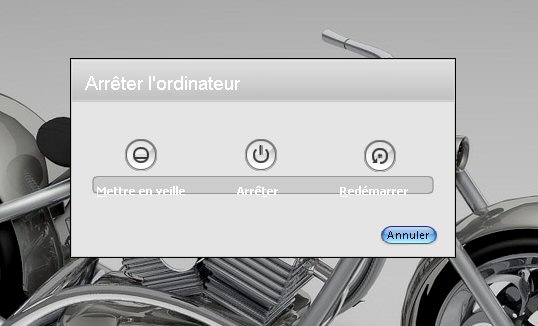
When I stop Win xp with the skin complete from FlyakiteOSX v3.5 the image and slightly to move! Like this:
look image upload !
Thus I would like to find the image to make small modifications !
Thank you
hello,
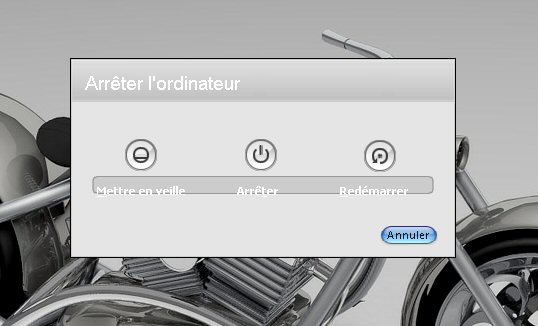
When I stop Win xp with the skin complete from FlyakiteOSX v3.5 the image and slightly to move! Like this:
look image upload !
Thus I would like to find the image to make small modifications !
Thank you
Reinstall, i mean just for that particular log off windows
file under .DLL file name msgina select check box
Did you try adjusting your font size? Just a thought.
yes I have just made the test !
always the same problem ! 
He is not you not possible to find the image and to increase the background of the text?
I have to find the place with Resource Hacker.
here the original:

and mine which I have to change :

when I replace then I save I have this like error!

????
Replace it in safe mode, otherwise it wont work.
finally succeeded !

first stage : safe mode F8
second stage : opening of Resource Hacker.
then to go to seek C:/windows/system32/msgina.dll
and to replace by that which you have to carry out !
save on another name. in the same file that system32. exemple : copy_msgina.dll
to change the name of the original msgina.dll --> mmsgina.dll
then to replace the copy_msgina.dll --> msgina.dll
REBOOT SYSTEM and functions!
Congrats!
Tho I suspect there was an easier way (as an alternative)... go to the flyakite installed folder and locate the resource related to msgina.dll and replace it there.. then using flyakiteOSX's installer... update/install just that dll. I remember reading somewhere that Chris designed it for this functionality. Please let me know if I'm off base here.