 Aqua-Soft Forums
Hi,
I'm a new user and this is my first post...is it an help post?
Sure! 
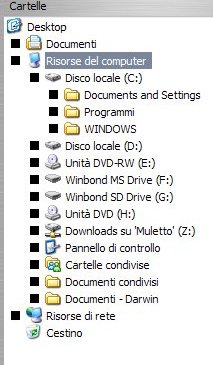
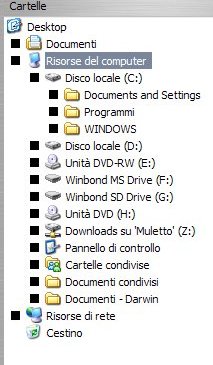
You can see my problem, if it is a really problem, in this pic:
Hi,
I'm a new user and this is my first post...is it an help post?
Sure!
You can see my problem, if it is a really problem, in this pic:
Did you try reverting back to windows XP theme, then back to Mac OSX? Offtopic-Is that italian windows?
just reload the skin
That's a little glitch with cracked versions of WindowBlinds I think. It works good to me. If you have a legitime copy (which I hope) I recommend you to download the skin again.
Yes...I'm italian 
Offtopic-Is that italian windows?
I have install a private copy of WB and I post this problem because I have try to change the WB skin and all work good, but with this skin I, and you, can see this problem...
Many thank's for the answers...
I had install XPize but now I remove it...the strange thing is that XPize icon hold steady in my "general" control board...is possible that is the cause of the problem?