
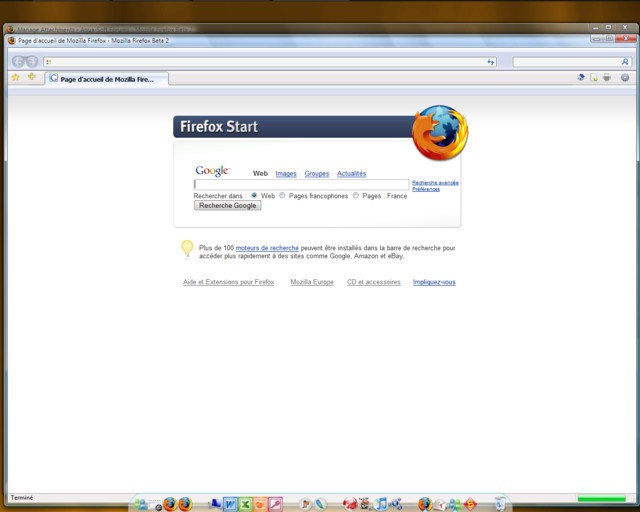
Firefox 2 beta 2 IE 7 theme

Okay I'm just releasing a mod of different themes that I've combined to fit my taste.

(IE7FoxVista that utilizes elements from juneyong's VistaFirefox theme and also from dlb's FirefoxVista theme)

It should also work with firefox 1.5 but I didn't try it.

After installing the theme and the extensions you will also need to put this in your user chrome.css in order to get rid of the addressbar go button and the border of toolbar menu.

* Remove toolbar borders*/

toolbar {border-top: none !important; border-bottom: none !important}

/* Remove toolbar separators */

#toolbar-menubar {

min-height: 12px !important;

padding: none !important;

margin: none !important;

border: none !important;

}

#nav-bar {

padding: none !important;

margin: none !important;

border: none !important;

}

#PersonalToolbar {

border: none !important;

}

#navigator-toolbox {

  border-bottom-width: 0px !important;

}

#urlbar-container

margin: none !important;

border: none !important;

padding: none !important;

}

/* Remove toolbar borders*/

toolbar {border-top: none !important; border-bottom: none !important}

/* Remove the search-go-button and fix searchbar spacing */

.search-go-button {

display: none !important;

}

#go-button {

display: none;

}

And in order to put the elements at the right place follow this guide from the orignal author of the theme.

http://tcmagazine.info/forums/index.php?showtopic=1635

I'm sorry I'm under vista and my print screen button doesn't work so Ican't give you a screenie of it but if someone can after installinf the theme it would be great.

ie7 firefox.zip

Extensions.zip

Attachment: ie7 firefox.zip

Attachment: Extensions.zip

#419960

Okay there's the screenie

post-53860-1159035798_thumb.jpg

ie7 firefox theme.jpg

#419967

That's cool :D

#420197

Nice :D would love to give it a try!

#420303

i can't extract the files, it just gives me error messages

#420329

@ urban

You must have winzip 10 to extract it

#420433

Luccio, can you reupload this in a .rar or a lower .zip file. I don't want to install winzip10 just to extract this... Thanks !

#421729

All you have to do to get rid of the Go button is

  1. Open the Toolbar Custumization window.
  2. Drag th go button to the window
  3. Click "Done"

EDIT: I'm getting unzipping error messages too! "File skipped unknown commpression method." On both zip folders!

EDIT2: WinRAR doesn't work either:

! C:Documents and SettingsAll UsersDocumentsDownloadsie7 firefox.zip: Unknown method in IE7FoxVista.jar

! C:Documents and SettingsAll UsersDocumentsDownloadsie7 firefox.zip: No files to extract

And on extentions:

! C:Documents and SettingsAll UsersDocumentsDownloadsExtensions.zip: Unknown method in all-in-one-sidebar-0.6.4.xpi

! C:Documents and SettingsAll UsersDocumentsDownloadsExtensions.zip: Unknown method in CompactMenu-1.7.4.5-defaut-Fr.xpi

! C:Documents and SettingsAll UsersDocumentsDownloadsExtensions.zip: Unknown method in new_tab_button_on_tab_bar-1.0-fx.xpi

! C:Documents and SettingsAll UsersDocumentsDownloadsExtensions.zip: Unknown method in stop-or-reload_button-0.2-fx.xpi

! C:Documents and SettingsAll UsersDocumentsDownloadsExtensions.zip: Unknown method in tab_x-0.9.2-fx.xpi

! C:Documents and SettingsAll UsersDocumentsDownloadsExtensions.zip: No files to extract

I WANT THIS BAD, MAN! (at least the extentions)

#421776

Please, re-upload!!! I really want this theme!

#435490

! C:Documents and SettingsmacTRIBEMy DocumentsDownloadsCompressedISO-8859-1''ie7%20firefox.zip: Unknown method in IE7FoxVista.jar

! C:Documents and SettingsmacTRIBEMy DocumentsDownloadsCompressedISO-8859-1''ie7%20firefox.zip: No files to extract

#435507