Nameless Player

Thx for reply, but I think this will be the "final" ui before beta release.

I just need play pause stop buttons. (Scrollers for Speed, Volume, etc ... doesn't look good when using system themed. The buttons were things that I wanted to let system themed ^^

Letting buttons, level jauges, and many things unskinned also makes sure that the memory footprint is small ;)

I don't think I can remove the panels boders, because it doesn't look good without them.

As I said, the play stop pause buttons are borrowed from Amarok, and I don't think I can use them since for the moment the project is closed-source.

#442378

Bump !

Being very busy lately with my studies, I don't know how I managed to do that many new features into NL.

What's new :

- Podcast Management

- Totally redisigned UI (I'll try to maintain the "old" one , but I will need the permission of the original author)

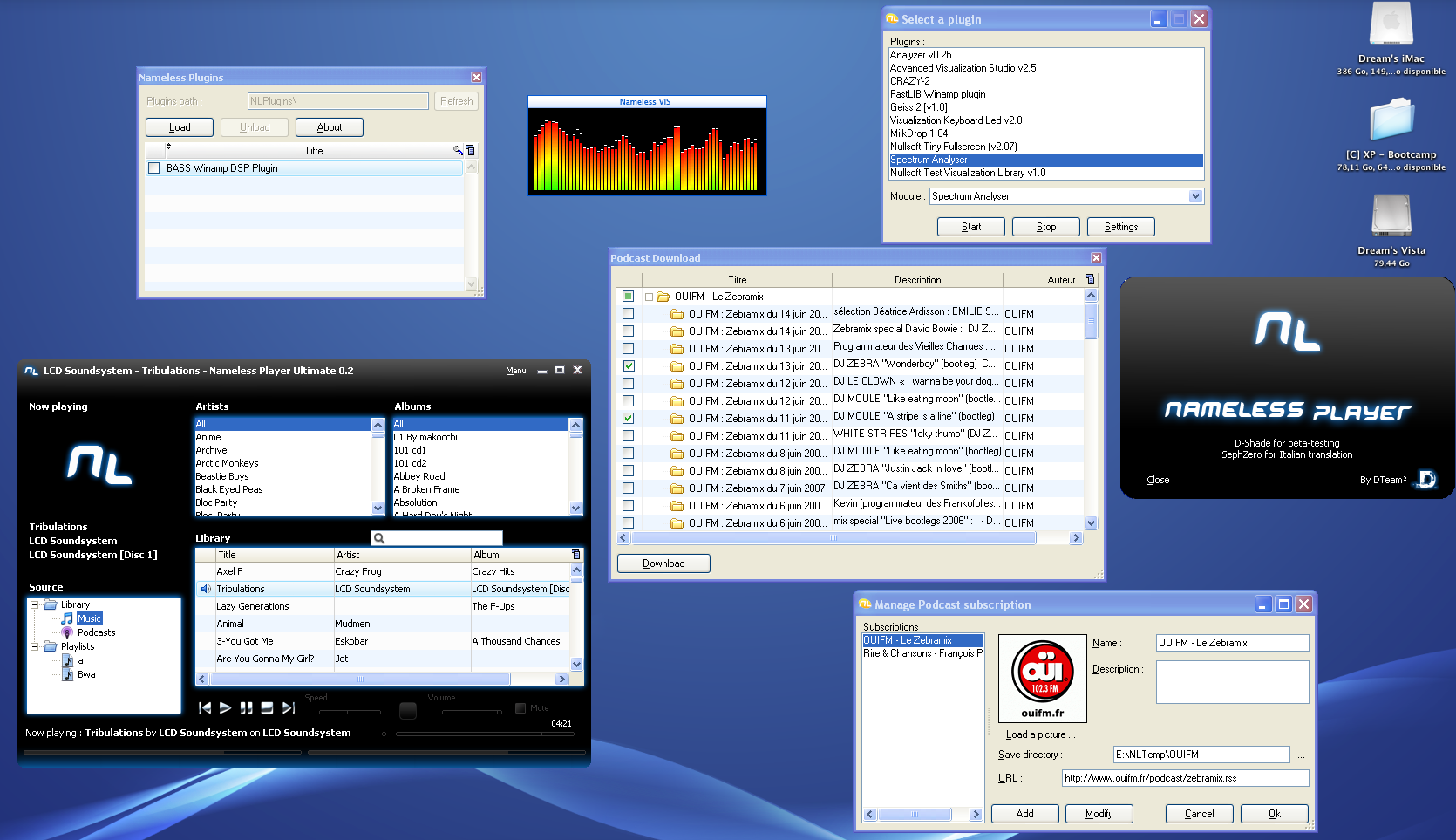
- Sadly, more important impact on memory : takes 32 mb while not minimised under XP (under Vista, if minimised, it will not change before an certain amount of time so you can still see it in Flip3D or whatever it's called , but for xp it will lower down), note that 32mb is also due to the Winamp VIS plugin that I have loaded.

- Wiped "album of this artist" in the new UI, still available in the old one.

- Plugins :D

- Bugfixes.

So it will be ready for release in not many time ( need to fix some bugs and optimisate the library search since it's kind of slow, because of the search-as-yu-type thingy.)

Actual screenshot : Here.

Please note that yes, the icons on the desktop are of OS X, but Nameless Player isn't cross-platform (and it will surely never be, OS X got iTunes and Amarok, same for Linux), I'm just running it under Parallels Desktop.

Now for release I need an gfx artist. With the new UI made by me, I don't need panels anymore, but I need some Menu icons, and as you can see the little speaker left of the playing song and the icons on the left (Library folder icon, Music Icon, etc ... are all from iTunes ressources ! I can't release that).

Hope I will get some answers this time ;)

#460341

Come on guys, let's help this man out!

-NC

#460443

Sadly, I have just tried the Tango icon project on NL, it just looks bad, green audio icon (even tainted to be blue) doesn't integrate well into NL. The Tango project also have a lack of media player specific icons , and I just don't like Banshee's ones :/

#460562

Good news ! I managed to fix the memory leak, now if you let it run for a long time it will go as down as 5mb (variable amount) - only tested under Vista -

Streams are quite of fixed now, not using ICY callbacks anymore, just checking every x seconds the ICY tags :/

I've also added some feature to detect games (simple list of executables that must be checked every x seconds) so you can hide the beat bars (the two on the bottom)

Having an second screen, leaving NL on the second screen with the beat detection on would just kill my FPS (due to the new styling). Now between 30 seconds they will automatically be hidden and thus, giving an big FPS boost (30 sec is not bad, considering you have to wait the loading time, this give more than enough time for Nameless Player to detect the bars) then I get back out of the game, they become visible again.

I've also added an option to permanently hide them if you need computer ressources all the time.

I still hope for someony to help me on the graphics part :P

Thanks anyway to the ones who supported me ;)

#461105

bump.

good stuff! keep up the good work.... you have some innovative ideas, specially with the game detection etc. dont give up now!

i like it when people 'think different' from the major companies (yet if u take some of the 'good stuff' from them as well i wont mind :P ). Make the player U want to use and people are bound to like it with you.

#469775

Batman bump !

I've totally redone the UI, ditched AudioGenie ocx (now I use AudioGenie dll, no more admin privileges required !), did the switch to unicode and modularised more features (notifier, now skinnable with fake transparency). New UI can look bad with some themes (like the vista screenshot without extended glass), but it can look pretty good with custom msstyles since it finally takes the native windows colors, so it blends into your environnement. Ram usage on my vista box is approx 13mb with 2000+ songs, while on my XP box with (lol) 40 songs it can go down to 9kb, I don't think it's the songs fault, but we are far from the 32mb mem usage that I had.

Chances that I start developping a coverflow plugin when flying cow appears as an DLL or OCX are high.

The two Artist/Album iTunes like panels have been ditched for something more vista-ish (like the explorer path bar, or WMP11's navigation style) : Library -> Artist -> Album or Library -> Playlist Name, etc ...

Podcast Management was awful (ram usage up to the size of the podcast) and slow, so I didn't fix it when it broke, I still don't know if it will be modularised or if it will totally disappear.

Screenshots :

NLNewUI_thumb.png

NLPathBar.png

Vista plugin :

NLGlass_thumb.png

Click here for more info

(Note : this is not advertising for my blog, it really is for more information because I don't feel like writing that again on the forums, where a copy paste just can't cut it)

#504549

NLGlass_thumb.png

http://dreamteam69.free.fr/blog/?p=5

I like that !! :cool:

I am too glad that all these years u never stopped developing it. I will be first to download if and when u release it !! :D

#504562

NLGlass_thumb.png

I like that !! :cool:

I am too glad that all these years u never stopped developing it. I will be first to download if and when u release it !! :D

#504563

Did u see that ?? I posted twice the same thing ( looks kinda cool ) !! Someone plzzzzzz remove it.

#504701