Thunderbird Tiger Mail Skin Folder Pane Display Error

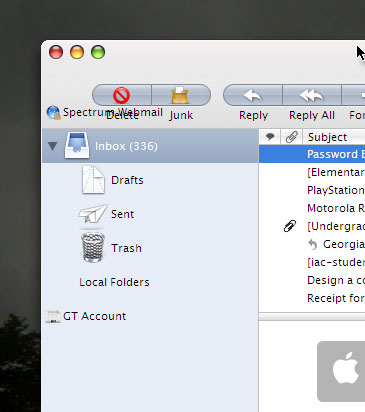
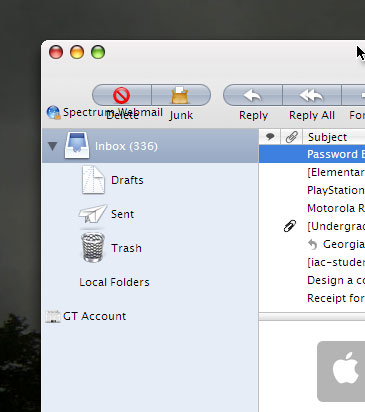
I just installed the modded Tiger Mail theme for Thunderbird (which I found under the thread "Thunderbird 1.5 to OS X Apple Mail") and the modded folder tree on the left pane somehow is displaced or overlaps the navigation bar above it (see the image I attached). Can anyone tell me which JAR or CSS file I need to edit or a fix or whatever I can do to correct this? Thank you so much!

dark0ne
post-42746-1158607715_thumb.jpg

Mail-Folder-Tree-problem.jpg

#418798

just make your account to " " which means space.

#418826

Thanks for the tip!

That sort of works, but it still activates when I select it, making everything look weird when it's selected. Is there any way to just lower the entire position of the folder pane so it all fits under the navigation bar?

#418897

AFTER MANY HOURS OF SEARCHING THE JAR FILE I HAVE FOUND THE SOLUTION!!!

For anyone else who used the amazing mod of the orginal TigerMail theme for Thunderbird and got this same problem as me, I found the line of code you need to fix.

Inside the theme's JAR file, navigate to "globaltree.css"

and look for this:

------------------------

/* ::::: tree rows ::::: */

#folderTree > treechildren {

margin-left: -14px;

margin-top: -34px;

}

------------------------

Change the "-34px" to "0px"

and that should fix the problem.

No need to rename root folders or all that other nonsense, and no more buttons rearranging everytime I scroll up and down newsgroup subscriptions... yay I am so happy!!

#426246

How to open jar file to change this?I was trying with notepad but I couldn't do enything.

#426287

You need to open the jar-file with Winrar, and edit the css with notepad

#426290

Thanks I have change and it realy works.The only thing in my Tiger theme is that the icon for template is still very small like the one in Tiger 2.1.1.

Do you know how can I change this?

#426297