Oops! Changed the .exe icon [Now every .exe is the same!]

Just curious in doing so with IconPhile and made a total mess. All the .exe icons have changed (Firefox icon, Warcraft 3 icon, and etc.). How can I restore the original .exe icon file without having to do change all icons manually? I tried IconPackager to set default to all my icons, but that did not work.

Need assistance!

Thanks!
#412073

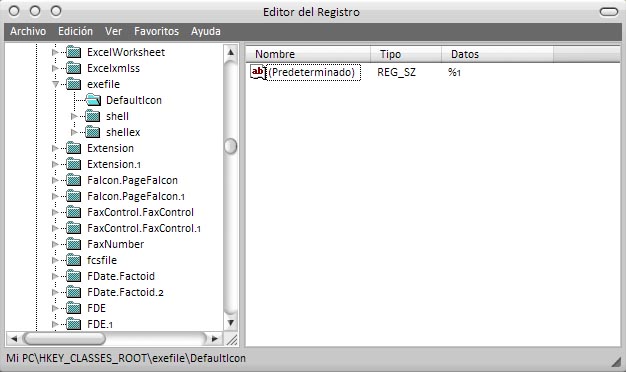
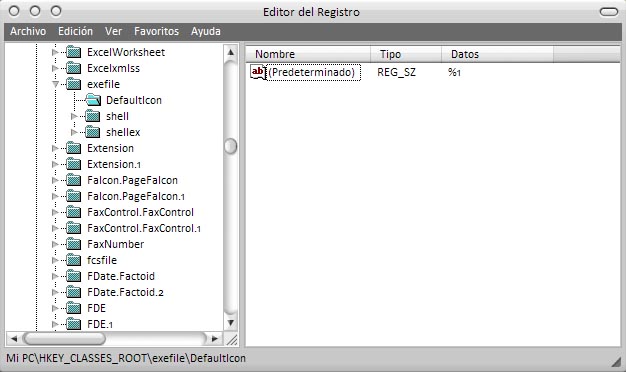
ROFL.... Open the registry editor (WIN+R and then type "regedit") and browse to HKEY_CLASSES_ROOTexefileDefaultIcon

In the "Default" string it should say "REG_SZ" and "BLAHBLAHBLAH". Change the "BLAHBLAH" to "%1" without the quotes.

Check the screenie.

post-35504-1155949299_thumb.jpg

yay.jpg
yay.jpg

#412075

damn. A long time a ago as a noob I just reistalled XP >_<, this info would have saved me from doing so

#412076

ROFLMFAO. A long time ago? :P You mean "today" ? ;)

#412079

Thanks dude! I actually gave thought in reformatting my computer's hard drive. But I know forums will have an answer before continuing to the last resort.

#412083

Ahh man!

The start menu with all the recent icons used still look corrupted, I tried clearing them, but that does not work. How can you fix it?

Thanks.

#412158

Clean your icon cache using TweakUI?

#412236

Right-click each one and see if they have an option to change icon in the properties. set to default.

#412266

Oh man fuBar, I just did the exact same thing today. Exactly the same, using iphile for a buuf icon set and I was just about to post a cry for help when I saw this thread!

#412361

A good free app for icon changeing and management is "activeicons"

http://www.cursorarts.com/ca_ai_d.html

Has far has i know it is "free ware" though the site also has lots of shareware. I used to use this app all the time until i stated useing icon packager. the best feature is of course globaling changing all folder icons to the same icon.

Screenie

activeiconsrp4.th.jpg

#413003

Instead of Re-installing, I simply lived with OS X icons liveing with the Defalt Luna Interface.

#413082

Hey i was wondering if any one on here can help me. i recently downloaded a trail of mcafee security centre, i removed all the viruses off my pc BUT now all my application files such as Flash and most my other software files have changed to exe. so when i open it a black box just flicks on for about half a second then goes and nothing happens. This has also happened to all my rar and zip files, i cant reinstall my software because all of the install files are in zips. ive uninstalled mcafee and that hasnt done anything, help will be extremely appreciated. Thanks

#417593

Hope it'll work in XP upto some extend....................

First, open the File Types dialog from any Explorer window (Tools | Folder Options | File Types Tab). Scroll down to where .EXE would be in the alphabetical order and make certain .EXE is not there (if it is, then fix it there). Finally, select the New button, type in EXE for the extension and select the Advanced button. From the list pick "Application."

#419406