Aqua-Soft Forums
Hi All,
I just wanted to create a usermenu close to Mac OS X. I did manage to achieve a bit. i thought i will share that with u all. if you are already aware of such an option bear with me for wating your time. But for those who do not know this already please carry on reading this further.
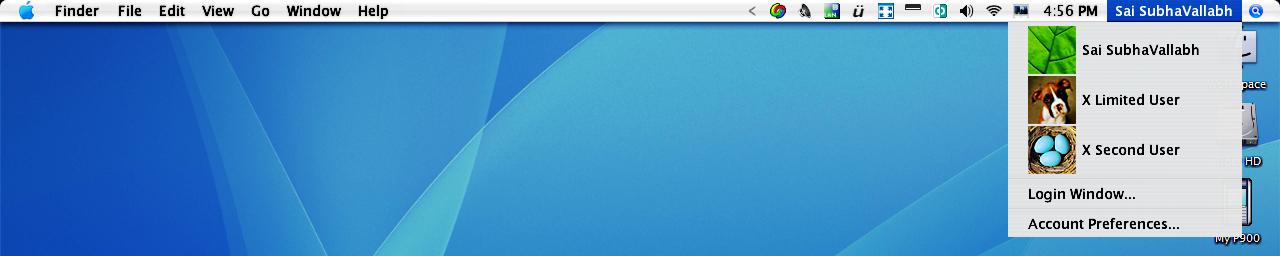
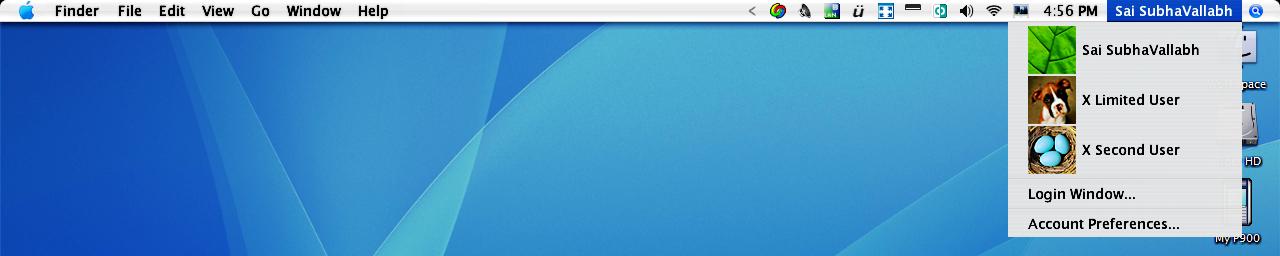
Please look at my Desktop Screen shot. If you want ur usermenu to resemble mine then ull need these:
Stardocks Objectbar
Gmetal OBbar(Thanks to kavin amuthans excellent port)
original Mac user menu Pictures (tiff files download from osx-e.com)
Software to convert tiff to ico(I used Advanced batch Convertor gives 30 day free trial so this should be enuf to do the job. website www.batchconverter.com)
Now For the Tutorial:
1. After downloading the software please follow the instructions of Advanced batch converter to convert your preferred mac user picture to ico format.( please choose size 48x48 and 32bit color for quality icons)
2.Now In your objectbar right click on username (whatever is urs. in my case Sai SubhaVallabh)
3.Now you have a option in objectbar which says "item options" Inside Item Options there is a further dropdown menu by name "Behaviour" and then "Edit behaviour"
4.Clicking Edit behaviour will open the Objectbar Theme editor.
5. in the behaviour Class drop Down choose "Pop up Menu"
6. In Popup Menu Choose the option Create New and Add
7. In the Following menu please enter as many usernames u need depending on ur system. (right clicking on the main menu under username will give an option to duplicate. the duplicated menu can be used a seperator or additional username.for current logged user in the display tab typing %username% will display the current user's username
8. in the display tab for the "display as" drop down choose text and icon
9. Now browse for the icon file that you saved using Advanced batch converter and link it to objectbar.
10.Do not choose any icon for mouseover option unless u like having it.
Now you must have exact replica of my Screenshot if you followed my instuctions clearly.
Please feel free to correct me and send in ur suggestions. I hope you found this tutorial useful.
P.S: I have narrated this tutorial keeping in mind that you already have a more than average understanding of OS X Emulation and Objectbar. if anyone is a newbee and wants further clarification please contact me @ vallabh.v@gmail.com